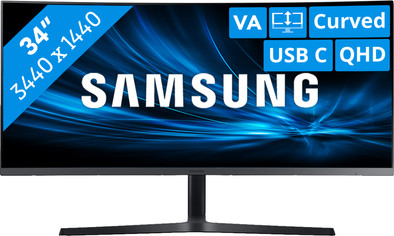
Samsung LC34H890WJUXEN
Never available again
View alternatives in the sidebar
View alternatives in the sidebar
According to our monitor expert
The Samsung LC34H890WJUXEN is a 34-inch curved monitor for your office or home if you want extra screen space. Thanks to the Ultra WQHD 3440x1440 resolution, you can use the monitor for displaying or editing high resolution visual material or large amounts of data. The monitor has a curved screen, so it follows the curve of your eyes. You'll be able to notice details more easily and images like pictures and 3D renders of surroundings will appear more true to life. On top of that, you'll have more screen space to work with, thanks to the ultra-wide size. Send through your image and supply your laptop with power, thanks to the USB-C port. You can also connect your smartphone with USB-C to charge it. The Samsung software for Windows helps you to divide programs and screens automatically across your image so you can multitask efficiently. Connect 2 video sources and display both images on the same screen, thanks to the Picture-by-Picture mode.
Sharpness | Quad HD (1440p) | |
|---|---|---|
Curved | ||
Aspect ratio | Ultrawide (21:9) | |
Refresh rate | 100 Hz | |
Response time | 4 ms | |
Panel type | VA panel | |
Color depth | 17 million colors (8-bit) | |
Built-in speakers |
5 stars
16
4 stars
8
3 stars
0
2 stars
0
1 star
0
The most striking thing about this monitor is that it is of course huge. It is not an "extra screen". It defies any desk you put it on. At the right distance, the curve is perfect. You don't even realize that the screen is curved, but it's very nice to have everything on the screen at the same distance from your eyes.
The USB-C connection is very nice to turn my laptop into a permanent workplace. The three USB ports in the monitor make it possible to always have your mouse, keyboard and external drive connected as soon as you sit down. It is a pity that you can only use the speed of the single USB3.0 port on the back if you connect your laptop by means of an HDMI/DP cable and a separate USB-C cable (this is also stated in the manual). . In that case, it will not charge your laptop either.
Unfortunately, I was quite surprised with the size of the monitor's base. It takes up a lot of space both behind the monitor and at the front. This means that the screen is directly closer to you because it can't be so close to the edge of the desk, and that you don't have much room left for books / homework next to your keyboard and mouse. Despite the higher QHD resolution, it is quite tiring and annoying to sit very close to this screen (after all, you are not at the right distance for the curve of the screen). It was therefore necessary for me to purchase a monitor arm. If you have a deep desk you won't have this problem. (depth desk in photo is 60CM)
Thom
12 May 2020
Automatically translated from Dutch
It is a very nice screen, both in terms of design and image quality. You can hide all the cables nicely in the foot.
Jasper
2 April 2020
Automatically translated from Dutch
Do you need a lot of workspace and do you see yourself behind in a bright room for a long time? Then this is a top screen! Due to the high brightness, it also looks nice when it is very bright outside and because of the high resolution you actually have 2x24" screens next to each other, but without an intermediate border. Enough space to read a web page, for example, in a full 16:9 screen. and also monitor your e-mail.
Also nice if you like to play racing games or flight simulators, you have a much wider viewing angle and therefore see more.
You connect with USB-C, after which you connect your peripherals to the USB ports of the screen. Plug in a cable and you're good to go. Your laptop or MacBook will also be charged in the meantime. I use an HP elitebook for work and private life, a MacBook Pro 16" from 2019. The latter actually needs a little more wattage, because the battery charge slowly decreases during prolonged intensive use. That takes a while, I have the charger of the mac are still in the package, so it's not a real problem, but important to know when to connect such a high wattage machine and go video editor for example.
Value for money is very good! You get whole for screen for a limited amount. I recommend this screen.
Lennart
27 May 2020
Automatically translated from Dutch
Product number | 807285 | |
|---|---|---|
Manufacturer code | LC34H890WJUXEN | |
Brand | Samsung | |
Processing of your defect | Carry-in warranty | |
Old product returned for free |
Recommended display resolution | 3440x1440 | |
|---|---|---|
Sharpness | Quad HD (1440p) | |
Brand-specific image technology | Samsung QLED | |
Aspect ratio | Ultrawide (21:9) | |
Refresh rate | 100 Hz | |
Response time | 4 ms | |
Panel type | VA panel | |
Brightness | 300 cd/m2 | |
Local dimming | ||
HDR support | ||
Contrast ratio | 3000 | |
Touchscreen | ||
Screen reflection | Anti-glare | |
Blue light filter | ||
Flicker-free technology | ||
Color space | sRGB | |
Color depth | 17 million colors (8-bit) | |
Adaptive Sync | ||
Type of adaptive sync | FreeSync | |
Resolution width | 3440 pixels | |
Resolution height | 1440 pixels | |
Anti-reflection type | Anti glare | |
Horizontal viewing angle | 178 ° |
Height | 53,89 cm | |
|---|---|---|
Width | 81,14 cm | |
Depth | 29,86 cm | |
Weight | 7,9 kg | |
Color | Black | |
Including stand | ||
Material | Metal | |
Cable management | ||
Appearance | Neutral | |
Curved |
Number of HDMI connectors | 1 | |
|---|---|---|
Number of Female HDMI type A 2.0 ports | 1 | |
Number of headphone jacks | 1 | |
Type of headphone connection | 3.5mm (TRRS) | |
Number of Female Standard DisplayPort 1.2 ports | 1 | |
Number of female 3.5mm TS Audio Jack ports | 1 | |
Number of female 3.5mm TRRS Audio Jack ports | 1 | |
Type of USB port | USB-C | |
Number of USB ports | 3 | |
Type of USB cable included | USB-C to USB-C |
Included by default | DisplayPort cable, HDMI cable, USB cable |
|---|
Adjustable in height | ||
|---|---|---|
Tiltable | ||
Pivotable stand | ||
Pivot function | ||
VESA mount option | ||
VESA mount | 100x100mm |
Energy consumption standby | 0,5 W | |
|---|---|---|
Energy consumption active | 57 W |
Built-in speakers | ||
|---|---|---|
Webcam | ||
Split screen | ||
Kensington lock | ||
Best tested |
Image quality according to customers | Excellent | |
|---|---|---|
Recommended for use | Internet, email, and text processing, Office work, Watching movies in Full HD |
