MSI Optix MPG27CQ
Never available again
View alternatives in the sidebar
According to our monitor expert
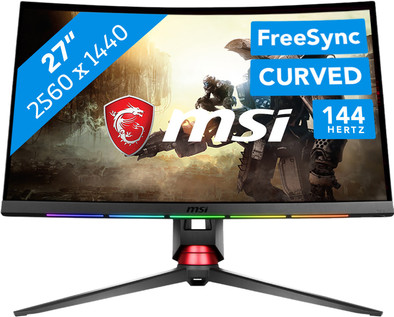
The MSI Optix MPG27CQ is a 27-inch gaming monitor. The 1,800R curve will give you the impression that you're right in the middle of your games. The MPG27CQ has a resolution of 2550x1440 pixels, which means you can play at a high resolution. The Optix MPG27CQ features RGB indicators at the front, which you can set to display cooldowns, timers, or Discord notifications. The RGB LED lights at the back provide a great, visual finishing touch. Thanks to the VA panel, you can see deep black levels on your screen, which means that dark images in shooters will look extra beautiful. If you're in the middle of a shootout in Battlefield 1 for example, the picture will remain smooth thanks to the 144Hz refresh rate. Besides, the 1ms response time means you won't be bothered by ghosting anymore. The screen can display 100% of the colors in the sRGB color spectrum, which lets you distinguish between different colors more easily.
Sharpness | Quad HD (1440p) | |
|---|---|---|
Curved | ||
Aspect ratio | Standard (16:9) | |
Refresh rate | 144 Hz | |
Response time | 1 ms | |
Panel type | VA panel | |
Color depth | 17 million colors (8-bit) | |
Built-in speakers |
5 stars
23
4 stars
1
3 stars
0
2 stars
0
1 star
0
Installation ease
User friendliness
Image quality
Price-quality ratio
Design
nice picture The screen has a nice image, 1440p is a nice upgrade from 1080p. I always had a 1080p screen, but when I upgraded to this screen I could quickly see that it is a lot sharper.
Price quality The price you pay for this screen is worth it for the quality. Although MSI is quite new to the monitor market, they have done a good job with this one. The material also feels high quality. It also looks beautiful.
Easy installation Installing this screen is pretty easy. In the box you get 3 parts that you have to put together yourself. And how that happens goes something like this: You can easily turn the two parts on the screen by hand on a screw. Once you've done that, you can easily have the screen mounted on it without any screws. Taking it apart is just as easy.
Easy to set up The settings are easy to change with a joystick on the back of the screen. And if you want, you can also download the Gaming OSD software from MSI to do it via your computer.
FreeSync & gSync This screen supports FreeSync but not gSync. So that means it might not work as well with an Nvidia graphics card. Although lately nvidia has been working on getting their graphics cards to work with FreeSync via their driver updates. I myself have an RTX 2080 from MSI and FreeSync works just about everywhere. The exceptions I've had so far where I had to turn off FreeSync for a while so that the game didn't stutter were the games: Minecraft & Overwatch. But I do think this could change in the future. And since gSync screens are more expensive, I would advise going with a high quality FreeSync screen since nvidia has been working on supporting it lately.
Default 60hz instead. 144hz When you first start the screen you can notice that it is at 60hz. But you can set this yourself in the Windows settings. But if you have no idea how that works, you have to google how you can change this.
The RGB lights are a bit redundant I think the lights are a bit redundant. Of course you can make it through the SteelSeries software to show certain things in games although I've only had it with CSGO so far but haven't really looked at it much since I've been into the game. The lights are pretty nice looking and give my setup a bit more life, so I wouldn't worry about it. And if they distract you, you can always disable them with the SteelSeries software.
Conclusion It is a nice screen with nice functions. Although the RGB lights may be redundant, they are beautiful on their own and you can still turn them off if they slip away. There may not be gSync but nvidia has been working on supporting FreeSync lately anyway and I've only had issues with it a few times so far, but then I just turned it off for a while. The installation & setup of the screen is almost easy. It's only 60hz when you start it up for the first time, but you can easily change this and you only have to do it once. The price lives up to the quality of the screen. So I really recommend this one since I've had a good experience with it.
Jake Nijssen
14 April 2019
Automatically translated from Dutch
Really good screen would definitely recommend it
Dean
30 November 2019
Automatically translated from Dutch
It takes some getting used to because of the higher resolution and the large screen, you will see imperfections better on lower resolution images (films, photos, games). But that's normal.
The installation is super easy. The foot in particular is very sturdy and stable (sometimes a bit of an issue with other monitors in my experience).
Unfortunately, the support of the LEDs (Gamesense) within games is still limited, but that is not the fault of MSI.
For the rest, you just get a very nice and sturdy monitor for a very reasonable price.
Hans Engelen
28 July 2018
Automatically translated from Dutch
Product number | 809717 | |
|---|---|---|
Manufacturer code | OPTIXMPG27CQ | |
Brand | MSI | |
Warranty | 3 years | |
Processing of your defect | Carry-in warranty | |
Old product returned for free |
Recommended display resolution | 2560x1440 | |
|---|---|---|
Sharpness | Quad HD (1440p) | |
Aspect ratio | Standard (16:9) | |
Refresh rate | 144 Hz | |
Response time | 1 ms | |
Panel type | VA panel | |
Local dimming | ||
HDR support | ||
Contrast ratio | 3000 | |
Touchscreen | ||
Screen reflection | Anti-glare | |
Blue light filter | ||
Flicker-free technology | ||
Color space | sRGB | |
Color depth | 17 million colors (8-bit) | |
G-sync | ||
G-sync Ultimate | ||
Adaptive Sync | ||
Type of adaptive sync | FreeSync | |
Resolution width | 2560 pixels | |
Resolution height | 1440 pixels | |
Anti-reflection type | Anti glare | |
Horizontal viewing angle | 178 ° | |
Vertical viewing angle | 178 ° |
Height | 55,5 cm | |
|---|---|---|
Width | 61,2 cm | |
Depth | 37 cm | |
Weight | 7,6 kg | |
Color | Black, Red | |
Including stand | ||
Material | Plastic | |
Cable management | ||
Appearance | Neutral | |
Curved |
Number of HDMI connectors | 2 | |
|---|---|---|
Number of Female Standard DisplayPort 1.2 ports | 1 | |
Number of female standard USB-B (3.0 form) ports | 1 | |
Number of USB ports | 1 | |
Type of USB port | Standard USB-B (3.0 form) |
Adjustable in height | ||
|---|---|---|
Tiltable | ||
Pivotable stand | ||
Pivot function | ||
VESA mount option |
Energy consumption standby | 0,3 W | |
|---|---|---|
Energy consumption active | 65 W |
Built-in speakers | ||
|---|---|---|
Split screen | ||
Kensington lock | ||
Best tested |
Image quality according to customers | Excellent | |
|---|---|---|
Design according to customers | Very nice | |
Recommended for use | Gaming, Office work |