Never available again
View alternatives in the sidebar
View alternatives in the sidebar
Product number | 823527 | |
|---|---|---|
Manufacturer code | DEEBOT901 | |
Brand | ECOVACS | |
Processing of your defect | Via Coolblue | |
Old product returned for free |
Mopping function |
|---|
Maximum threshold height | 1,8 cm |
|---|
Compatible with smartphone / apps | ||
|---|---|---|
Maximum noise level | 68 dB |
Included accessories | ||
|---|---|---|
Extra side brush | ||
Brush cleaner | ||
Extra filter |
Width | 33,7 cm | |
|---|---|---|
Height | 9,5 cm | |
Depth | 33,7 cm | |
Weight | 3,5 kg | |
Color | Black | |
Material | Plastic | |
Shape | Round |
According to our robot vacuum expert
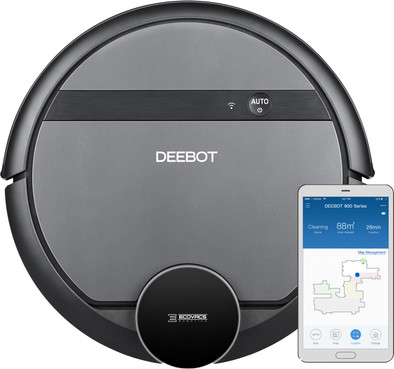
You can easily control this robot via your mobile phone, the app lets you see exactly how far along the robot is via a map of your home.
Using advanced lasers, the robot accurately scans the room, ensuring you it doesn't skip any spots.
Once the battery runs out, the robot vacuum drives itself back to the docking station to station and immediately picks back up where it left off.
Due to its round shape, the robot can have difficulty vacuuming the corners of the room.
The Ecovacs Deebot 901 used advanced lasers to map a space and create the most efficient cleaning route. This way, the robot doesn't skip and spaces while ensuring you that all the dirt ends up in the dust cup. Using its lasers, the robot scans whether there are any obstacles and neatly drives around them. You can check a map of the floor via the app. This also shows you how far along the robot is with its cleaning program. In addition, it's possible to indicate via the app that the robot only needs to clean certain areas of the house. Once it's done doing its round, the robot automatically drives back to the charging station.
5 stars
7
4 stars
6
3 stars
3
2 stars
0
1 star
0
After having been able to enjoy the convenience of an Anker Eufy r500 (successor to the 11s) for 2 months, bought from a 'conculega' of Coolblue, it broke and was refunded. Coolblue had an offer of this Deebot 901, which brought a smarter robot vacuum cleaner to replace the Eufy within the budget. Because I now have experience with a considerably cheaper, dumber, vacuum cleaner and a smart one, I focus the review on this.
The Eufy did its job haphazardly, but after about an hour it had done our entire ground floor of about 30 m2 in total. With its 6 cm it could also go under everything and taking obstacles was no problem. The suction technology was quite impressive for such a cheap vacuum cleaner: The device only produced around 50 dB of noise and detected when it came on our mid-pile carpet and then automatically started sucking a little harder. And actually everything, except in corners, was picked up. Unfortunately, it broke pretty quickly. And with the suction off (eg when he was on his way to his dock) he was almost inaudible. Also nice that you could control it 'manually' with the remote control.
Then this Deebot 901: For starters, it's definitely not a noise maker. Certainly on the 'normal' suction power you can still hear the TV just fine. Unfortunately, it does produce a pretty annoying high-frequency (in the thousands of Hz) beep at this suction power. Despite my middle age, I'm still sensitive to that, so that's quite a minus. Fortunately, the beep at the maximum suction power is gone and the noise is not too bad. But I don't want to let it work at that noise level if, for example, our daughter is sleeping. The vacuum cleaner also makes audibly more noise due to its drive mechanism (a bit of a 'whining' motor noise, as if the motor is having a bit of trouble). In terms of motor and suction technology, this robot does not seem to have the very latest technology and, in my view, it performs 'less' than the latest 'dumber' models of the competition.
What is really nice about this vacuum cleaner is that it 'scans' the room with its rotating sensor and then maps out an optimal path. Especially once the map is made, it can cover our ground floor in just under 35 minutes. It is also nice to see how he elegantly first tackles the edges and corners and also carefully turns around furniture legs. Despite the 'roof' with the rotating sensor, it is still low enough to get through under our sofa and other upstanding furniture.
However, the 'smartness' of this vacuum cleaner is also its major weakness (which means that it scores lower for me on several points than if it were better in order. The software of the device, both in the vacuum cleaner itself and the Android app , are substandard in my opinion. It actually starts with the setup of the Android app and WiFi connection of the vacuum cleaner: The Android app needs a large load of permissions, of which only a few can be substantiated for the functionality that Furthermore, it was very difficult to get the vacuum cleaner on the WiFi network. After trying many WiFi settings in the access points, the major problem with registration eventually turned out to be because modern Android smartphones open a 4G connection in addition to WiFi, as soon as the WiFi network does not provide internet access, so the smartphone could no longer access the internal IP on the vacuum cleaner's WiFi network to set it up for the first time. set. With mobile internet 'hard' turned off in Android, it was a breeze to get the vacuum cleaner set up.
Then another major stumbling block: Getting the card vacuumed and created for the first time: For reasons that are hard to understand, the vacuum cleaner MUST complete its first round on its own without any interruptions, before saving the card 'finally'. This shouldn't be necessary with a little good firmware design. The vacuum cleaner dares to climb on many things: the bottom plate of the cat scratching post, the 1.5 cm higher beams of our Ikea armchairs, etc. However, sometimes it can't find a way out and gives up, only to report that it ' lifted'. Poof, immediately remove the card, so start over. It would also be nice if there was an option to occasionally set the vacuum cleaner to work on the upper floor without immediately throwing the card away from below. A third drawback is that manual control is no longer possible at all in terms of the direction it has to go. Yes, you can indicate on the map one area per 'scoon making assignment' that he has to do and you can create virtual walls. But, for example, quickly sending the arrow keys into the hallway to clean there too (even if the door to the hallway was closed when creating the initial card because of the cats) would be nice. Furthermore, I also once had that for unclear reasons he thought that the environment had changed and so just threw away his card, while he was in a familiar environment.
In other words: Ecovacs would like to emphasize how smart the vacuum cleaner is, but it is nowhere near smart enough to immediately make a somewhat more flexible or manual control unnecessary. Still, they've left those options out, partly as a likely conscious choice (no more arrow buttons) and partly because the device's firmware itself is still full of bugs.
Sharing the vacuum cleaner with a separate Ecovacs account of my friend for her own phone did not go smoothly either. I needed support for this (who also responds very nicely and within 24 hours, but did not immediately understand me at first).
In other words, long story short: In the current state of the Android app and the firmware in particular, I cannot immediately call the vacuum cleaner a recommendation. Therefore, after deliberation, clicked on "not recommended". This could easily be done with some firmware updates and an update of the Android app.
Eymert Versteegt
29 April 2019
Automatically translated from Nederlands
A bit of a mixed story. The robot itself cleans well. A big disadvantage I think is that the app requires an incredible amount of permissions: Device status and identity, take photos and videos, record audio, approximate and precise location, contents usb storage and internal memory, a whole range of network permissions, bluetooth, adjust system settings. Much of this is not obvious. I really doubted whether I would return the vacuum cleaner because of the app. Currently installed the app on an old tablet that does not contain any personal data. I am definitely not going to put this app on my regular phone or tablet. At the moment it has not yet been possible to have the vacuum cleaner cleaned according to a schedule. Settings (in the app) seem simple and have been entered correctly. If this is not resolved, the vacuum cleaner will still be returned, because the intention is that it will vacuum when I am not at home, without me having to worry about it. Creating the initial map was somewhat difficult. Had to start over a few times because the vacuum cleaner was in the middle of the room yelling that it had "difficulty to locate". Furthermore, the vacuum cleaner always wanted to go through the sliding door and got stuck in the floor heating well. When creating the map, it is not yet possible to set up a virtual wall. Finally made a card with the curtains drawn over a row of chairs that stood on the convector pit. Then the map was made effortless. Coolblue's assessment options are a bit limited. They seem more intended for conventional vacuum cleaners.
Bas
22 April 2019
Automatically translated from Nederlands
After a few weeks very satisfied with the vacuum cleaner. You can't throw the vacuum away just yet, but it cleans most of the floor. especially useful for pets. Sound is not disturbing, you can just watch TV while cleaning. He can get confused with ascending objects (slopes) and obstacles of 1cm high, especially during the first cleaning I would clear the floor of this completely, after that he can save himself again by locating himself. I would not let him (especially with pets) do his work 100% independently, first clear the floor of any. vomit and toys. Dust reservoir is quite small and inconvenient to open, but this is not a very big problem.
Evert van den Berg
25 March 2019
Automatically translated from Nederlands