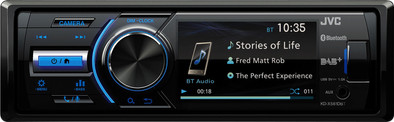
JVC KD-X561DBT
Never available again
View alternatives in the sidebar
View alternatives in the sidebar
According to our car radio expert
Listen with the JVC KD-X561DBT to high quality radio. The built-in DAB + tuner provides a digital and noise-free radio signal. On the screen you see more information about the radio station that you are listening to. Do you no longer want the radio? Then you connect a smartphone or tablet to the car radio via Bluetooth. You then stream your favorite music wirelessly. If you have a rear view camera, connect it to the car radio. On the screen of the radio you can see what is happening behind you.
Display size (DIN) | 1-DIN | |
|---|---|---|
Bluetooth | ||
DAB radio | ||
Controls for Android | ||
Controls for Apple | ||
Integrated Bluetooth car kit | ||
Navigation possible | ||
Plays from USB memory |
5 stars
5
4 stars
1
3 stars
0
2 stars
1
1 star
0
very good product for a very reasonable price. Service coolblue excellent. fast installation.
jan beyens
1 July 2019
Automatically translated from Dutch
Fast, efficient, effective. As used to from coolblue
He Schuldink
18 October 2019
Automatically translated from Dutch
I had high expectations of this radio, but unfortunately they are not fulfilled. The only reason I don't return it is because I spent several hours installing it (removing the antenna and microphone) and because the radio frame is bent, so sending it back will probably only cause discussion.
Below is a further explanation of the points.
Built-in: The installation of the radio is the same as any other brand, so no details on that point. Getting rid of the DAB antenna is some extra work, but it's doable if you're a bit handy. It is nice that the radio is short due to the lack of a CD slot, but that also applies to other brands.
Connections: Sufficient connections, especially the connection for the reversing camera is fine for a single DIN radio without a folding screen.
Manual: The manual is unclear, steps are not well described or are simply not correct. It seems that the manual was written by someone who really has no idea about how the radio actually works. Certain terms that are used are also unclear and not written for end users. In the end you will figure it out with some playing, but it takes an unnecessary amount of time.
DAB+: I expected a lot from DAB+, but that expectation has not been fulfilled. The DAB+ reception is actually downright bad. Transmitters continuously cut out (South Limburg) In addition, the factory settings are far from ideal. If the reception is lost in DAB+, you will receive the message 'no signal' and this will remain so until you take the car off the ignition and switch it on again. Only if you make an adjustment in the factory settings, the radio will continue to try.
Whether the poor reception is due to the DAB+ antenna, the radio or the poor coverage in the south of Limburg I don't know, but it is certainly a downside.
Besides the poor reception, selecting your preset favorite channel is also not convenient. As soon as you select DAB on the radio, it always goes to the full DAB list and not automatically to your favorites. That means that you always have to scroll through your favorites list with the magnifying glass, arrow key and then with the rotary knob. This is inconvenient and dangerous because your attention is diverted from the road.
FM: If DAB+ doesn't work, you could fall back on the standard FM option, but this one doesn't work either.
The radio seems to mute the sound continuously, so you can't enjoy the music. One time it sounds clear and a minute later it sounds muffled again. This is something I had no problems with with the previous radio. Nothing has changed on the antenna.
Besides the fact that the sound is not great, the operation is also far from intuitive and just plain clunky. RDS information is not stored, so that you only see the frequencies in the favorites and not the station name. With the arrows forward/backward, the radio will search for a station, but with FM it will not switch to the next station set by you. You have to press the magnifying glass every time and select your channel with the rotary knob. This is inconvenient and distracts from the road, making it just unsafe.
Telephone book: As with so many bluetooth radios, you can synchronize your phone's phone book with the radio. Unfortunately, this is again something that does not work with this radio. It stays in sync but nothing happens. This has been tested with several Android phones.
Daniel
29 November 2019
Automatically translated from Dutch
Product number | 831976 | |
|---|---|---|
Manufacturer code | KD-X561DBT | |
Brand | JVC | |
Warranty | 2 years | |
Processing of your defect | Via Coolblue | |
Old product returned for free |
Display size (DIN) | 1-DIN | |
|---|---|---|
Backlit screen | ||
Display | ||
Removable display | ||
Tiltable | ||
Dimmable display | ||
Tap screen | ||
Display backlight | ||
Backlight color | Variable | |
Steering wheel control support |
Height | 5,2 cm | |
|---|---|---|
Width | 18,2 cm | |
Depth | 11,7 cm |
Plays from USB memory | ||
|---|---|---|
Plays from Apple devices via USB | ||
Plays from Android devices via USB | ||
DAB radio | ||
Number of DAB preset stations | 18 | |
DAB + antenna included | ||
FM radio | ||
Number of FM preset stations | 18 | |
USB port | ||
Plays music | ||
Plays videos | ||
Audio file format | MP3, WAV, WMA, aac, flac |
Number of audio channels | 4 | |
|---|---|---|
Number of subwoofer channels | 1 | |
Number of pre-out audio channels | 3 | |
Number of stereo RCA outputs (back) | 2 |
Equalizer | ||
|---|---|---|
Number of equalizer bands | 13 | |
Number of equalizer presets | 8 |
Bluetooth | ||
|---|---|---|
Bluetooth version | 3.0 | |
NFC | ||
Multipoint pairing | ||
Number of devices that can be paired | 1 |
Controls for Android | ||
|---|---|---|
Controls for Apple | ||
Android car | ||
Android apps in head unit | ||
Apple Carplay | ||
Siri Eyes Free |
Navigation possible | ||
|---|---|---|
Input for backup camera |
Integrated Bluetooth car kit | ||
|---|---|---|
Contacts | ||
Microphone noise suppression | ||
Built-in microphone |
Microphone connector | ||
|---|---|---|
USB port |