Never available again
View alternatives in the sidebar
View alternatives in the sidebar
Sharpness | Quad HD (1440p) | |
|---|---|---|
Curved | ||
Aspect ratio | Ultrawide (21:9) | |
Refresh rate | 60 Hz | |
Response time | 5 ms | |
Panel type | IPS panel | |
Color depth | 1 billion colors (10-bit) | |
Built-in speakers |
According to our monitor expert
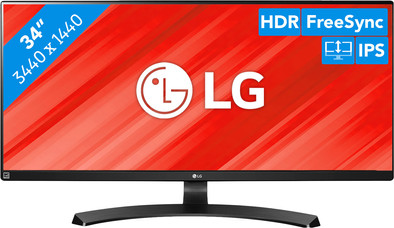
The LG 34WL750 is a 34-inch ultrawide monitor on which you can watch movies, edit your holiday photos, and do your administration. The screen has a third more screen space than a 'regular' monitor, making it easy to work in multiple windows at the same time. With the simple split screen function, you can even divide the screen into several 'separate' screens. The HDR image quality ensures high contrasts and intense colors. This makes photos and movies look very realistic. Adjust the 34WL750 to your ideal sitting position by tilting the screen or adjusting its height. This way, you have a good viewing angle and you won't strain your neck or shoulders as easily. Do you like to game every now and then? If so, the FreeSync technique prevents faltering images.
5 stars
3
4 stars
2
3 stars
0
2 stars
0
1 star
0
As a semi-professional photographer I was looking for a new IPS screen. this LG performed well in several tests. I don't want to spend 1000 euros on an egg so I end up with some more price-friendly screens.
The monitor is easy to configure. Nice that it comes with an HDMI. Displayport cable was not included (luckily I still had).
Mounting on the foot is easy and is really very stable. The monitor does not shake. The foot is also really nice to see. With my previous (2x 24") screens, I had chosen a vesa mount monitor arm precisely because of the ugly foot.
The screen out of the box is way too bright! (100% brightness 70% contrast). This was scaled back quite a bit (60-60). In addition, FreeSync is turned off by default. Even if you turn it on, my AMD card recognizes it as a 'not compatible' monitor.. Good for colors. I did calibrate the screen with my Spyder, the colors don't really change, but the contrast does. Much better after calibration. The colors are therefore good by default, but contrast/black values could be better.
Since the 60hz is nice to play a game every now and then, but more than 60FPS does little. Since it is a 1440P monitor you should also have nice hardware to play 60FPS. If you want high-end gaming, buy a 100hz screen (often no IPS).
Overall satisfied after calibration. I'm a bit skeptical whether I should have chosen a different screen. That the contrast value deviate so much from the calibration surprises with negative.
Tom
20 July 2020
Automatically translated from Dutch
Wash as easy as cable in and it works!
Kroko Dino
7 June 2020
Automatically translated from Dutch
For the price this is a very good product, the bezels are bigger in real life than in the picture.
Dries Van de Velde
23 July 2020
Automatically translated from Dutch
Coolblue takes care of everything, from taking out an insurance to repairs
For almost all accidents
More coverage in case of damage than your standard warranty
No deductible
First, add your monitor to your shopping cart. On the next page, choose the Protection Plan below. You always have a 30-day return window and pay no deductible in case of damage.
3-year Protection Plan
65,-
one-time5-year Protection Plan
116,-
one-time
Product number | 838475 | |
|---|---|---|
Manufacturer code | 34WL750-B.AEU | |
Brand | LG | |
Processing of your defect | Via Coolblue | |
Old product returned for free |
Recommended display resolution | 3440x1440 | |
|---|---|---|
Sharpness | Quad HD (1440p) | |
Aspect ratio | Ultrawide (21:9) | |
Refresh rate | 60 Hz | |
Response time | 5 ms | |
Panel type | IPS panel | |
Brightness | 300 cd/m2 | |
Local dimming | ||
HDR support | ||
Contrast ratio | 1000 | |
Touchscreen | ||
Type of HDR | HDR10 | |
Screen reflection | Anti-glare | |
Blue light filter | ||
Flicker-free technology | ||
Color space | sRGB | |
Color depth | 1 billion colors (10-bit) | |
Adaptive Sync | ||
Type of adaptive sync | FreeSync | |
Resolution width | 3440 pixels | |
Resolution height | 1440 pixels | |
Anti-reflection type | Anti glare | |
Horizontal viewing angle | 178 ° |
Height | 54,8 cm | |
|---|---|---|
Width | 82,99 cm | |
Depth | 4,92 cm | |
Weight | 8,4 kg | |
Color | Black | |
Including stand | ||
Material | Plastic | |
Cable management | ||
Appearance | Neutral | |
Curved |
Number of HDMI connectors | 2 | |
|---|---|---|
Number of Female HDMI type A 2.0a port | 2 | |
Number of headphone jacks | 1 | |
Type of headphone connection | 3.5mm (TS) | |
Number of Female Standard DisplayPort 1.4 ports | 1 | |
Number of female 3.5mm TS Audio Jack ports | 1 |
Included by default | HDMI cable |
|---|
Adjustable in height | ||
|---|---|---|
Tiltable | ||
Pivotable stand | ||
Pivot function | ||
VESA mount option | ||
VESA mount | 100x100mm |
Energy consumption standby | 0,3 W | |
|---|---|---|
Energy consumption active | 60 W |
Built-in speakers | ||
|---|---|---|
Webcam | ||
Split screen | ||
Kensington lock |
Recommended for use | Internet, email, and text processing, Watching movies in Full HD |
|---|
