AOC CU34G2X/BK

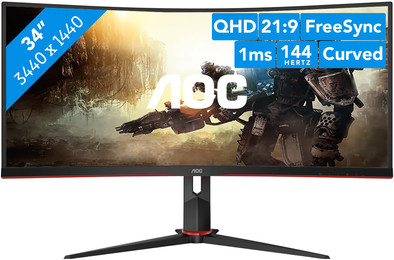
Never available again
View alternatives in the sidebar
View alternatives in the sidebar
Product number | 855617 | |
|---|---|---|
Manufacturer code | CU34G2X/BK | |
Brand | AOC | |
Processing of your defect | Via Coolblue | |
Old product returned for free |
Screen size | 34 inches | |
|---|---|---|
Recommended display resolution | 3440x1440 | |
Sharpness | Quad HD (1440p) | |
Aspect ratio | Ultrawide (21:9) | |
Refresh rate | 144 Hz | |
Response time | 1 ms | |
Panel type | VA panel | |
Brightness | 300 cd/m2 | |
Local dimming | ||
HDR support | ||
Contrast ratio | 3000 | |
Touchscreen | ||
Screen reflection | Anti-glare | |
Blue light filter | ||
Flicker-free technology | ||
Color space | sRGB | |
Color depth | 17 million colors (8-bit) | |
Adaptive Sync | ||
Type of adaptive sync | FreeSync | |
Resolution width | 3440 pixels | |
Resolution height | 1440 pixels | |
Anti-reflection type | Anti glare | |
Horizontal viewing angle | 178 ° |
Height | 52,82 cm | |
|---|---|---|
Width | 80,83 cm | |
Depth | 23,74 cm | |
Weight | 8,1 kg | |
Color | Black | |
Including stand | ||
Material | Plastic | |
Cable management | ||
Appearance | Gaming | |
Curved | ||
Screen curve | 1500 R |
Number of HDMI connectors | 2 | |
|---|---|---|
Number of Female HDMI type A 2.0 ports | 2 | |
Number of headphone jacks | 1 | |
Type of headphone connection | 3.5mm (TRS) | |
Number of Female Standard DisplayPort 1.4 ports | 2 | |
Number of female standard USB-A ports | 4 | |
Female standard USB-A port version | 3.0 | |
Number of female 3.5mm TRS Audio Jack ports | 1 | |
Type of USB port | Standard USB-A | |
Number of USB ports | 4 |
Included by default | DisplayPort cable, HDMI cable | |
|---|---|---|
Not included by default | USB-C cable |
Adjustable in height | ||
|---|---|---|
Tiltable | ||
Pivotable stand | ||
Pivot function | ||
VESA mount option | ||
VESA mount | 100x100mm |
Energy label | G | |
|---|---|---|
Energy consumption standby | 0,5 W | |
Energy consumption active | 67 W | |
Energy consumption per 1000h | 39 kWh | |
Annual energy consumption | 56,94 kWh | |
Annual energy costs | 22,78 euros |
Built-in speakers | ||
|---|---|---|
Webcam | ||
Split screen | ||
Kensington lock |
Recommended for use | Gaming, Internet, email, and text processing, Watching movies in Full HD |
|---|
Sharpness | Quad HD (1440p) | |
|---|---|---|
Curved | ||
Aspect ratio | Ultrawide (21:9) | |
Refresh rate | 144 Hz | |
Response time | 1 ms | |
Panel type | VA panel | |
Color depth | 17 million colors (8-bit) | |
Built-in speakers |
According to our monitor expert
Thanks to the 1 ms response time and 144Hz refresh rate, you'll experience extremely smooth images.
With an ultrawide monitor, you can see more of the playing field if the game supports this.
The 3440x1440 resolution ensures sharp images during gameplay.
This monitor doesn't have integrated speakers to play the sound of your games.
The AOC CU34G2X/BK doesn't have an IPS panel, so colors are more blurry with a large viewing angle.
Immerse yourself completely in your favorite games with the AOC CU34G2X/BK UltraWide gaming monitor. The CU34G2/BK refreshes 144 times per second, so you can game with a very smooth image. Thanks to the 21:9 aspect ratio and the 34-inch screen, you can see more of the playing field. You don't have to compromise on the pixels, because this large screen has a resolution of 3440x1440. The 1ms response time ensures that you don't experience any ghosting. The curved screen fold around your field of vision, so you feel like you're in the middle of your game. Set up FreeSync to adjust the refresh rate to the number of fps that your video card produces. You can tilt, rotate, and adjust the monitor in height for a comfortable sitting position while you game.
Note: for QHD gaming, you need a powerful video card like a NVIDIA GeForce RTX GPU or AMD Radeon RX 5000-series GPU, an Xbox One, Xbox Series X or S, or a PlayStation 5.
Very good price for a monitor with these specs (1440p, 144hz, ultrawide, 1ms). Screen has a nice design, subtle red decoration. Can be used as a game monitor, but wouldn't look out of place in my (home) office. Delivered well packaged including cables and test report. This gave my unit an sRGB DELTA E of 0.73 (>2 is good, so this is almost perfect). Luminance uniformity as well (only one of the 25 measuring points (top right) at 101%. Others all 100%. Checked out some test screens myself. Colors nice and uniform, very slight deviation at the edges, but you can't escape that with this format of VA panels due to viewing angle. Black, gray and white screens show no deviations / color difference. I switched from an IPS panel so was a bit hesitant about colors of VA panel. But this VA panel is much more accurate and nicer than my IPS monitor. In addition, much deeper black values what really stands out. Has a nice curve. Only drawback is that the 'overdrive' can only be used effectively to medium. You will not get the 1ms. However, this monitor also delivers great game performance on medium. Play a lot of Apex. I run this at ~80 to ~100 fps in combination with 1080 gtx with g-sync (compatible). Plays wonderfully smooth. Ultrawide in combination with 34' is just great. I set my 'User RGB' to R35, G36, B50 for such a neutral possible look (no green, b lukewarm or warm haze). Then 'GameColor' on 11 (+1) for just that little bit of extra pop of the colors. Very satisfied.
Kevin Oudhuis
14 July 2020
Automatically translated from Nederlands
There are many things that this screen does well for the price. You do notice in small things that the screen is really a price fighter. This is of course not a problem if you are aware of it in advance.
Out of the box this screen is somewhat mediocre, in the OSD of the screen settings have to be adjusted in order to get the most out of the screen. For example, the colors are a bit "flat" and freesync is not turned on by default (And I understand why they leave it off by default).
The screen buttons are located at the bottom of the panel on the right. This makes adjusting the settings in the OSD a challenge. Especially if, like me, you turn off your screen a few times instead of clicking confirm (These buttons are right next to each other). Ultimately, when you have set the screen to your liking, you no longer have to sit here if all is well, so this is a one-time disturbing factor. I am someone who lowers the brightness of his monitor at night and increases the warm colors of the screen so as not to jump into bed. For this I use the programs Twinkle Tray and F.lux. This means you no longer have to deal with the clumsy buttons if you want to adjust the brightness of your screen.
The curve of the monitor is very fine, and you get used to it after a few minutes. I've always had 27 inch 16:9 monitors without a curve before. No more monitors for me without a curve that exceeds 34 inches. This certainly works out well because the viewing angles of a VA panel like this aren't great. You notice this, for example, when you slump while watching a movie, luckily the screen is easy to adjust on the supplied premium foot.
Starting with the quality of the panel itself, I would like to return to the Freesync option. This monitor has the freesync option turned off by default to prevent many people who buy this screen from returning it. This one has significant flicker issues during game loading screens, or poorly optimized games such as my favorite Mmorpg; Guild Wars 2. There are several guides on the internet how you can adjust the refresh range of the sync with the CRU program so that it will flicker less/no flicker. I turned off the Freesync feature because I don't notice much screen tearing in most games, and I'm more sensitive to a screen that lights up a few times a second like a Christmas tree.
Let's talk about that Christmas tree. There is a red/copper color trim at the bottom of the screen. Tastes differ but I think this looks kitsch. But I understand that the company has chosen this to provide the real gamers with a "Flashy" looking display.
The final rating for me is an 8.5/10 for a screen of this price. It is a price fighter that broadly does many things well on this screen. For example, I did not expect that decent HDMI and Displayport cables would be included. And a good thing too! because my old DisplayPort cable couldn't handle the 144Hz refresh rate, so it switched back to 120. Besides all the things this screen does well, you can see that they have cut off in other areas. The entire screen is made of plastic and there are no speakers in this screen, but these are recognized by Windows, so you have to disable them manually in Windows. I think these are smart decisions to save money, because you don't feel anything of that plastic if you don't stroke your screen every day and monitor speakers generally sound even worse than a cookie tin with a rotten banana in it.
I would recommend this screen to people who are not afraid to change settings on their hardware. If you have more money and want to spend and want a nice out of the box experience, this may not be the screen for you. If, like me, you're looking for the best hardware for the least money, look no further!
Daan Mulder
8 December 2021
Automatically translated from Nederlands
The first reasonably priced 34” monitor with a high refresh rate and a resolution of 3440 x 1440, this makes for an immersive gaming experience, although I will be ordering another graphics card to be able to play at this resolution in newer titles as well. The screen is also suitable for surfing the internet, keep in mind the 21:9 aspect ratio, you can display a lot more in width, but less in height, needs to be adjusted in the beginning, I'm used to it by now . Compromises have been made to keep the price reasonable, but I am impressed with the result and happy with my purchase.
Jeroen Haesendonckx
24 April 2020
Automatically translated from Nederlands
