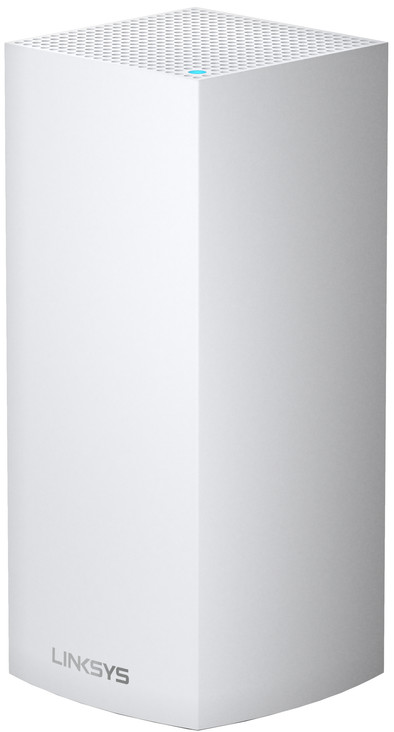
Linksys Velop MX5300 WiFi 6
Never available again
View alternatives in the sidebar
View alternatives in the sidebar
According to our expansion for routers expert
With the Linksys Velop MX5300, you can provide one floor in your house with superfast WiFi 6. If you combine this router with an existing Linksys WiFi 6 WiFi system, you get extremely fast wireless internet for your extra floor or in rooms with insufficient coverage. Thanks to WiFi 6, you can set up a WiFi connection that is up to 3 times faster than standard WiFi. You also get better coverage with WiFi 6, also known as 802.11AX. You can easily use the network with many devices at once. This is useful if you and your family or roommates are streaming, downloading, and gaming at the same time. Simply manage your home network in the comprehensive Linksys app. Here, you can set parental controls, create a guest network, or give certain devices priority.
Speed class | High-end |
|---|---|
Frequency bands | Simultaneous tri-band |
WiFi standards | Wireless AC, Wireless AX, Wireless G, Wireless N, [Wireless AC Wave 2] |
Ethernet speed | Gigabit Ethernet (1000Mbps) |
Number of Ethernet ports | 4 |
5 stars
25
4 stars
14
3 stars
6
2 stars
5
1 star
2
Range
Stability
Installation & user friendliness
Price-quality ratio
After a day of disappointment, returns and search for other brands that would not have the problems of this Linksys product, I came to the conclusion after reading many reviews that Wifi 6 mesh is still a bridge too far in terms of reliability. The Linksys product installs quickly out of the box. The problems arise when you make adjustments afterwards, by moving 'nodes'. Then the installation procedure no longer works and you need [an excellent] Flemish Linksys supporter to help you out with a 'plan B' [in my case no installation via the app but directly hardware-wise]. However: the range and distance of bridging from/via the 'nodes' remains a weak point and after 'switching off' you can start installing again.... In short: far too expensive for a solid and fast WiFi facility. Maybe in a year?
Willem Broere
4 June 2021
Automatically translated from Dutch
The router was really installed within 10 minutes via the Linksys iPhone app, after which the WiFi + underlying internet worked perfectly. Immediately did a firmware update and I think that also took about 10 minutes in total, including restarting the router.
I have my internet modem in bridge mode so this Linksys router really acts as a router. Have it running for a day now and everything works perfectly. Or will it stay that way? Well, I don't know. This is my first Linksys router so I have to wait and see but after the positive experience of the installation that went really fast and smooth and after the reboot of the router (after firmware update) everything just works very stable. I've had routers (from TP-Link) that dropped out on 5 GHz as well as 2.4 GHz within a few hours. The pleasant feeling I have after using it for a day makes me suspect that this Linksys router will make me very happy.
What is important to know is that I did not necessarily buy this router for the AX / WiFi 6 capacities. I'm only on a 250 Mbps down and 25 Mbps up internet speed and I don't have a single WiFi 6 device in the house yet. Then why pay EURO 399 for a router? Because of being a bit future proof. I think that in the coming years I will at most want to double my internet subscription, but will certainly not exceed 1 Gbps. This is important to know about the WAN and LAN ports on this Linksys router. So I also have zero experience with which AX speeds this Linksys router can achieve.
A buddy of mine also has a Velop (WiFi 5 in mesh = 4 nodes) and he is very satisfied with it, which is why I went to look at Linksys Velop. However, I only live in a 75 m2 apartment so 1 node of this Linksys WiFi 6 router is more than enough for coverage in my entire apartment.
Finally, I would like to point out that this router is more of a plug and play router, I mean if you really want to have a lot of control over your internal network and therefore want to adjust many settings yourself, you may be disappointed with this router. I knew that in advance and for me that is a plus instead of a con. For example, you cannot choose whether a device will be on the 2.4 GHz band or the 5 GHz band. The router takes care of that automatically. You can only set one ssid. My iPhone and MacBook were automatically set to 5 GHz by the Linksys and my Brother scanner/printer and my Siemens dishwasher set the router to 2.4 GHz. You can, however, activate a separate guest WiFi network.
For me, the presence of sufficient LAN ports was also important, for my Mediabox Next, Apple TV and Sonos boost. In addition, I personally find the router aesthetically beautiful in my interior. After all, it's full face in my living room, but it fits perfectly next to my white modem and white Sonos playbase and boost.
Michel
1 May 2020
Automatically translated from Dutch
These Velop nodes provided a significantly less stable connection than my old WiFi 5 solution, despite the fact that all nodes had an Ethernet backhaul. Multiple nodes dropped several times and devices had no stable connections. Nodes were in the same place as my old WiFi nodes.
Martijn Janssen
21 August 2021
Automatically translated from Dutch
Product number | 859770 | |
|---|---|---|
Manufacturer code | MX5300-EU | |
Brand | Linksys | |
Processing of your defect | Via Coolblue | |
Old product returned for free |
Speed class | High-end |
|---|---|
Can be expanded with extra stations | |
Maximum number of stations | 10 |
Built-in WiFi | |
|---|---|
WiFi standards | Wireless AC, Wireless AX, Wireless G, Wireless N, [Wireless AC Wave 2] |
Frequency bands | Simultaneous tri-band |
WiFi speed | AX5300 |
2.4GHz band speed | 1147 Mbit/s |
5GHz band speed | 4134 Mbit/s |
WiFi on/off switch | |
Signal transmission | Omnidirectional |
Number of WiFi antennas | 8 |
Ethernet speed | Gigabit Ethernet (1000Mbps) |
|---|---|
Network connector | |
Number of Ethernet ports | 4 |
WAN ports | 1 |
PoE support | |
USB port | |
Type of USB port | Standard USB-A |
Number of USB ports | 1 |
Mobile data connection | No |
|---|---|
Automatically switches to 3G/4G | |
SIM card slot |
Quality of Service (QoS) | |
|---|---|
MIMO | |
MU-MIMMO | |
UPnP AV support | |
Seamless roaming | |
Beamforming | |
Port forwarding | |
LACP Link aggregation |
Parental controls | |
|---|---|
WLAN security | 802.1X, WEP, WPA, WPA-PSK, WPA2, WPA2-PSK |
Firewall | |
Firewall type | DoS, NAT Firewall, SPI Firewall |
Guest network |
Mounting possible | |
|---|---|
Height | 25,15 cm |
Depth | 13,72 cm |
Width | 31,5 cm |
Weight | 2,83 kg |
Color | White |
Material | Plastic |
Memory card reader |
|---|
Power supply type | Power grid |
|---|