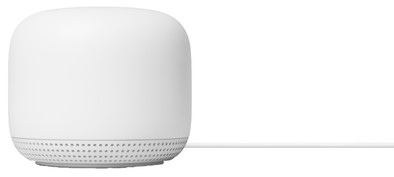
Google Nest WiFi White Expansion
Never available again
View alternatives in the sidebar
Choose your expansion for routers:
AC2200
|
1
Choose your expansion for routers
WiFi speed
Number of stations
View alternatives in the sidebar
Choose your expansion for routers:
AC2200
|
1
WiFi speed
Number of stations
According to our expansion for routers expert
With this Google Nest WiFi expansion, you can expand your existing Google Nest WiFi Mesh WiFi system with an extra station. This way, you provide an extra floor with fast wireless internet. This extra WiFi point has a built-in voice assistant, so you can connect smart devices to this station and control them with your voice. For example, you can turn on your smart lights or turn up the smart thermostat by talking to your router.
Speed class | High-end |
|---|---|
Frequency bands | Simultaneous dual-band |
WiFi standards | Wireless AC, Wireless G, Wireless N, [Wireless AC Wave 2] |
5 stars
128
4 stars
57
3 stars
9
2 stars
5
1 star
0
Range
Let's start with my current Platinum 7840 router that I got from the provider is not performing well in terms of range. Downstairs neat, but as soon as I'm upstairs it collapses and I don't even get 10Mbit. (Package 250/250Mbit). Because my whole house is (smart) with a Nest doorbell, Nest thermostat, Nest Hub + number of Nest minis, my choice was quickly made to go for Nest wifi + 1 point.
This was mainly the choice because installation (for all products) is very easy.
Picked up the Nest Wifi today at Coolblue in Tilburg. Very friendly and the store is very well prepared for the corona virus (class). Service a 10!..
Contents box ; 1x Nest Wi-Fi router 1x Nest Wi-Fi point 1 x Ethernet cable 2x power supply Manual (not used).
Roadmap ; Connect plug. Ethernet cable into the Nest router and to your current modem/router port. Start the Google home application and click on + and let it search in your network. Router was found immediately and step-by-step plan follows. Choose your SSID (wifi name) and your password. After this you will be given a choice to place a WiFi point, which I placed in the bedroom (1st floor). Here is also a short step-by-step plan to, for example, use the Google assistant and configure your voice.
Because I already own Nest/Google products, I didn't have to do this again.
Finally, an update was found and installed. This took 2/3 minutes total installation was less than 10 minutes.
Finally speed ;
Router is in the living room and the point in the bedroom. You can run the test in Google home application.
1 test living room ; 247Mbit / 200Mbit 2 test bedroom ; 247Mbit / 204Mbit 3 test attic. ; 245Mbit / 193Mbit
As you can see, range remains the same throughout the house! Where I used to get no higher than 10Mbit upstairs in the bedroom.
Are there any negative points?
Yes, I miss an extra lan connection on the point. To connect a device via wire.
Unfortunately no Wifi 6 support, but I don't have any devices that support it yet.
Last disadvantage ; Price
If in doubt, I say don't do it! If convenience, speed and range are important to you, then this product is the right choice.
If you are a Tweaker and want to adjust many settings in the router, then I advise against the product.
martijn van neerven van neerven
12 May 2020
Automatically translated from Dutch
Small, simple, with speaker
Richard
25 August 2020
Automatically translated from Dutch
It forms a stable home network, easy to install and manage.
Bart
21 November 2020
Automatically translated from Dutch
Product number | 861567 | |
|---|---|---|
Manufacturer code | GA00667-FR | |
Brand | Google Nest | |
Warranty | 2 years | |
Processing of your defect | Via Coolblue | |
Old product returned for free |
Speed class | High-end |
|---|---|
Can be expanded with extra stations | |
Maximum number of stations | 6 |
Built-in WiFi | |
|---|---|
WiFi standards | Wireless AC, Wireless G, Wireless N, [Wireless AC Wave 2] |
Frequency bands | Simultaneous dual-band |
WiFi speed | AC2200 |
2.4GHz band speed | 400 Mbit/s |
5GHz band speed | 1733 Mbit/s |
WiFi on/off switch | |
Signal transmission | Omnidirectional |
Number of WiFi antennas | 6 |
Network connector | |
|---|---|
WAN ports | 1 |
PoE support | |
USB port |
Mobile data connection | No |
|---|---|
Automatically switches to 3G/4G | |
SIM card slot |
Quality of Service (QoS) | |
|---|---|
MIMO | |
MU-MIMMO | |
UPnP AV support | |
Seamless roaming | |
Beamforming | |
Port forwarding | |
LACP Link aggregation |
Parental controls | |
|---|---|
WLAN security | WPA2, WPA2-PSK |
Firewall | |
Firewall type | NAT Firewall, SPI Firewall |
Guest network | |
VPN server | |
VPN client | |
VPN passthrough |
Mounting possible | |
|---|---|
Height | 9 cm |
Depth | 9 cm |
Width | 11 cm |
Weight | 0,38 kg |
Color | White |
Material | Plastic |
Memory card reader |
|---|
Power supply type | Power grid |
|---|