Samsung Odyssey G7 QLED Gaming LC27G75TQSPXEN
Never available again
View alternatives in the sidebar
View alternatives in the sidebar
Product number | 862975 | |
|---|---|---|
Manufacturer code | LC27G75TQSPXEN | |
Brand | Samsung | |
Processing of your defect | Via Coolblue | |
Old product returned for free |
Screen size | 26,9 inches | |
|---|---|---|
Recommended display resolution | 2560x1440 | |
Sharpness | Quad HD (1440p) | |
Aspect ratio | Standard (16:9) | |
Refresh rate | 240 Hz | |
Response time | 1 ms | |
Panel type | VA panel | |
Brightness | 600 cd/m2 | |
Local dimming | ||
HDR support | ||
Contrast ratio | 2500 | |
Touchscreen | ||
Type of HDR | DisplayHDR 600 | |
Screen reflection | Anti-glare | |
Blue light filter | ||
Flicker-free technology | ||
Color space | DCI-P3 | |
Color depth | 1 billion colors (10-bit) | |
Adaptive Sync | ||
Type of adaptive sync | FreeSync, FreeSync 2, G-Sync Compatible | |
Resolution width | 2560 pixels | |
Resolution height | 1440 pixels | |
Anti-reflection type | Anti glare |
Height | 57,6 cm | |
|---|---|---|
Width | 61,4 cm | |
Depth | 30,6 cm | |
Weight | 7,2 kg | |
Color | Black | |
Including stand | ||
Material | Plastic | |
Cable management | ||
Appearance | Gaming | |
Curved | ||
Screen curve | 1000 R |
Number of HDMI connectors | 1 | |
|---|---|---|
Number of Female HDMI type A 2.0 ports | 1 | |
Number of headphone jacks | 1 | |
Type of headphone connection | 3.5mm (TRRRS) | |
Number of Female Standard DisplayPort 1.4 ports | 2 | |
Number of female standard USB-A ports | 2 | |
Female standard USB-A port version | 3.0 | |
Number of female 3.5mm TRRRS Audio Jack port | 1 | |
Type of USB port | Standard USB-A | |
Number of USB ports | 2 | |
Suitable for daisy chaining |
Included by default | DisplayPort cable | |
|---|---|---|
Not included by default | HDMI cable, USB-C cable |
Adjustable in height | ||
|---|---|---|
Tiltable | ||
Pivotable stand | ||
Pivot function | ||
VESA mount option | ||
VESA mount | 100x100mm |
Energy label | G | |
|---|---|---|
Energy consumption standby | 0,3 W | |
Energy consumption active | 60 W | |
Energy consumption per 1000h | 60 kWh | |
Annual energy consumption | 87,6 kWh | |
Annual energy costs | 35,04 euros |
Built-in speakers | ||
|---|---|---|
Webcam | ||
Kensington lock |
Recommended for use | Gaming, Image editing and graphic design, Internet, email, and text processing, Office work, Photo editing, Video editing, Watching movies in Full HD |
|---|
Sharpness | Quad HD (1440p) | |
|---|---|---|
Curved | ||
Aspect ratio | Standard (16:9) | |
Refresh rate | 240 Hz | |
Response time | 1 ms | |
Panel type | VA panel | |
Color depth | 1 billion colors (10-bit) | |
Built-in speakers |
According to our monitor expert
Thanks to the 240Hz refresh rate and 1ms response time, you can play games with extremely smooth images.
The combination of QLED and HDR600 provides clear, colorful images.
The QHD resolution displays your games 2 times sharper than Full HD would.
This monitor doesn't have built-in speakers.
This monitor has a large stand, so make sure you have enough space before your purchase.
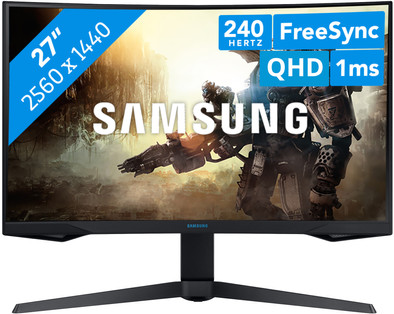
The Samsung Odyssey G7 QLED LC27G75TQSPXEN is a 27-inch gaming monitor with a QLED screen. This screen contains a lot of tiny LED lights that provide a colorful gaming experience. You also get a high brightness, strong contrast, and wide color gamut thanks to DisplayHDR 600 and DCI-P3. You can play even the fastest shooters and racing games without stuttering thanks to the 240Hz refresh rate and 1ms response time. With the QHD resolution, you can see characters and landscapes 2 times sharper than with Full HD. This monitor has a strong curve of 1000R, so you can see the entire screen at a glance. The LC27G75TQSUXEN has a sleek, black design with adjustable LED lighting on the back to complete your gaming setup.
Installation ease
Image quality
Price-quality ratio
Design
During the installation, had the necessary problems, Monitor got "no" signal from my RTX-3080-TI via DP or HDMI 2.1 cable. First updated Bios from 1004.0 to 1007.3, it didn't help. Finally got a picture via the Picture in picture option.
Jeroen Lansink
10 October 2021
Automatically translated from Nederlands
I looked at multiple screens for my PC, looked at multiple sites what the best PC screens are and then I came across this one, I may be just one person in the reviews for this screen but believe me when I say I'm really happy am that I bought this one, this is my first time making a review and I think it's because I think this screen deserves it, I can easily get rid of the cables, the screen is really easy to operate and no screen problems , I'm someone who really likes gaming and I think this screen is perfect for that.
Ritchie van Rheenen
6 October 2022
Automatically translated from Nederlands
Likes it. I read in other reviews that the menu is slow, but not bothered by this.
Johannes Schroeder
18 January 2023
Automatically translated from Nederlands


