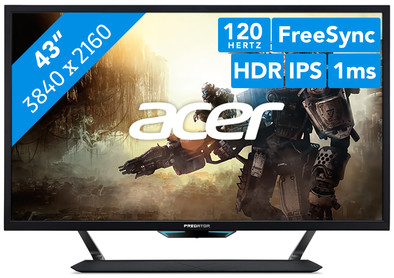
Acer Predator CG437KP
Never available again
View alternatives in the sidebar
View alternatives in the sidebar
Sharpness | 4K (UHD) | |
|---|---|---|
Curved | ||
Aspect ratio | Standard (16:9) | |
Refresh rate | 120 Hz | |
Response time | 1 ms | |
Panel type | VA panel | |
Color depth | 17 million colors (8-bit) | |
Built-in speakers |
According to our monitor expert
Experience razor-sharp graphics while you game with the 43-inch Acer Predator CG437KP 4K gaming monitor. In addition to the 4K resolution, the Predator CG437KP also has Display HDR1000 and DCI-P3 color space, so you enjoy true-to-life colors. This is ideal for games with demanding graphics, like Grand Theft Auto or Need for Speed. Thanks to the 120Hz refresh rate and 1ms response time, this monitor is suitable for a fluid gaming experience with your Xbox One X. And with the FreeSync 2 and G-Sync compatibility, your refresh rates and fps remain the same when you use an AMD or NVIDIA video card. This way, you won't be bothered by stuttering images or ghosting while you game anymore.
5 stars
1
4 stars
1
3 stars
0
2 stars
0
1 star
0
Bought for work (I've been home every day for a year). I went from a 32 inch HDTV to this screen for an (even) sharper image and more desktop. And that's exactly what I have now: mission accomplished :-)
Besides work I like to race around with games like Assetto Corsa (on 4K), rFactor2 (on 2K), Automobilista (on 4K), Dirt rally 2 (on 2K) but also the more casual racing games such as F1 2018 (4K), GRID 2019 (2K) and Sebastien Loeb rally EVO (2K). Everything looks nice, but I'll have to replace my old video card (GTX 950) to run everything on MAX settings and 4K.
In the reviews, I often see the fact that the monitor is large. The fact that the monitor is large is completely correct, but you will first have to measure your desk to see if it fits nicely. So make some preparations before you buy. After that, you can enjoy one of the most beautiful monitors available at the moment.
I only noticed that this monitor has an NVIDIA G-SYNC facility after I installed it (stated in large letters at the bottom left). I actually didn't know what this did, but after some research it turns out to be a nice addition to an NVIDIA video card where the image is less shocking and (according to the reports) also more beautiful. What I notice is that I can run many games at 144Hz, while the specs of my card indicate that the card does not support more than 60Hz. I don't think I fully understand the technique, but the fact is that the monitor indicates that it is actually running at 144HZ.
The fact that a remote control is included with the monitor is a plus, but it does feel a bit simple. In addition, the response time is not flash. I have turned off the automatic port finder, so that I have to indicate which port I am using. Sometimes I am too late to select the port and the monitor turns off because it finds nothing on the current port. Not a big problem, but it could be a little smoother.
Just after installation (quite a job with that very large box and heavy monitor) the difference was very big with my previous monitor, so I sometimes felt a bit dizzy, but after a day that quickly disappeared and I am completely used to it. After a few weeks of use I wouldn't want to/can't go back :-)
Jan de Boer
5 February 2021
Automatically translated from Dutch
Coolblue takes care of everything, from taking out an insurance to repairs
For almost all accidents
More coverage in case of damage than your standard warranty
No deductible
First, add your monitor to your shopping cart. On the next page, choose the Protection Plan below. You always have a 30-day return window and pay no deductible in case of damage.
3-year Protection Plan
204,-
one-time5-year Protection Plan
359,-
one-time
Product number | 869975 | |
|---|---|---|
Manufacturer code | UM.HC7EE.P01 | |
Brand | Acer | |
Processing of your defect | Via Coolblue | |
Old product returned for free |
Recommended display resolution | 3840x2160 | |
|---|---|---|
Sharpness | 4K (UHD) | |
Aspect ratio | Standard (16:9) | |
Refresh rate | 120 Hz | |
Response time | 1 ms | |
Panel type | VA panel | |
Brightness | 1000 cd/m2 | |
Local dimming | ||
HDR support | ||
Contrast ratio | 1000 | |
Touchscreen | ||
Type of HDR | DisplayHDR 1000 | |
Screen reflection | Anti-glare | |
Blue light filter | ||
Flicker-free technology | ||
Color space | DCI-P3 | |
Color depth | 17 million colors (8-bit) | |
Adaptive Sync | ||
Type of adaptive sync | FreeSync 2, G-Sync Compatible | |
Resolution width | 3840 pixels | |
Resolution height | 2160 pixels | |
Anti-reflection type | Anti glare | |
Horizontal viewing angle | 178 ° |
Height | 67,2 cm | |
|---|---|---|
Width | 97,87 cm | |
Depth | 26,43 cm | |
Weight | 18,65 kg | |
Color | Black | |
Including stand | ||
Material | Metal, Plastic | |
Cable management | ||
Appearance | Gaming | |
Curved |
Number of HDMI connectors | 3 | |
|---|---|---|
Number of Female HDMI type A 2.0 ports | 3 | |
Number of headphone jacks | 1 | |
Type of headphone connection | 3.5mm (TS) | |
Number of USB-C ports | 1 | |
Number of USB 3.1 Female USB-C port | 11 | |
Number of Female Standard DisplayPort 1.4 ports | 1 | |
Number of female standard USB-A ports | 1 | |
Female standard USB-A port version | 3.1 | |
Number of female 3.5mm TS Audio Jack ports | 1 | |
Type of USB port | Standard USB-A, USB-C | |
Number of USB ports | 2 |
Included by default | DisplayPort cable, USB cable |
|---|
Adjustable in height | ||
|---|---|---|
Tiltable | ||
Pivotable stand | ||
Pivot function | ||
VESA mount option | ||
VESA mount | 200x100mm |
Energy label | G | |
|---|---|---|
Energy consumption standby | 0,45 W | |
Energy consumption active | 118 W | |
Energy consumption per 1000h | 135 kWh | |
Annual energy consumption | 197,1 kWh | |
Annual energy costs | 43,36 euros |
Built-in speakers | ||
|---|---|---|
Sound system | Stereo | |
Webcam | ||
Split screen | ||
Kensington lock |
Recommended for use | Gaming, Watching movies in 4K |
|---|
