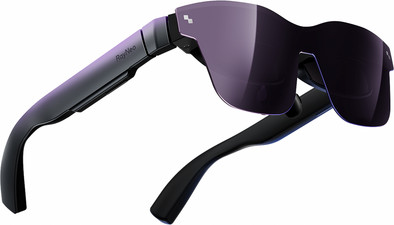
I bought this device expecting to be able to use it to work on the couch in the evening, for example. Now I often go to my desk in the attic, but I thought it would be nicer to have a large screen downstairs so that I could also be near my wife (and children) in the evening. Added value that it would be like glasses so that it could easily be stored in the cupboard after use.
For reference, this was tested with a:
All had no problem with the USB-C DP connection and the glasses worked immediately.
I tested these glasses for a week and unfortunately returned them because they did not work as I thought I would use them. In the longer term:
Build quality and image
Build quality is very good. Sturdy glasses, sit well on the face (once you can adjust the nose bridge properly). Not a heavy device so can stay on for a long time. Also a bit more convenient to wear than for example a Meta Quest (I have the 2 myself) because it is "only" a pair of glasses. You can also look underneath so that you can still see your keyboard or you have the space to eat or drink something without having to take off the glasses.
In terms of image, it is generally very good. Nice and sharp in the middle, unfortunately blurry along the edges. I often need this so this was really a minus point for me.
Brightness can be switched quite high so that you get a very nice screen in front of your eyes. The glasses certainly darken the background sufficiently for this. The blurry sides are one of the reasons why it does not work for me.
Also keep in mind that this is not a VR headset like the quest. If you turn your head, the screen also turns. So you cannot focus on the edge of the screen by turning your head a bit.
Work use
I wore the glasses for a few hours to program with, which was my main purpose to use them in the armchair. Because you can still see your keyboard, typing is very smooth (I can also type quite blind, that will also play a role).
It does require some refocusing every time you look at your keyboard to get the screen really sharp again.
This in combination with the fact that the edges were not sharp, made it not an ideal combination for me to work with.
Media
Playing media via the PC is very smooth. Beautiful and clear image quality. Again some blur on the edges but that doesn't bother me as much when watching a movie.
Sound
Really solid. Of course I can't compare it with expensive headphones because I don't have any. But it doesn't seem like a very fair comparison if we had to do that, looking at the prices of headphones that easily match the price of these glasses for a quality device. So for the price of these glasses with headphones, I found the sound more than solid.
The built-in whisper function was also handy.
Software
Big disappointment. I had looked up in advance and found that there was software so that you could drag several screens (3) from your PC into a program and then give them a place on the glasses so that you could multitask with multiple screens and the mouse and keyboard of your PC.
Ideal, that was actually what would make it an added value for me.
Unfortunately... Dragging the windows/programs you want to your glasses was not that handy. Once this was done, the screens were nowhere to be found at first. It turned out that I had some kind of tracking and that they were floating somewhere at the bottom.
Putting them in the right place with the mouse was also a challenge.
After that, it was actually still impossible to work in it because everything was extremely zoomed in so that you got a screen of 400 by 600px, so to speak.
Tried everything to get it right, but unfortunately. I couldn't get it right.
Personal opinion after a week
All in all, this is a very good device. Depending on what you want to do with it. In my case this was working, but I can't recommend it for that (yet). Maybe with some updates to the software for example.
Multimedia wise it was definitely a good device. If it had been 1/3 of the price, I would have definitely kept it for this.
But since I already have a Meta Quest which is actually also very nice for watching multimedia, a second device is not that useful for me.
I do hope to see improvements to these devices in the future, because I would really use this a lot if it does what I would really enjoy if it was even better suited to work with.