
Written by Donato
Edited on
14 September 2022
·
07:35
How do you reset your Sony television?
In this article, we'll explain how to reset your Sony TV to factory settings. This often solves minor issues. Keep in mind that a reset erases all your settings and downloaded apps.

Step 1: open the settings menu
Press the settings button on your remote. This button has the icon of a gearwheel on it.

Step 3: open 'System'
Select the 'System' menu in the settings menu.

Step 3: choose 'About'
Select 'About' and press the Eeter button

Step 4: choose 'Reset'
Select 'Reset' and press the enter button
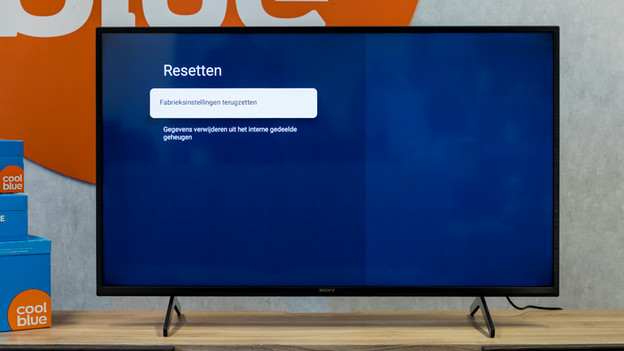
Step 5: choose 'Reset to factory settings'
Select Restore factory settings and press the Enter button.
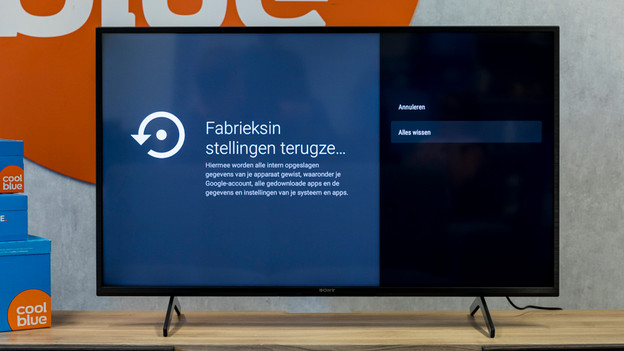
Step 6: confirm the reset
The television will ask you whether you're sure if you want to erase all settings. Select 'Clear all' and press the enter button.
You're done!
The television will repair itself and shut down when it's done. Turn the television back on to re-calibrate your settings. Click the link below for tips on configuring your television.
Article by Donato
Television Expert.
