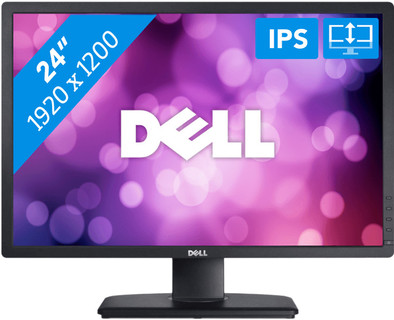
Dell UltraSharp U2412M
Never available again
View alternatives in the sidebar
View alternatives in the sidebar
Product number | 165143 | |
|---|---|---|
Manufacturer code | 210-AGYH | |
Brand | Dell | |
Processing of your defect | Carry-in warranty | |
Old product returned for free |
Screen size | 24 inches | |
|---|---|---|
Recommended display resolution | 1920x1200 | |
Sharpness | WUXGA | |
Aspect ratio | Standard (16:9) | |
Refresh rate | 60 Hz | |
Response time | 8 ms | |
Panel type | IPS panel | |
Brightness | 300 cd/m2 | |
Local dimming | ||
HDR support | ||
Contrast ratio | 1000 | |
Touchscreen | ||
Screen reflection | Anti-glare | |
Blue light filter | ||
Flicker-free technology | ||
Color space | sRGB | |
Color depth | Less than 17 million colors (less than 8-bit) | |
Adaptive Sync | ||
Resolution width | 1920 pixels | |
Resolution height | 1200 pixels | |
Anti-reflection type | Anti glare | |
Horizontal viewing angle | 178 ° |
Height | 36,2 cm | |
|---|---|---|
Width | 55,6 cm | |
Depth | 6,5 cm | |
Weight | 4 kg | |
Color | Black | |
Including stand | ||
Material | Plastic | |
Cable management | ||
Appearance | Neutral | |
Curved |
Number of Female Standard DisplayPort 1.2 ports | 1 | |
|---|---|---|
Number of female standard USB-A ports | 4 | |
Female standard USB-A port version | 2.0 | |
Number of female standard VGA ports | 1 | |
Type of USB port | Standard USB-A | |
Number of USB ports | 4 |
Adjustable in height | ||
|---|---|---|
Tiltable | ||
Pivotable stand | ||
Pivot function | ||
VESA mount option | ||
VESA mount | 100x100mm |
Energy consumption standby | 0,2 W | |
|---|---|---|
Energy consumption active | 38 W |
Built-in speakers | ||
|---|---|---|
Webcam | ||
Split screen | ||
Kensington lock | ||
Best tested |
Image quality according to customers | Good | |
|---|---|---|
Design according to customers | Neutral | |
Recommended for use | Internet, email, and text processing, Office work |
Sharpness | WUXGA | |
|---|---|---|
Curved | ||
Aspect ratio | Standard (16:9) | |
Refresh rate | 60 Hz | |
Response time | 8 ms | |
Panel type | IPS panel | |
Color depth | Less than 17 million colors (less than 8-bit) | |
Built-in speakers |
According to our monitor expert
The IPS panel displays true-to-life colors from all angles.
Thanks to the anti-glare screen, you won't have any issues with reflections, glare, or greasy fingerprints.
This monitor is adjustable in multiple ways for a comfortable working posture.
This monitor doesn't have an HDMI connector.
A DisplayPort cable isn't included.
The Dell UltraSharp U2412M is a 24-inch monitor for home and office use. The IPS screen ensures that the monitor remains legible from all viewing angles. In addition, the 1920x1200 resolution produces sharper images than most screens, and gives you more screen space for documents and texts. Because of the anti-reflective coating, glare or reflections won't be an issue. The monitor can be rotated, pivoted, and tilted in any direction. It's also height-adjustable, to ensure a comfortable posture. Enable text mode to read long documents more easily.
5 stars
65
4 stars
37
3 stars
2
2 stars
1
1 star
0
After a year at school and in my flat (room) using only my 13" notebook, I started to have problems with my neck and back. So I went looking for a monitor, but had my conditions.
I wanted a monitor that is height adjustable, has a matte surface, good viewing angles, high resolution and a pretty good color gamut. There weren't many options, but the very popular Dell U2412M I regularly came across on forums, and the reviews here were also very good. After some more research I decided to buy one.
My first impression was: what a big screen! I've never owned a monitor larger than 17", so I was a bit shocked by the size when I took it out of the box. After three weeks I'm used to that.
The monitor is very convenient to assemble. No hassle with screws to get the panel on the foot, you can just click it in and it is firmly in place. The foot is wonderfully sturdy and easy to adjust. You can simply slide the monitor up or down without any problems, tilt it forwards or backwards, rotate it horizontally or even use it in portrait mode. I'm quite tall and always use it at the maximum height, but to watch a movie from the seat it is sometimes more convenient to put it all the way down.
Compared to the 100% sRGB panel in my laptop, the color gamut of the monitor is slightly less, but compared to any other average monitor it is a lot better. The contrast is surprisingly good, I didn't think the black values would be so good. Watching movies on the monitor is a real pleasure. The brightness is also good, it can be much higher than necessary. I rarely use it at a brightness higher than 75%, even in direct sunlight.
The viewing angles are, as you would expect from an ICS panel, very good. The only downside is that with darker images in the corners you get some IPS glow when your monitor is tilted a little too far forward. Tilting him back a bit or just sitting a little further will solve that too.
With a completely black image, there is a very small amount of backlight bleeding perceptible, at the top of the left edge. However, when I compare this with other monitors (and with reviews of other copies of the same monitor), it is already a lot less disturbing. I guess Dell has tweaked the manufacturing process and I'm happy with that.
The matt surface is pleasant, you are hardly bothered by reflections, the monitor scores well here. The only slightly unfortunate thing is that the matte layer sometimes makes the sharpness and contrast seem a bit lower, or at least when you are really close to your screen. From a normal viewing distance there is no problem.
The monitor came with a DVI cable and a VGA cable. Because I use the monitor with my laptop (which only has VGA and HDMI) I connected the monitor via VGA for the first week. This worked, but there was a lot of interference on the image. This sometimes occurs on certain computers because of a so-called "ground loop" with which the groundings conflict. One solution is to plug the computer and display into independent power outlets.
The solution I used for this (and the best solution) is to buy a converter from HDMI to DVI. HDMI and DVI use exactly the same image signals, so this is perfectly possible. A turnover piece costs next to nothing. Connected, monitor was recognized perfectly and all interference was completely gone! Connecting your monitor digitally via DVI or DisplayPort is the message!
Then briefly about the design. Everything is done in matte black plastic, with some matte silver plastic on the back of the rim (not visible in front). The bezels are quite thin for a monitor of this size. The control buttons are incorporated in the right edge, and they work well. Navigating through the menu is very smooth. There are two USB ports on the left and on the back. If you connect the screen to your computer via the supplied USB cable, you have a built-in USB hub, which is quite handy. For example, I connected my mouse and keyboard to it (via a wireless receiver). Now when I get home, I just plug HDMI and USB into my laptop, and I can get started right away with my screen, mouse and keyboard. Can also be very useful for an external hard drive, for example (although you might lose some speed).
All in all, I consider this monitor a very good purchase. While he doesn't perform exceptionally well in any area, there isn't a single area where he doesn't perform well. A very good all-rounder that almost everyone will be very satisfied with!
Ambroos Vaes
22 June 2012
Automatically translated from Nederlands
As a digital wildlife photographer, I worked with an Eizo wide-gamut monitor as the first monitor in a dual-monitor setup because it allowed me to view almost the entire Adobe RGB color space. This works great with offset printers, although digital printers often prefer the more common s-RGB. However, since I also work more and more with the Internet (web design), I ran into problems because under both Windows and OSX a wide-gamut monitor has to work in a fully adapted (Adobe) environment. In all other software you get disturbing color deviations. That's why I went looking for a new monitor. The Dell Ultrasharp U2412M seemed the most interesting candidate. With the Coolblue 14-day return guarantee, there was no real risk either.
The monitor was delivered correctly, connected and I was immediately impressed with the quality of the image. No dead pixels, and without further calibration already very close to color correct. The driver is fine, and the monitor comes with a color profile. You still have to install this because it is software added to the list but not really automatically linked to the monitor. . This should be mentioned in the manual.
The Eizo is built more solidly, which does not mean that the Dell has a bad construction. It's more of the "normal" monitor. In practice you should always be careful with all equipment. This Dell also has four USB2 connectors, two at the bottom and two at the left edge. The latter two are placed under each other so that you can also connect a thicker USB stick without blocking the second port as well.
Conclusion: I'm not a gamer, so I can't say anything about speeds. But for anyone who finds very good image quality and color reproduction important, this is an astonishingly good monitor for the money and easily recommended for the digital photographer (level RAW and Photoshop) and the web designer.
Erik Heyninck
30 July 2013
Automatically translated from Nederlands
I've been using the screen for a week or two now. Downloaded a profile on the internet and the screen now displays the colors correctly. It wasn't bad out of the box either. Calibrate soon. I mainly use the screen for photo editing and it works fine. The sharpness is impressive. The extra space (1200 instead of 1080 pixels) is very noticeable and gives just a little more workspace. the menu and setting options are also sufficient. The lack of an HDMI input is not a loss. The dvi is fine.
In short, do not regret the purchase. Next day delivery and customer service is good. I had provided the wrong e-mail address and with a phone call everything was arranged.
Roel Gaj
3 January 2013
Automatically translated from Nederlands
