Logitech G810 Orion Spectrum QWERTY
Never available again
View alternatives in the sidebar
Connection type | Wired | |
|---|---|---|
Backlit keyboard | ||
Keyboard composition | Keyboard, Numpad | |
Ergonomic design | ||
Mechanical keyboard | ||
Physical keyboard layout | ISO | |
Geographic keyboard layout | US layout | |
Suitable for gaming |
According to our keyboard expert
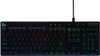
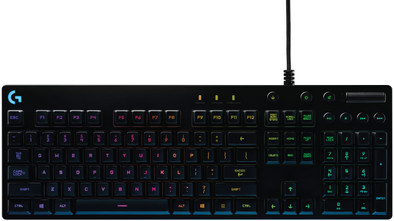
With the arrival of the Logitech G810 Orion Spectrum, Logitech's Spectrum range has acquired its first full-size keyboard. (Considering the G410 is a tournamentedition.) The G810 is equipped with the same, familiar Romer-G mechanical keys, which (according to Logitech) are 25% faster than the better-known Cherry MX switches. Its most striking feature is the RGB lighting. It's totally up to you to decide which key lights up when and in which of the 16.8 million available colors. You can set up your own light show, or choose your favorite existing pattern: the Logitech Gaming Software is preprogrammed with adjustable lighting profiles for more than 300 games.
Note: this keyboard has a large enter key and a small shift key
5 stars
16
4 stars
8
3 stars
0
2 stars
0
1 star
0
NOTE: The photo on the website is not correct. The copy I was sent had an ISO layout (ISO=small left shift key with an extra "" key next to it and a vertical Enter key) instead of the ANSI layout in the photo (ANSI=wide left shift key and horizontal enter key). The extra "" key at the bottom left is also superfluous, as it is already next to the Enter key. I would have preferred a bigger left shift key.
I sent the keyboard back after the weekend. I didn't like the keystroke at all. No feedback whatsoever. No pressure point. It's one numb movement from start to finish of the keystroke. A pity, because the keyboard is of very good quality and has (for me) the perfect layout (apart from the left shift key).
The software is very easy to use and there are some fine adjustment options. For example the "after-glow" mode where each key lights up for a short time after being pressed (after-glow time is adjustable).
I think this keyboard could be very suitable for hardcore gamers. I suspect you can press the keys super fast one after the other. However, I am not a gamer. I use the keyboard for a lot of typing (I'm a programmer) and in my opinion this keyboard is unsuitable for that.
A minus point of the software is that all selected settings are only active as long as the logitech app is active in the system tray. Consequently, my copy was running in rainbow mode every morning because the PC had gone into standby mode. I don't know if that will improve the life of the LEDs in the long run.
Rob
22 February 2016
Automatically translated from Dutch
Simple and straight forward keyboard. No unnecessary bells and whistles.
Design and comfort The keyboard is a standard US layout (large left-shift) keyboard. This was a plus for me personally when purchasing a keyboard. There are also UK-layout keyboards from Logitech where this shift is a small key. The chance that you miss this when sprinting in a game is therefore much greater.
The feet can be set in 2 positions, which works great for ergonomics. However, no wrist rest is included. Not that I really miss this one, but this can be a point of criticism for other interested buyers.
The thread is braided, which is highly desirable to prevent knots, curls and twists. Point of criticism, if I have to comment, is that the wire is not detachable from the keyboard. There is a fairly thick protective sleeve on the keyboard to prevent breaks in the cable. As a result, you cannot route the cable tightly along the keyboard (as far as cable management is concerned).
Quality In addition to using the keyboard for gaming, I also chose this keyboard for other things such as working with large chunks of text. Mechanical keyboards are all nice and nice (I don't believe in the hype), but I do like a firm touch over chiclets or domes. This keyboard has an excellent pressure level, you don't have to ram the key through the bottom before it is registered. Great for typing long texts without your tendons protesting.
Due to the absence of macro keys (I rarely if ever use these to be honest) and all kinds of displays, this makes a wonderful standard keyboard. The LEDs are not too bright, the media keys offer added value. The Num-Lock, Caps-Lock and Scroll-Lock indicators are present, but it is not indicated which LED is for which application. Not really interesting, after a while you automatically know which indicator belongs to which function.
Miscellaneous The Logitech G software to program the keyboard is not necessary. The keyboard works fine without software. However, to program light patterns and zones, or to create game profiles, you do need the software. The software is nice, does its thing, but it's not exactly easy. With Razer you could program a macro 'on-the-fly', with Logitech this is not possible (or I haven't found it yet).
Would I recommend the keyboard? Sure! If you're not prone to vloggers and streamers praising mechanical keyboards, or manufacturers throwing around terms like "gamers-only," "battlefield domination," and I know what they're using these days to tap into your gut feeling, then this is exactly the keyboard you are looking for. No-nonsense, straight-forward, those are the characteristics of this ramp.
Just a simple but decent keyboard, they should do that more often now.
Paul
27 May 2017
Automatically translated from Dutch
Simple and straight forward keyboard. No unnecessary bells and whistles.
Design and comfort The keyboard is a standard US layout (large left-shift) keyboard. This was a plus for me personally when purchasing a keyboard. There are also UK-layout keyboards from Logitech where this shift is a small key. The chance that you miss this when sprinting in a game is therefore much greater.
The feet can be set in 2 positions, which works great for ergonomics. However, no wrist rest is included. Not that I really miss this one, but this can be a point of criticism for other interested buyers.
The thread is braided, which is highly desirable to prevent knots, curls and twists. Point of criticism, if I have to comment, is that the wire is not detachable from the keyboard. There is a fairly thick protective sleeve on the keyboard to prevent breaks in the cable. As a result, you cannot route the cable tightly along the keyboard (as far as cable management is concerned).
Quality In addition to using the keyboard for gaming, I also chose this keyboard for other things such as working with large chunks of text. Mechanical keyboards are all nice and nice (I don't believe in the hype), but I do like a firm touch over chiclets or domes. This keyboard has an excellent pressure level, you don't have to ram the key through the bottom before it is registered. Great for typing long texts without your tendons protesting.
Due to the absence of macro keys (I rarely if ever use these to be honest) and all kinds of displays, this makes a wonderful standard keyboard. The LEDs are not too bright, the media keys offer added value. The Num-Lock, Caps-Lock and Scroll-Lock indicators are present, but it is not indicated which LED is for which application. Not really interesting, after a while you automatically know which indicator belongs to which function.
Miscellaneous The Logitech G software to program the keyboard is not necessary. The keyboard works fine without software. However, to program light patterns and zones, or to create game profiles, you do need the software. The software is nice, does its thing, but it's not exactly easy. With Razer you could program a macro 'on-the-fly', with Logitech this is not possible (or I haven't found it yet).
Would I recommend the keyboard? Sure! If you're not prone to vloggers and streamers praising mechanical keyboards, or manufacturers throwing around terms like "gamers-only," "battlefield domination," and I know what they're using these days to tap into your gut feeling, then this is exactly the keyboard you are looking for. No-nonsense, straight-forward, those are the characteristics of this ramp.
Just a simple but decent keyboard, they should do that more often now.
Paul
27 May 2017
Automatically translated from Dutch
Coolblue takes care of everything, from taking out an insurance to repairs
For almost all accidents
More coverage in case of damage than your standard warranty
No deductible
First, add your keyboard to your shopping cart. On the next page, choose the Protection Plan below. You always have a 30-day return window and pay no deductible in case of damage.
2-year Protection Plan
14,99
one-time3-year Protection Plan
23,99
one-timeProduct number | 695567 | |
|---|---|---|
Manufacturer code | 920-008151 | |
Brand | Logitech G | |
Processing of your defect | Carry-in warranty | |
Old product returned for free |
Keyboard layout | QWERTY | |
|---|---|---|
Geographic keyboard layout | US layout | |
Physical keyboard layout | ISO | |
Typing comfort | Mid-range | |
Backlit keyboard | ||
Spill-resistant | ||
Number of colors lighting | 16.8 million | |
Brightness of backlight adjustable | ||
Programmable keys | ||
Multimedia shortcuts | ||
Flat keys | ||
Suitable for gaming | ||
Recommended for game genre | MOBA, RPG, [FPS] | |
Mechanical keyboard | ||
Mechanical key type | Romer-G | |
Type of keycaps | Medium |
Connection type | Wired | |
|---|---|---|
Cable length | 1,8 m |
Power supply type | USB port PC/laptop |
|---|
Keyboard composition | Keyboard, Numpad | |
|---|---|---|
Ergonomic design | ||
Height | 3,45 cm | |
Width | 44,35 cm | |
Depth | 15,3 cm | |
Wrist rest | ||
Color | Black | |
Weight | 1,18 kg |