Never available again
View alternatives in the sidebar
View alternatives in the sidebar
Product number | 720557 | |
|---|---|---|
Manufacturer code | 90IG0230-BM0N00 | |
Brand | ASUS | |
Processing of your defect | Via Coolblue | |
Old product returned for free |
WLAN security | 802.1X, WEP, WPA, WPA-PSK, WPA2, WPA2-PSK | |
|---|---|---|
Number of WiFi antennas | 4 | |
Replaceable WLAN antennas | ||
WiFi on/off switch | ||
External antennas | ||
Number of external antennas | 2 | |
Firewall | ||
MAC address filter | ||
Parental controls | ||
Frequency bands | Simultaneous dual-band | |
2.4GHz band speed | 600 Mbit/s | |
5GHz band speed | 1300 Mbit/s |
Compatible with operating system | Windows, macOS |
|---|
Height | 1,75 cm | |
|---|---|---|
Depth | 3 cm | |
Width | 11,5 cm | |
Weight | 44 g | |
Color | Black | |
Material | Plastic | |
--- NL | Yes | |
--- BE | Yes |
Frequency bands | Simultaneous dual-band | |
|---|---|---|
WLAN security | 802.1X, WEP, WPA, WPA-PSK, WPA2, WPA2-PSK | |
2.4GHz band speed | 600 Mbit/s | |
5GHz band speed | 1300 Mbit/s |
According to our WiFi adapter expert
AiRadar ensures a larger and more stable WiFi signal.
The WiFi adapter has Wireless AC with a WiFi speed of up to 1,300Mbps.
WiFi Standard AC is up to 3 times faster than WiFi standard N.
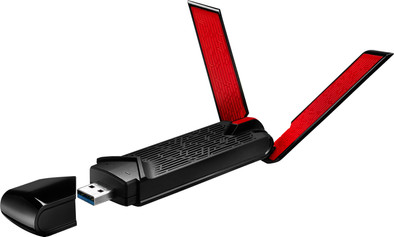
The WiFi adapter isn't small, so it sticks out of your laptop.
The drivers for Windows 10 aren't included by default, so you have to download these from the Asus website.
Connect a PC or laptop with the Asus USB-AC68 dual-band WiFi adapter using the wireless network. The MIMO antennas and AiRadar technology ensure a stable and strong signal. Place the adapter in the stand to direct the external WiFi antennas for better range. Thanks to the fast WiFi Standard Wireless AC, the USB-AC68 is suitable for online gaming without glitches.
5 stars
79
4 stars
13
3 stars
4
2 stars
2
1 star
2
Range
Reception
User friendliness
Speed
Before I bought this I read a lot of reviews. Where they throw with speeds measured or not measured in a lab. After a few tests at home, I find that none come close to what I measured at home.
So I set up a real-life test at home myself.
Hardware used:
Using the NAS performance tester 1.7 tool, a file of 1Gb is copied to the NAS, and then downloaded back.
To compare, the laptop was first connected to the Netgear Nighthawk r7000 via TP6 cable at 1Gbit.
The upload was 875 Mbps and the download I even reached an average of 950 Mbps. I must confess that I allow Windows to use 100% of the bandwidth where it is set to 80% by default. That the upload is slightly lower may be due to the fact that I am reaching the limits of writing to the hard drives of the NAS.
Then the laptop was connected to the ASUS USB-AC68. The laptop was located 7 meters from the Netgear Nighthawk r7000 (set to channel 44) in open space. Windows states that it is connected at 1.3Gbps. You should know that this is theoretical, and that even in labs can never reach these speeds. Due to all kinds of circumstances such as malfunctions, data has to be sent much more often than via the cable, where this phenomenon exists to a lesser extent. I notice that although Windows claims to be tied to 1.3Gbps, the actual transfer rate depends on the placement and orientation of the antennas. After some searching I have an ideal setup for myself. The upload was an impressive 639 Mbps The download was slightly less but no less impressive with an average of 593 Mbps. I also notice that the transfer maintains a quasi-stable speed.
Finally, I now connect to the "white Telenet AC router" (set to channel 104). Which is set up just next to the Netgear. The antenna of the Asus was not moved. Windows shows that it is connected at 1.3Gbps. The results are still nice, but a lot lower. Upload was 339 Mbps and download 541 Mbps. I noticed that the transfer speed was not stable and experienced huge ups and downs. I repeated the test. The upload was 330Mbps and download 473Mbps. Back there the transfer speed was erratic. There are a few possible explanations for this. The Telenet router is not of the same level as the Netgear. But the choice of channel may also have played a role here.
While in America it is recommended to use channel 136 or higher at 5Ghz, here in Belgium/the Netherlands the opposite is the case. Using higher channels also brings us closer to the wavelengths of cordless phones, baby monitors, microwave, etc. This can have a negative impact. In my situation, there is indeed a cordless telephone near the routers. I could change my configuration, but I think it's clear that this USB wifi adapter manages to deliver excellent performance.
I have already had the impression that the stick has a tendency to make poor contact (when using the supplied foot).
Windows 10 installed a driver itself, but it is recommended to download the latest version directly from the ASUS site. Please note, after installation the adapter works, but the performance was not what I expected, after a reboot this was okay.
The 2 external antennas seem quite fragile to me. Not really a problem for me because the intention is to place the USB adapter on the cabinet next to my desk and connect it via a USB 3.0 extension cable of 3 meters. After all, the above-mentioned tests were all performed with a USB adapter in its socket and via the USB 3.0 extension cable. I also did some tests with a USB 2.0 cable. Speeds are then slightly lower between 200 and 300 Mbps. For internet access, that is sufficient, given that the fastest internet connections in Belgium are only 200Mbps for the time being (with the exception perhaps of the few who try the fiber connections).
Paul De Meersman
24 January 2017
Automatically translated from Nederlands
On a new Windows 10 laptop as well as a new iMac, this adapter loses its connection under load. Either the adapter is no longer visible or it no longer responds at all. In addition, this adapter is nowhere near the specified value. And this under ideal conditions. The test set was a professional AP using an unused 5Ghz band (only AP on this frequency), no other clients and 1m away. In principle, a good adapter should achieve 0.65 of the link speed in these circumstances (>800Mbit/s). Measured mean values were 550--600Mibt/s RX/TX over a short period of time IF it worked. However, usually the tests could not be terminated due to loss of the connection or the adapter that was no longer visible (responding). Similar tests with an iMac with built-in wifi card (3x3) give values up to 700Mbit/s RX and this without loss of connection during test periods of 15min and longer. Testing with a recent iPhone (2x2) consistently gives values of +500Mbit/s. The windows laptop gave values of 300Mbit/s (1x1). All a lot closer to the realistic 0.6-0.65 * link speed and this under continuous load. Testing with the Asus adapter failed almost consistently if the load persisted for more than 2 minutes. Sporadically you saw peak speeds of up to 650Mbit/s but the average was more in the order of magnitude of 550Mbit/s-600mbit/s IF the test could be terminated. In addition , the adapter apparently preferred to connect to an AP with channel 36-48 even though the signal from this AP was much lower than the test AP with channel between 52-64 or higher . This quickly became apparent because I have several APs operating on different frequencies. This leads me to suspect that the roaming functionality in this adapter is poorly implemented.
Dirk Brouns
1 January 2018
Automatically translated from Nederlands
It is difficult to find a decent 3SS device, but Asus has developed and tested this device well. The reception is very good!
With the right drivers (which are included) you can get up to 1300Mbps on the 5Ghz band. Please note, you need good APs to get this speed stable and to be able to handle 3 spatial streams on the 5Ghz band.
When all this is in order, you will get data transfers of around 50-60MB/s, about half that of a wired network, but still extremely good for a WiFi connection.
Tim Tielens
10 October 2017
Automatically translated from Nederlands
