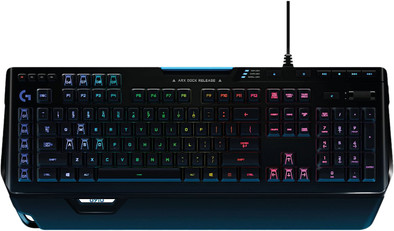
Logitech G910 Orion Spectrum QWERTY
Never available again
View alternatives in the sidebar
View alternatives in the sidebar
Product number | 721278 | |
|---|---|---|
Manufacturer code | 920-008018 | |
Brand | Logitech G | |
Processing of your defect | Via Coolblue | |
Old product returned for free |
Keyboard layout | QWERTY | |
|---|---|---|
Geographic keyboard layout | US international layout | |
Physical keyboard layout | ISO | |
Typing comfort | High-end | |
Backlit keyboard | ||
Spill-resistant | ||
Number of colors lighting | 16.8 million | |
Brightness of backlight adjustable | ||
Programmable keys | ||
Multimedia shortcuts | ||
Flat keys | ||
Suitable for gaming | ||
Recommended for game genre | First Person Shooter, MOBA, RPG | |
Mechanical keyboard | ||
Mechanical key type | Romer-G Tactile (brown) | |
Type of mechanical keyboard switch | Tactile | |
Type of keycaps | Medium |
Connection type | Wired | |
|---|---|---|
Type of USB port | Standard USB-A | |
Cable length | 1,8 m |
Keyboard size | 100% (Complete) | |
|---|---|---|
Keyboard composition | Keyboard, Numpad | |
Ergonomic design | ||
Height | 3,43 cm | |
Width | 50,5 cm | |
Depth | 21 cm | |
Wrist rest | ||
Color | Black | |
Weight | 1,97 kg |
Power supply type | USB port PC/laptop |
|---|
Connection type | Wired | |
|---|---|---|
Backlit keyboard | ||
Keyboard composition | Keyboard, Numpad | |
Ergonomic design | ||
Mechanical keyboard | ||
Physical keyboard layout | ISO | |
Geographic keyboard layout | US international layout | |
Suitable for gaming |
According to our keyboard expert
The backlight of this keyboard can be adjusted for each key, so you can choose to only highlight WSAD in one of the 16.8 million colors, for example.
With sensitive Romer-G switches, you don't have to push the keys completely for a keystroke to register.
The 9 programmable G-keys let you record on-the-fly macros, so you can respond faster in MMO games, for example.
In order to use the Arx Control Display, you need additional (free) Logitech software.
The Logitech G910 Orion Spectrum is the successor to the immensely popular Logitech G910 Orion Spark. Logitech has somewhat tweaked the design. Apart from that, the Orion Spectrum is almost the same as its predecessor. Every mechanical (Romer G-) key can still be highlighted in 1 of 16 million colors. This also goes for the 9 programmable G-keys that give you direct access to your most important commands and macros. Just like the Orion Spark, the Orion Spectrum has room for an iPhone or Android phone. Place it in the Arx Control docking station and download the necessary Logitech software to have handy and oh-so-crucial game statistics in sight while you're gaming.
Note: This keyboard has a big enter key and a big shift key and features an ISO layout.
Installation ease
Ergonomics
My parents gave me the Logitech G910 Orion Spectrum for my birthday. It took me a while to get used to the keys, which are a bit smaller than usual, but I'm completely used to it now!
The software is really one of those things that you learn as you use it, just like the app (which doesn't quite work for me, by the way).
It's a small thing, but I absolutely love the volume wheel, it's very easy and smooth, and it's a huge upgrade when playing games as turning the volume up or down takes less effort and time .
Although the phone booth only accepts phones without a case, I'm glad it's there, because I'm just at school, so if I'm playing after school, I immediately see it when my mom calls me for dinner :)
The lighting is very bright, expandable and per key in 16.8 million. Like I said, it's a little tricky figuring out how that lighting works once, but now that it works and I know how, I love it!
Hugo van Dijk
27 September 2017
Automatically translated from Nederlands
In the beginning it took some getting used to because the keys are much larger than my previous keyboard, but after a day or two I was used to it luckily. What I personally like about this keyboard is that it has handy fast switches. The macro keys are very nice because you can set certain key combinations on them or put one/several shortcuts on them so that when you press such a certain key, everything you need immediately opens. I also like the phone position because I don't leave that thing lying around somewhere all the time. What I also really like about this keyboard is that you can quickly turn the sound up or down with a sort of scroll button at the top right. For the rest, relatively expensive and the keys also make quite a lot of noise, which is not really strange with mechanical keys, but it can still be annoying if, for example, I'm in a skype call with friends and if I then type 1 thing that their hear a noise all at once. But definitely recommended if you don't have a low budget.
Stefanie de Coster
25 February 2017
Automatically translated from Nederlands
I've had this keyboard for about a month and a half now and it feels great. it took me a while to get used to it because the keys are slightly more upwards than my previous keyboard so I occasionally bumped into the front of a key(, I'm completely used to that now and don't bother at all anymore by). The driver that you can download for free is very nice after you get to know it, for example you can change the 9 G keys that this keyboard has all the way to your own wishes, for example I have one to open google and one for the whole quick clicks of my mouse. all in all I think it's a fantastic keyboard and I'm glad I bought it.
Casper. B.
1 October 2018
Automatically translated from Nederlands