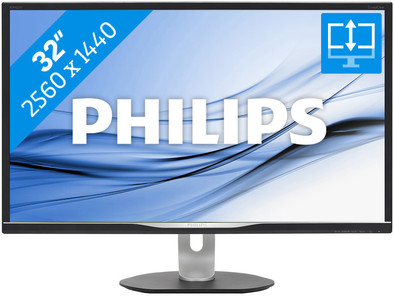
Philips Brilliance BDM3270QP2
Never available again
View alternatives in the sidebar
View alternatives in the sidebar
According to our monitor expert
The Philips Brilliance BDM3270QP2 is a screen aimed at graphic professionals and industrial designers. Thanks to 100% coverage of the sRGB spectrum, colors appear true-to-life. Thanks to the high WQHD resolution, you can easily work with multiple program windows side by side on this monitor. You can also use the space to focus on the details of a design or photo. This screen lets you get through the day with ease, as the flicker-free technology helps to reduce eye strain. In addition, you can tilt, pivot, and rotate the screen so that it's always in the right position for you.
Sharpness | Quad HD (1440p) | |
|---|---|---|
Curved | ||
Refresh rate | 60 Hz | |
Response time | 4 ms | |
Panel type | AMVA panel | |
Color depth | 1 billion colors (10-bit) | |
Built-in speakers | ||
Adjustable in height |
5 stars
33
4 stars
18
3 stars
3
2 stars
0
1 star
0
After a week of use I can recommend this monitor to everyone! My (web) programming is a lot faster because of the enormous work surface. in combination with the Windows 10 snap and drag capabilities allow you to very quickly display two applications side by side (drag the windows to the left or right edge). If you drag a window to the corners, you have 4 applications open in no time. The windows are then still large enough to read emails, surf in another, have a code window open in another, etc.
To give you an idea of the work surface: if you open an (empty) Excel worksheet over the entire screen, you will have 57 rows. In width it then goes from column A to AM. Put your two blank Excel sheets next to each other as just described, both worksheets run from A to S.
I was afraid of the size of the screen when I bought it, but the dimensions are really not that bad. The monitor stands on the (supplied and very stable) stand. In its lowest position, when the monitor is pushed all the way down, the height is 49 cm. (the width is 74cm)
A big difference with my previous screen is the easy tilting and rotation - in all conceivable directions.
Even if the screen is not set to its ideal resolution of 2560x1440px, this monitor displays clearly legible letters.
I can only agree with the positive reviews about this screen!
Steven
14 January 2017
Automatically translated from Dutch
After looking for a while after a replacement of my 23.6 Inch IPS LG LED screen, I chose this 32 Inch Philips. Screen is VA and colors and brightness settings are very nice. Screen size was a bit of a shock when it was on my desk but after 1 day used to and pleasant working. Can be set in all positions. Connections for images are at the bottom, which is a bit more difficult. USB on the side. Top not regret the purchase so far. Resolution is nice to work with, I sit relatively close to the screen. For relaxation (flight sim) it gives a nice wide view. In use with GTX 960. Movies also very nice this screen
Ronald
11 November 2016
Automatically translated from Dutch
Finally it was time to replace my 24 inch Full HD screen with something bigger. Very suitable for movies and series. I was afraid that Full HD or 720p films would look slightly stretched out, but I don't notice this at all. Since the aspect ratio (16:9) is the same as that of Full HD (1080p), you won't notice it.
Gaming is also great on this screen. With its response time of 4ms, it's not the fastest screen, but I personally don't see the difference between 1ms and 4ms when gaming. What this screen is actually designed for is for designers. The VA panel is very colorful and the high resolution and screen size make this screen very pleasant to work on with, for example, Lightroom. The color reproduction is realistic, no excessively increased contrasts.
In addition, the image is very easy to rotate, tilt and adjust in height. The screen is on the heavy side, so you have to put it on a solid surface. When I bump into my desk, the screen wobbles a bit. I get the feeling that I should have screwed the screen tighter, but I can't. It is not the case that he easily falls over.
Unfortunately, there is nothing in the design that allows you to neatly hide the cables. You can put the cables through the hole in the leg, but you will still see them hanging under the screen. But this may be a personal preference. The built-in speakers are quite nice, although they sound quite dull compared to the desktop speakers I normally use. The power of the speakers is quite high, the volume can be really loud. It is very nice that there is also a headphone connection, which I use when I connect my PS3 to the screen. The extra USB connections can be useful if you want to charge your mobile, tablet or something else. These do not function as an extra USB connection for your PC. All in all I am very positive about this monitor.
If you're looking for a large-sized screen that's suitable for just about anything you can do on a PC, I definitely recommend this one.
Marthijn Visser
16 November 2016
Automatically translated from Dutch
Product number | 738721 | |
|---|---|---|
Manufacturer code | BDM3270QP2/00 | |
Brand | Philips | |
Processing of your defect | Carry-in warranty | |
Old product returned for free |
Sharpness | Quad HD (1440p) | |
|---|---|---|
Refresh rate | 60 Hz | |
Response time | 4 ms | |
Panel type | AMVA panel | |
Brightness | 250 cd/m2 | |
Local dimming | ||
HDR support | ||
Contrast ratio | 3000 | |
Touchscreen | ||
Screen reflection | Glossy | |
Blue light filter | ||
Color depth | 1 billion colors (10-bit) | |
Adaptive Sync | ||
Resolution width | 2560 pixels | |
Resolution height | 1440 pixels | |
Anti-reflection type | Anti glare | |
Horizontal viewing angle | 178 ° |
Height | 27 cm | |
|---|---|---|
Width | 74,2 cm | |
Depth | 65,7 cm | |
Weight | 10,76 kg | |
Color | Black | |
Including stand | ||
Material | Plastic | |
Cable management | ||
Curved |
Number of USB ports | 4 |
|---|
Adjustable in height | ||
|---|---|---|
Tiltable | ||
Pivotable stand | ||
Pivot function | ||
VESA mount option | ||
VESA mount | 100x100mm |
Energy consumption standby | 0,5 W | |
|---|---|---|
Energy consumption active | 62,3 W |
Built-in speakers | ||
|---|---|---|
Sound system | Stereo | |
Split screen | ||
Kensington lock | ||
Best tested |
