Never available again
View alternatives in the sidebar
View alternatives in the sidebar
Sharpness | 4K (UHD) | |
|---|---|---|
Curved | ||
Aspect ratio | Standard (16:9) | |
Refresh rate | 75 Hz | |
Response time | 5 ms | |
Panel type | IPS panel | |
Color depth | 1 billion colors (10-bit) | |
Built-in speakers |
According to our monitor expert
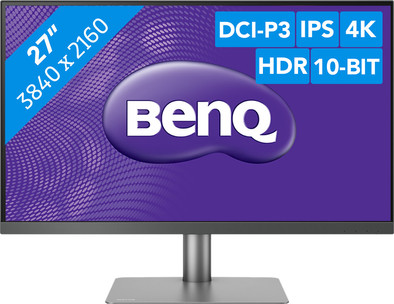
The BenQ PD2720U is a 27-inch monitor that suitable for graphic design, photography, and video editing. Choose the color representation that suits your work, like the 100% sRGB, Adobe RGB, and Rec. 709 and 96% DCI-P3 support. Combined with the HDR10 technology, this monitor displays your work in 1 billion true-to-life colors. With the hotkeys and the rotation wheel on the included hotkey puck, you can quickly and easily choose your preferred screen settings. With the two Thunderbolt 3 ports, you can connect 2 4K monitors to your MacBook or laptop via daisy chain. That means you connect a second monitor with a short cable from the first monitor.
Note: As a result of 4K resolution, text and icons become smaller, which you can't always enlarge. For a 4k output, you need a modern laptop or PC with a fairly powerful video card. Make sure it has at least a DisplayPort 1.2, HDMI 2.0, or Thunderbolt 3 connection.5 stars
3
4 stars
1
3 stars
0
2 stars
0
1 star
0
Installation ease
Image quality
Price-quality ratio
Design
I already use the monitor as a second screen for my iMac, my Macbook pro, my AVR receiver and my Apple TV. In all cases, I get excellent image quality in ultra HD that is extensively customizable. The hotkey puck is a real convenience when choosing the right input, quickly switching between the image of the iMac and the Macbook pro and operating the menu.
Willem Klinkhamer
14 September 2019
Automatically translated from Dutch
Purchased as an external screen for MacBook Pro 15". By means of the supplied Thunderbolt 3 cable, the MBP can be charged and data transfer takes place, very handy! Despite the fact that the BenQ PD2720U 'only' supplies 60W and the MBP can in principle handle 87W, I experience this no problems with it, the battery of the MBP remains neatly at 100%. It is possible that the capacity of the battery can (temporarily) decrease with a heavier load, but I have not experienced that until now (± 2 weeks in possession) . Furthermore, connecting is a piece of cake and the settings of the screen itself are also very easy to set, especially if you use the supplied 'puck'. The viewing angle is a bit disappointing, if you look at the screen from the side, I find the image quickly less clear, it has a somewhat grayish glow, especially compared to my MBP, the viewing angle is a lot better. But if you sit right in front of it, you (of course) have a super sharp image. I think the design of the monitor is beautiful, it fits very well with the MacBook (pro). The screen is very easy to adjust in height without having to use too much force, it can even be tilted and can easily be rotated a lot without having to move the foot. The foot of the screen is heavy and sturdy, which makes this screen very sturdy (plus). The power cord was a bit on the short side for me; The advantage of the cord is that it is just a cord, no external power supply / adapter. The biggest drawback of this screen, in my opinion, is the high price. But there are very few 4K 27" screens with Thunderbolt 3 connection that are also very well made.
Annemarie
31 December 2019
Automatically translated from Dutch
vlot geïnstalleerd en verrast met de beeldkwaliteit.
Filip De Gruytere
3 February 2021
Coolblue takes care of everything, from taking out an insurance to repairs
For almost all accidents
More coverage in case of damage than your standard warranty
No deductible
First, add your monitor to your shopping cart. On the next page, choose the Protection Plan below. You always have a 30-day return window and pay no deductible in case of damage.
3-year Protection Plan
138,-
one-time5-year Protection Plan
243,-
one-time
Product number | 832389 | |
|---|---|---|
Manufacturer code | 9H.LHKLA.TBE | |
Brand | BenQ | |
Processing of your defect | Via Coolblue | |
Old product returned for free |
Recommended display resolution | 3840x2160 | |
|---|---|---|
Sharpness | 4K (UHD) | |
Aspect ratio | Standard (16:9) | |
Refresh rate | 75 Hz | |
Response time | 5 ms | |
Panel type | IPS panel | |
Brightness | 350 cd/m2 | |
Local dimming | ||
HDR support | ||
Contrast ratio | 1300 | |
Touchscreen | ||
Type of HDR | HDR10 | |
Screen reflection | Anti-glare | |
Blue light filter | ||
Flicker-free technology | ||
Color space | sRGB | |
Color depth | 1 billion colors (10-bit) | |
Adaptive Sync | ||
Resolution width | 3840 pixels | |
Resolution height | 2160 pixels | |
Anti-reflection type | Anti glare | |
Horizontal viewing angle | 178 ° |
Height | 36 cm | |
|---|---|---|
Width | 61,4 cm | |
Depth | 8,7 cm | |
Weight | 8,3 kg | |
Color | Silver | |
Including stand | ||
Material | Plastic | |
Cable management | ||
Curved |
Number of HDMI connectors | 2 | |
|---|---|---|
Number of Female HDMI type A 2.0 ports | 2 | |
Number of headphone jacks | 1 | |
Type of headphone connection | 3.5mm (TRS) | |
Number of Female Standard DisplayPort 1.4 ports | 1 | |
Number of female standard USB-A ports | 3 | |
Female standard USB-A port version | 3.1 | |
Number of female 3.5mm TRS Audio Jack ports | 1 | |
Type of USB port | Standard USB-A | |
Number of USB ports | 3 |
Included by default | DisplayPort cable |
|---|
Adjustable in height | ||
|---|---|---|
Tiltable | ||
Pivotable stand | ||
Pivot function | ||
VESA mount option | ||
VESA mount | 100x100mm |
Energy consumption standby | 0,5 W | |
|---|---|---|
Energy consumption active | 42 W |
Built-in speakers | ||
|---|---|---|
Sound system | Stereo | |
Webcam | ||
Split screen | ||
Kensington lock |
Recommended for use | Image editing and graphic design, Internet, email, and text processing, Office work, Watching movies in 4K |
|---|
