Asus ZenScreen Touch MB16AMT
Never available again
View alternatives in the sidebar
Choose your monitor:
ASUS ZenScreen Touch MB16AMT
Choose your monitor
View alternatives in the sidebar
Choose your monitor:
ASUS ZenScreen Touch MB16AMT
Choose your monitor
According to our monitor expert
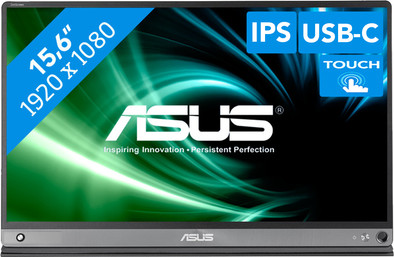
The Asus Touch VT229H is a 15.6-inch portable monitor with a touchscreen. You can take this lightweight and compact monitor with you wherever you go and use it beside your laptop. That is why this is a good monitor for business use. It doesn't matter whether you work in the library, in the canteen at work, or in a coffee shop, for example. Thanks to the integrated battery, you don't even have to look for a power outlet. Do you want to show a presentation or text to project members or a client? You can easily go through it with them, thanks to the touchscreen. Take notes quickly and easily with the included ZenScreen pen. You can connect the Touch VT229H to your laptop via USB-C or micro HDMI. Want to relax? If so, watch a movie in Full HD resolution, which displays sharp images. The Asus Eye Care technology protects your eyes against strain by blocking harmful light from the screen.
Sharpness | Full HD (1080p) | |
|---|---|---|
Curved | ||
Aspect ratio | Standard (16:9) | |
Refresh rate | 60 Hz | |
Response time | 5 ms | |
Panel type | IPS panel | |
Color depth | 17 million colors (8-bit) | |
Built-in speakers |
5 stars
11
4 stars
18
3 stars
8
2 stars
2
1 star
0
Finally! I have been using the ultimate portable multiscreen workstation for over a year now, consisting of a Surface Pro 5, surface docking station, an Asus USB screen MB16AC (predecessor of this product) and a Windows Sculpt wireless keyboard and mouse. Ideal set that I set up both at home on the dining table and at a customer's house within a few minutes, and where you also quickly disconnect the surface to walk to a meeting.
Working with the surface has the advantage that you can easily release the mouse to touch something on the screen, and I missed this a bit on the 2nd screen. That's why I received the pre-announcement of the MB16AMT earlier this year with enthusiasm, and this week I saw that it was available through the trusted Coolblue. So ordered right away!
Just arrived and in the meantime I am almost used to a 3 monitor setup, where the new touch has become the middle screen. Immediately able to do the comparison with the older MB16AC:
The MB16AMT is better in a few areas:
A handy tip for other users: the touchscreen was not properly set up for me at first. When using multiple touchscreens in desktop expansion, you must first go through a wizard, so that windows knows which touchscreen belongs to which desktop, otherwise the touch of the 2nd screen will end up on the main screen. Took a while to find the first time...
To do this, search through Control Panel for 'touch' and choose 'Tablet PC Settings'. The wizard is started via the admin button Settings and you have to touch the screen of all touchscreens and then press enter for the next screen.
TK
27 September 2019
Automatically translated from Dutch
If you work at the kitchen table on a laptop, you don't have room for a monitor. But a second screen is very useful as a gamer, and almost a necessity as an ITer and designer. Most portable monitors have a low brightness and/or resolution to keep the price low. If you have a window behind you, cheap is expensive. This one doesn't have that problem.
The Asus ZenScreen Touch MB16AMT is more expensive than the average portable monitor. But you do get value for money. A bright 1080p display with 10 finger touch input, enclosed cover/stand, a battery and included speakers.
The biggest reason for the price is the 10-finger multi-touch functionality. On Windows 10 with a Thunderbolt connection, this works out of the box without any problems. When used with a cheaper cable, or HDMI+USB A (HDMI naturally has no touch input so you need a USB A connection) some calibration may be necessary.
The screen is very bright (250 cd/㎡ with a contrast ratio of 700:1, in practice (depending on the settings) more around 240 cd/m² with a contrast ratio of 1,260:1) and nicely sharp (also in is set to 50% by default). The colors are nice and bright, adjustable (!!!), and there are different settings for blue filters. Note: The Standard mode is quite dull, choose another mode.
The cover also serves as a standard with 3 positions in landscape mode, and 1 in portrait mode. It's an origami trick the first 1 or 2 times (see quick guide), but after that you fold it in the right position, and the 2 primary positions are indicated on the cover with stripes. The landscape mode is quite stable, even with a curious cat who can't keep his hands off it, it hasn't fallen over yet. The portrait mode is unstable, but that is also possible with 15.6 ".
There are speakers in the monitor. These have the volume and quality of an average smartphone speaker, which is reasonable for a monitor.
I had no problems at all with the initial installation and configuration and was done with it within 2 minutes, but that depends on the situation. I'm an IT person, and the first thing I do with any device is adjust settings. If you expect plug&play, take a look at the manual. You can find this on the Coolblue product page under "Included as standard". (In Dutch).
I have been looking for a high quality portable monitor for next to my laptop for years. This one was a little pricey, but I'm really happy with it, and it's perfect for what I was looking for. Well worth the money!
A few important points to keep in mind:
on “Power from NB/PC” to also supply power via USB C. Every time you turn on the screen you will now be asked if you want to use power from the PC.
Dominique Knobben
25 May 2020
Automatically translated from Dutch
I wanted to make a number of use cases possible : both an extra screen for PC, as a "note screen" (purchased separate stylus) next to my normal laptop screen, as an extra large "tablet" screen for my smartphone (samsung Galaxy - with DEX environment) , so that I no longer need an extra tablet in addition to my smartphone. All these use cases worked flawlessly. Only a pity that the device is quite pricey and that it cannot be charged during use. Apparently it is the only device on the market that can handle this.
Emmanuel Van Tomme
11 August 2020
Automatically translated from Dutch
If you buy the Asus ZenScreen Touch MB16AMT now, you'll receive a refund after purchasing this router. You register for this via Asus. Go to the promotional Terms and Conditions (PDF) for more information on how much money you'll get back. All steps are also explained here.

Product number | 837811 | |
|---|---|---|
Manufacturer code | 90LM04S0-B01170 | |
Brand | ASUS | |
Warranty | 3 years | |
Processing of your defect | Via Coolblue | |
Old product returned for free |
Recommended display resolution | 1920x1080 | |
|---|---|---|
Sharpness | Full HD (1080p) | |
Aspect ratio | Standard (16:9) | |
Refresh rate | 60 Hz | |
Response time | 5 ms | |
Panel type | IPS panel | |
Local dimming | ||
HDR support | ||
Contrast ratio | 700 | |
Touchscreen | ||
Screen reflection | Anti-glare | |
Blue light filter | ||
Flicker-free technology | ||
Color space | Adobe RGB | |
Color depth | 17 million colors (8-bit) | |
G-sync | ||
G-sync Ultimate | ||
Adaptive Sync | ||
Resolution width | 1920 pixels | |
Resolution height | 1080 pixels | |
Anti-reflection type | Anti glare | |
Viewing distance | 25 - 68 m | |
Horizontal viewing angle | 178 ° |
Height | 22,74 cm | |
|---|---|---|
Width | 35,97 cm | |
Depth | 0,9 cm | |
Weight | 0,9 kg | |
Color | Black | |
Including stand | ||
Material | Metal | |
Cable management | ||
Appearance | Gaming | |
Curved |
Number of HDMI connectors | 1 | |
|---|---|---|
Number of Female HDMI Type C 1.4 ports | 1 | |
Number of HDMI Female USB-C port | 1 | |
Number of USB-C ports | 1 | |
Type of USB port | USB-C | |
Number of USB ports | 1 | |
Type of USB cable included | USB-C to USB-C | |
USB-C dock |
Included by default | HDMI cable, USB-C cable |
|---|
Adjustable in height | ||
|---|---|---|
Tiltable | ||
Pivotable stand | ||
Pivot function | ||
VESA mount option |
Energy label | F | |
|---|---|---|
Energy consumption standby | 0,5 W | |
Energy consumption active | 12 W | |
Energy consumption per 1000h | 13 kWh | |
Annual energy consumption | 18,98 kWh | |
Annual energy costs | 7,59 euros |
Built-in speakers | ||
|---|---|---|
Sound system | Stereo | |
Webcam | ||
Split screen | ||
Kensington lock | ||
Best tested |
Recommended for use | Internet, email, and text processing, Office work, On the go, Watching movies in Full HD |
|---|
