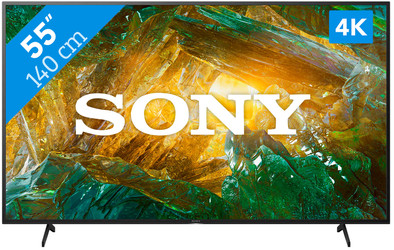
Sony KD-55XH8096 (2020)
Never available again
View alternatives in the sidebar
View alternatives in the sidebar
According to our television expert
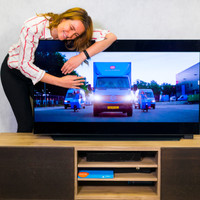
The Sony KD-55XH8096 allows you to watch sharp and colorful images. The Triluminos screen increases the color gamut, so you can see more subtle tones in a flower field, for example. Your favorite movies and series are displayed realistically in combination with the sharp 4K resolution. Android TV gives you access to websites, games and useful apps like YouTube or Netflix. You can stream photos or videos from your smartphone to the TV with the same effortlessness. When you activate the integrated Google Assistant, you can control the most important functions with your voice. Adjust the volume, look up a video, or ask for the weather forecast, for example. The TV has 4 HDMI inputs, which allows you to connect multiple devices at the same time. You could connect a console, Blu-ray player, soundbar, and a digital decoder, for example.
Screen size | 55 inches | |
|---|---|---|
Image quality | Good | |
Smart platform | Android | |
Refresh rate | 50 Hz | |
Screen type | LED-LCD | |
Sharpness | 4K (UHD) |
5 stars
9
4 stars
4
3 stars
0
2 stars
0
1 star
0
Something that immediately struck me is the way the TV is packaged. The box (part of the polystyrene foam) is also the standard for mounting the legs. You don't want to put your brand new TV on a blanket somewhere on the screen.
Installation. The TV setup was extremely easy. It simply started with a few questions regarding the choice of provider (Caiway, Canal Digitaal, KPN, T-Mobile, Tele2, Ziggo or none). The Ziggo MediaBox Next was also immediately detected and I could use the remote control of the Sony TV.
Not only does this TV have a built-in Chromecast 4K, but Apple users can also indulge themselves. The TV also supports AirPlay and HomeKit.
Image. With the standard screen settings, you will notice that this TV has a beautiful image, thanks to the TRILUMINOS display. Flowers and plates in particular almost jump out of the screen.
Sound. The sound from the TV is less than I expected. My expectations were too high regarding Dolby Atmos. Perhaps because I'm used to a surround set.
I believe that both Android and Apple enthusiasts can enjoy this TV. The versatility in streaming to and from Android as well as Apple products works perfectly. Thanks to the support of AirPlay2, the TV can be used perfectly with, in my case, the HomePod from Apple. Seamlessly listen to music in multiple rooms. This works great.
lexus2510
10 May 2020
Automatically translated from Dutch
To start with the most important. The image is a 55 inch (139 cm) Ultra HD 4K display. Using the X1 processor, the image must display a true-to-life and structured 4K image. That is right. I find the image reproduction and colors very natural. Very nice to look at. Often when I watch televisions in stores the colors are too bright and unnatural. I don't experience that with this Sony. This could be due to the Trilumino color spectrum produced by the X1 processor. This means that more colors are displayed than a "normal" television.
I normally look at a 37 inch screen and a 55 inch screen takes some getting used to at first because the first impressions on such a screen size are large. But looking at the screen I experience as very calm. The screen is also easy to see in direct daylight. I dread going back to my own 37 inch television screen.
The TV has Dolby Atmos where the sound comes from above and from the side, so that you should hear objects pass above you more realistically. It should give a multidimensional experience. But I am less pleased with the sound of the television. Not that it's bad, but I expected more. My 11-year-old Phillips is no less than that. But if you are an audiophile, you will still connect the device to a separate surround set or soundbar.
Sony itself says that the device has a refined design that fits everywhere. That's right, but in terms of design, the television is not an eye-catcher. The design is simple in my opinion. Not that this television would be out of place anywhere. But you don't buy a television just to gather dust somewhere. You buy it for the image and when the image is on it is a picture to look at. The bezels around the screen are thin. Maybe not the thinnest among the televisions on the market today, but thin enough as far as I'm concerned.
The device therefore runs on Android. You can't see it that way at first glance. If you dive a little further into the settings, you will recognize the structure of Android. And because of that, I know where to look for certain settings. I like that very much. But I've also run into something a few times that doesn't work (immediately) and I recognize Android in that too. Like not being able to pair with my phone at first to make initial setup easier or not being able to find my Bluetooth earbuds even though they support A2DP. I have been in contact with Sony for the latter, but so far this has not led to the desired result. If all goes well, a file has now been created at Sony. I should also point out that I read back on the internet that the sound does not match the image when you connect a Bluetooth headset to a television and that it is better to use a headset with a transmitting station. But I wanted to test the Bluetooth on this Sony, but unfortunately that didn't work out.
It is also nice that the device immediately finds my Synology NAS in the network and that I can easily consult it to view photos. That way I can also watch movies (in avi in mkv format) that I have on it. It does not play videos that I have made with my mobile. But then again via the Synology apps that can be found and installed via the Play Store.
Chromecast and Apple Airplay are built into the television. This allows you to easily stream from your Android or Apple device. Although more than 5000 apps can be found on the TV, not all apps can be found there. For example, I could not find RTL XL (but Videoland) because, according to the internet, these can only be found on LG, Samsung and Phillips smart TVs. With the KIJK app, I couldn't get past the first screen to agree to the terms and conditions because I couldn't navigate to the button. The latter is not attributable to Sony anyway. The KIJK app is just worthless. But you can stream these two apps to your TV via your smartphone or tablet and that works well. I especially love that Apple Airplay is supported. And using the Netflix and Disney+ apps on television is a joy. I would like to see a Disney+ button in addition to the handy Netflix button on the remote control.
The remote control has the Google Assistant button with which you can record a search query. This works well in the sense that what you say comes through well and is taken over. But what I think is a pity is that you do not find what you expect in the search result. An example. I say search query "Lion King". Then I get as search result data about the film and some videos on Youtube about the film. I would like to see a direct link to Disney+ to watch the movie. The same applies if I search for "Tiger King" for example. Then I don't get to see the link to the Netflix series. I would like to see added in this search function.
Now let's talk about what hopefully you only need to do once. Namely placing and installing the television. I took the device out of the packaging myself and mounted the legs under it and placed it on the sideboard. He's a big boy, but that was doable. I only had help when placing the legs to prevent it from falling over. After that it is only a matter of plugging in the cable to the set-top box, Playstation and power cable and the device is ready to use.
Then the actual installation process begins. It asks if you want to connect to your phone to simplify the process. Nice I thought. Then I don't have to look up and enter that complicated long WiFi password of mine. But unfortunately. That didn't work and I still had to enter the wifi password manually. And it takes a while with such a keyboard on your screen with which you have to navigate from one side to the other with the arrows on your remote control. Later, because I wanted to solve the Bluetooth problem described above, I reset the television to factory settings. Then I ran into the problem again that you couldn't set it up quickly. The instruction on the television says to open your Google app on your smartphone and type "Set up device" or say "Hey Google, Set up device". Then you should select your television and continue through the installation process. But in both cases you will be directed to an instruction page from Google and you will not see your device anywhere. But I managed anyway. How? See below.
Tip!!! For quick setup, don't press "Set up device" or say "Hey Google, Set up device", but instead press "Set up device" or say "Hey Google, set up device". Then you will be taken to the actual installation process. Then your phone will search and find your television. Then you can select your gmail account and it will take over all data including wifi data. Then it will indeed be a lot faster.
The rest of the installation went very smoothly. He installed my set-top box himself and thus Ziggo channels. The TV remote also worked immediately as my set-top box's. Nice! That makes another one.
In short, not everything about this Sony is perfect, but good enough to make watching television an experience. I am especially happy with the smart part.
Mathieu van Sluis
18 April 2020
Automatically translated from Dutch
This Sony TV from 2020 has all the technical gadgets you can think of. For me, Airplay 2 support was the deciding factor. As a downside, it is indicated that the TV would only be 50 hertz, but you don't notice this because of the new techniques from Sony. the image gives very nice colors and is super sharp. With the moving images where before you could notice that you had a 50 hertz TV, you don't notice it anymore. All in all, a very good TV at a competitive price. Highly recommended.
Harold
2 April 2020
Automatically translated from Dutch
Product number | 858029 | |
|---|---|---|
Manufacturer code | KD55XH8096BAEP | |
Brand | Sony | |
Warranty | 2 years | |
Processing of your defect | At your home | |
Old product returned for free |
Image quality | Good | |
|---|---|---|
Screen type | LED-LCD | |
Screen size | 55 inches | |
Sharpness | 4K (UHD) | |
Refresh rate | 50 Hz | |
Color depth | 17 million colors (8-bit) | |
Recommended for television use | Stream series and movies, [Watching standard TV] |
Quality viewing angle | Good | |
|---|---|---|
Pixel structure | RGB | |
Local dimming | ||
Type local dimming | Edge lit | |
HDR support | ||
Type of HDR | Dolby Vision, HDR10, HLG | |
Input lag | 10 ms | |
Motionflow XR (Sony) | 400 |
Smart TV | ||
|---|---|---|
Smart platform type | Extensive | |
Smart platform | Android | |
Guaranteed support with updates | Unknown | |
Built-in WiFi | ||
Bluetooth | ||
DLNA | ||
AirPlay | ||
AirPlay version | AirPlay 2 | |
Media player |
Built-in soundbar | ||
|---|---|---|
Number of speakers | 2 | |
Continuous/nominal total output capacity (RMS) | 20 W | |
Subwoofer | ||
Dolby Atmos support |
Sleep timer | ||
|---|---|---|
Light sensor | ||
Best tested | ||
Pivotable stand | ||
Ambilight |
Controls via app | ||
|---|---|---|
Controlled via Android app | ||
Controlled via Apple app | ||
Voice control |
CI/CI+ slot | ||
|---|---|---|
Digital tuner | ||
Digital video signal | Cable (DVB-C), Digitenne (DVB-T), Satellite (DVB-S) | |
DVB-T Twin tuner | ||
DVB-S Twin tuner |
Antenna connector | ||
|---|---|---|
Female HDMI Type A port version | 2.0 | |
Digital optical connector | ||
Headphone jack | ||
USB port | ||
Component video connector | ||
Composite connector | ||
Network connector | ||
RCA connector | ||
VGA connector |
VESA mount option | ||
|---|---|---|
VESA mount | 300x300mm | |
Including TV mount |
Color | Black | |
|---|---|---|
Height | 71,8 cm | |
Width | 124,3 cm | |
Depth | 6,4 cm | |
Weight | 16 kg | |
Height including stand | 78,2 cm | |
Width including stand | 124,3 cm | |
Depth with stand | 34 cm | |
Stand height | 6,4 cm | |
Total weight including stand | 16,8 kg | |
Year introduced | 2020 |