Never available again
View alternatives in the sidebar
View alternatives in the sidebar
Product number | 868999 | |
|---|---|---|
Manufacturer code | LF32TU870VPXEN | |
Brand | Samsung | |
Processing of your defect | Via Coolblue | |
Old product returned for free |
Screen size | 31,5 inches | |
|---|---|---|
Recommended display resolution | 3840x2160 | |
Sharpness | 4K (UHD) | |
Aspect ratio | Standard (16:9) | |
Refresh rate | 60 Hz | |
Response time | 8 ms | |
Panel type | VA panel | |
Brightness | 250 cd/m2 | |
Local dimming | ||
HDR support | ||
Contrast ratio | 2500 | |
Touchscreen | ||
Type of HDR | HDR10 | |
Screen reflection | Anti-glare | |
Blue light filter | ||
Flicker-free technology | ||
Color space | DCI-P3 | |
Color depth | 1 billion colors (10-bit) | |
Adaptive Sync | ||
Resolution width | 3840 pixels | |
Resolution height | 2160 pixels | |
Anti-reflection type | Anti glare | |
Horizontal viewing angle | 178 ° |
Height | 61 cm | |
|---|---|---|
Width | 71,6 cm | |
Depth | 22,6 cm | |
Weight | 8,1 kg | |
Color | Black | |
Including stand | ||
Material | Plastic | |
Cable management | ||
Appearance | Neutral | |
Curved |
Number of HDMI connectors | 1 | |
|---|---|---|
Number of Female HDMI type A 2.0 ports | 1 | |
Number of headphone jacks | 1 | |
Type of headphone connection | 3.5mm (TRRS) | |
Number of USB-C ports | 2 | |
Protocol mini DisplayPort port | DisplayPort | |
Number of Female Standard DisplayPort 1.2 ports | 1 | |
Number of female standard USB-A ports | 2 | |
Female standard USB-A port version | 3.0 | |
Number of Female RJ-45 ports | 1 | |
Number of female 3.5mm TS Audio Jack ports | 1 | |
Number of female 3.5mm TRRS Audio Jack ports | 1 | |
Type of USB port | Standard USB-A, USB-C | |
Number of USB ports | 4 | |
Suitable for daisy chaining | ||
USB-C dock | ||
Maximum USB-C dock power | 90 W |
Included by default | HDMI cable | |
|---|---|---|
Not included by default | USB-C cable |
Adjustable in height | ||
|---|---|---|
Tiltable | ||
Pivotable stand | ||
Pivot function | ||
VESA mount option | ||
VESA mount | 100x100mm |
Energy label | G | |
|---|---|---|
Energy consumption standby | 0,5 W | |
Energy consumption active | 54 W | |
Energy consumption per 1000h | 39 kWh | |
Annual energy consumption | 56,94 kWh | |
Annual energy costs | 22,78 euros |
Built-in speakers | ||
|---|---|---|
Webcam | ||
Split screen | ||
Kensington lock | ||
Best tested |
Recommended for use | Image editing and graphic design, Internet, email, and text processing, Office work, Photo editing, Watching movies in 4K | |
|---|---|---|
Result Stiftung Warentest | Good |
Sharpness | 4K (UHD) | |
|---|---|---|
Curved | ||
Aspect ratio | Standard (16:9) | |
Refresh rate | 60 Hz | |
Response time | 8 ms | |
Panel type | VA panel | |
Color depth | 1 billion colors (10-bit) | |
Built-in speakers |
According to our monitor expert
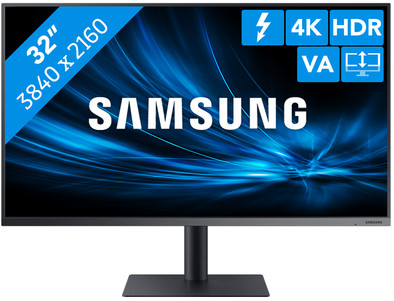
This monitor has a 4K resolution, which is 4 times sharper than Full HD.
With HDR10, you can enjoy true-to-life colors and a high contrast with movies, series, and games.
The blue light filter of this screen reduces the risk of strained eyes and sleeping problems.
This monitor doesn't have integrated speakers to play music.
The Samsung LF32TU870VPXEN is a 4K monitor for business use. You can edit photos or videos in a high resolution of 3840x2160. The monitor is also suitable to watch a Netflix movie or series for relaxation. Thanks to HDR10, you can enjoy true-to-life colors and a high contrast for content like movies and games with HDR support. Daisy chaining is also possible. Simply connect 1 extra monitor directly to this monitor via a DisplayPort or Thunderbolt cable. This allows you to use 2 monitors at the same time without having to connect all the cables directly to your laptop or desktop. Thanks to the blue light filter and the flicker-free technology, you can work with Word or Photoshop all day without getting strained eyes.
Note: as a result of 4K resolution, text and icons become smaller, which you can't always enlarge. For a 4K output, you need a modern laptop or PC with a fairly powerful video card. Make sure it has at least a DisplayPort 1.2, HDMI 2.0, or Thunderbolt 2 connection.
Installation ease
Gebruiksgemak
Image quality
Price-quality ratio
Design
As a photographer and graphic designer I work with images on a daily basis. These must be of the highest quality and so the colors must be very clearly visible. With this screen I can clearly see (after calibration) what can be improved in the photos I deliver and I can therefore make adjustments very quickly.
There's virtually no lag in what I'm doing on my laptop to this screen, and I can easily use a Wacom tablet that only does big screen editing.
In addition, the design is what you expect from Samsung, modern and stylish. Very nice to have on my desk and also very easy to let customers watch what I have made for them. This is also because the screen shows the same colors on all sides without deviations. Definitely recommended!
Geert Pieters
18 March 2020
Automatically translated from Nederlands
Very good value for money. In terms of screen quality, better than the LG UL27 series, which is slightly more expensive than this series.
Chris
12 October 2020
Automatically translated from Nederlands
While I am quietly enjoying my cup of coffee, after a good working day I am writing this review. Tapping on my keyboard, looking at a 21:9 ultra wide 4K screen from Samsung.
I've had this screen for a few weeks now, and man man man, what a fantastic screen this is! Unpacked for the first time, the box was bigger than expected. A 34" 21:9 monitor, that's quite large, and you expect that. But the screen is a bit bigger than you think. You will definitely notice this when you sit down for the first time. If you play a game At 75Hz and a response speed of 4ms, that's pretty tough. I come from a 24" 16:9 screen, so I felt like I was watching a game of tennis. My head went from left to right just to take in the screen. But don't worry, this was a matter of getting used to, and was soon remedied. Anyway, I'm going to divide this review into a few parts. This makes it a little easier for you to read!
Gaming, Video and Photography/Design.
gaming: Prepare yourself. A 4K 75Hz experience that will melt your heart and make you fall in love with your monitor! But(-yes really a but) your computer will like you a little less if you don't have an ultimate high-end PC. Now I have quite a decent set-up myself. I have an Nvidia 1080 GPU and an I7 4790 CPU. I'm used to just playing most high-end games quietly on high and ultra. That is not so easy anymore! If, like me, you're pretty 'keen' on your FPS, then you really need to have some hardware under the hood. Let's take "Assassin's Creed Odyssey" as an example. A reasonable CPU and GPU intense game that I have always been able to play on Ultra without too much trouble (with the exception of incredibly pressing spots where I sometimes flipped to 55FPS). This won't work anymore. I have to pull my settings down quite a bit if I want to play this a bit decent with at least 60FPS. Games like "Tom Clancy's: Rainbow Six Siege" are optimized slightly differently, so they work fine at 4K. But unoptimized games such as "ARK: Survival Evolved" don't run well, and should really be downscaled to 2K or 1080P. So what I'm trying to say with this is that 4K gaming is quite heavy on your hardware, especially if you're also playing 75Hz. SO BE AWARE!
By the way, the PBP/PIP function is fantastic for streamers, for example. You want to play console games, but at the same time save space AND watch your chat? Then this is really IDEAL! You just plug in two devices, and you can see both at the same time! Video:
I always work with the Adobe package, so mainly in Premiere and After Effects. And if you know this a bit, you know that the entire workspace can be turned around so that it works exactly the way you like it. I also did that with this screen. However, editing has never been so much fun. I always work with a minimal dual set-up, but this is a lot easier. I set up my preview monitor nicely and have my assets on my second monitor. And the full-length timeline at the bottom. This works so very well! It sounds a bit like a superfluous luxury, but if you have to edit daily, this is really ideal! I can't say much more about it that this just works great! And of course it's also nice that you edit 4K (and don't have cinebars ;) )!
Watching movies is also a really different experience. Streaming websites such as Netflix and Amazon Prime work perfectly, but if you have a 1080P movie rendered WITH cine bars, you will always have two black bars on the side. That's a sacrifice it makes with a 21:9 screen. Although I got used to it very quickly. Photography/Design
It's not much different from video for photography and editing. You can simply adjust the workflow much more desired, and you have that little bit extra with the 21:9.
In terms of color palette, the screen is not IPS, but if you have not worked with IPS before, and you designed it, then you will not miss this! I've calibrated the screen, and it looks really good! I did notice that I had to throw in a little more contrast in my settings. Blacks aren't really crushed very well. And usually that's not such a disaster, but in this case it turned out less well. I had a design where a lens was photographed. The person in question didn't see a weird outline of his Photoshop file, although I could see it very clearly.
Other than that I really don't have much to complain about. All in all, it's a fantastic workhorse. Provided you have the right hardware for this! The specs are just here, so I don't have to go into detail for that. The pixel density is great, and the colors look fantastic. (I had to calibrate it to my wishes of course.)
DePemy
DePemy
13 December 2018
Automatically translated from Nederlands
