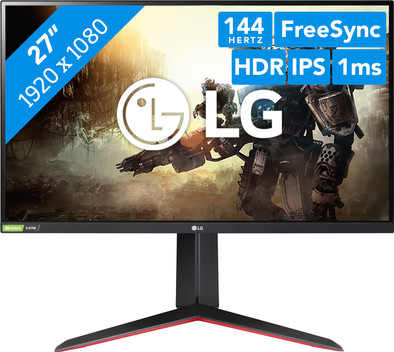
LG UltraGear 27GN650
Never available again
View alternatives in the sidebar
View alternatives in the sidebar
According to our monitor expert
Experience sharp colors and images on the LG UltraGear 27GN650 27-inch Full HD HDR gaming monitor. Thanks to the combination of HDR10 and the DCI-P3 color space, your screen displays lively and true-to-life images. This ensures beautiful surroundings when you're gaming. You can see these surroundings sharply from every viewing angle, thanks to the IPS panel. With the 144Hz refresh rate and 1ms response time, games run smoothly. Even with demanding shooters and action games. Do you have an AMD or NVIDIA video card like the Radeon 6800 or RTX 3080? The FreeSync and G-Sync technologies ensure that it's synchronized with your monitor. So you can prevent screen tearing when you're gaming. Set up the LG monitor to be ergonomically sound by tilting, rotatingm or adjusting the monitor in height. This way, you can assume the right sitting posture for your gaming marathon.
Sharpness | Full HD (1080p) | |
|---|---|---|
Curved | ||
Aspect ratio | Standard (16:9) | |
Refresh rate | 144 Hz | |
Response time | 1 ms | |
Panel type | IPS panel | |
Color depth | 17 million colors (8-bit) | |
Built-in speakers |
5 stars
7
4 stars
2
3 stars
0
2 stars
0
1 star
0
It was a pleasure that I was able to test this monitor over the past few weeks. Being able to open the box was already a party. Because the monitor and parts were packed super neatly between styrofoam. I was able to grab what I needed to assemble the display. It is useful to use the user manual. This way you know that the pole must first be placed on the foot before you attach it to the screen. When attaching, you don't have to search endlessly for your screwdriver, because LG has thought of this by attaching tabs to the screws. So just twist your fingers the old-fashioned way. The monitor is set up within a minute. Just plug in the adapter and the video cable and I could start playing.
Before I started the first game, I had to update the G-Sync software. This made the monitor compatible, or properly recognized by the software. I was able to play flawlessly without any problems. There was no delay or shadow work where it shouldn't be. Not that I have the best fps skills, but it was a real pleasure to die in sharpness and clarity. I haven't seen any screen tearing either.
Compared to my other brands of monitors, this monitor is much sharper, more beautiful in color and calmer for the eyes. Black is really black, also in games, which I think is quite important because you can better distinguish trees and other avatars, for example. So nocturnal adventures come into their own better because of this.
The ease of use with regard to setting personal preferences is also good. My 13 year old nephew who only plays on consoles had no problem with this. The button in the middle below the screen works intuitively, it is like a mini-joystick with which you go from setting to setting. You can, for example, turn off the screen, but you can also control your response time in the menu. By default, the screen is set to Gamer 1. The color white is a kind of warm white. This is nice and quiet for your eyes. As soon as you turn on HDR, the white pops out and the monitor becomes a light box, so first blink before you continue. So there is nothing wrong with the brightness and you can set it to your personal preference. Depending on the time of day, I like to have this option.
If you want speed, nice warm colors, real black, no lag or ghosting, then I recommend this monitor because the price is certainly not bad for the quality and options you get.
Suzanne
24 June 2021
Automatically translated from Dutch
I was allowed to test this screen for a few weeks. The IPS and the NVidia G-sync together provide very nice gaming experiences. The colors are beautiful and it plays very smoothly.
In terms of settings, you can make adjustments yourself such as response time, brightness and dark colors.
This screen is not only beautiful to see when it is on. The monitor has a beautiful design. It is black with red accents. Beautiful to see! This screen is also tiltable and adjustable in height. Ideal!
Anshari
21 June 2021
Automatically translated from Dutch
A few weeks ago I received my monitor in the mail. It took 5 minutes to get it up and running. This does not require a screwdriver, but it is still a very sturdy construction. The statue can be placed in all kinds of positions and heights. Ideal, especially if several people use it. Also tiltable, a feature I never quite understand… Quickly run a test on dead pixels and viewing angle. This was okay. And then it was time to play. You notice that the screen is made for that purpose! I don't mind the 1080p resolution. The response time of 1ms and the IPS technology provide beautiful images for the ultimate gaming experience.
Krost
25 June 2021
Automatically translated from Dutch
Product number | 880337 | |
|---|---|---|
Manufacturer code | 27GN650-B.AEU | |
Brand | LG | |
Warranty | 2 years | |
Processing of your defect | Via Coolblue | |
Old product returned for free |
Recommended display resolution | 1920x1080 | |
|---|---|---|
Sharpness | Full HD (1080p) | |
Aspect ratio | Standard (16:9) | |
Refresh rate | 144 Hz | |
Response time | 1 ms | |
Panel type | IPS panel | |
Local dimming | ||
HDR support | ||
Contrast ratio | 1000 | |
Touchscreen | ||
Type of HDR | HDR10 | |
Screen reflection | Anti-glare | |
Blue light filter | ||
Flicker-free technology | ||
Color space | sRGB | |
sRGB color coverage percentage | 99 % | |
Color depth | 17 million colors (8-bit) | |
Adaptive Sync | ||
Type of adaptive sync | FreeSync, FreeSync 2, G-Sync Compatible | |
Resolution width | 1920 pixels | |
Resolution height | 1080 pixels | |
Anti-reflection type | Anti glare | |
Viewing distance | 0,43 - 1,15 m | |
Horizontal viewing angle | 178 ° |
Height | 75,5 cm | |
|---|---|---|
Width | 61,4 cm | |
Depth | 29 cm | |
Weight | 7,2 kg | |
Color | Black | |
Including stand | ||
Material | Plastic | |
Cable management | ||
Appearance | Gaming | |
Curved |
Number of HDMI connectors | 2 | |
|---|---|---|
Number of Female HDMI type A 2.0 ports | 2 | |
Number of headphone jacks | 1 | |
Type of headphone connection | 3.5mm (TS) | |
Number of Female Standard DisplayPort 1.4 ports | 1 | |
Number of female 3.5mm TS Audio Jack ports | 1 | |
Suitable for daisy chaining |
Included by default | DisplayPort cable | |
|---|---|---|
Not included by default | HDMI cable, USB-C cable |
Adjustable in height | ||
|---|---|---|
Tiltable | ||
Pivotable stand | ||
Pivot function | ||
VESA mount option | ||
VESA mount | 100x100mm |
Energy label | F | |
|---|---|---|
Energy consumption standby | 0,3 W | |
Energy consumption active | 32 W | |
Energy consumption per 1000h | 46 kWh | |
Annual energy consumption | 10,58 kWh |
Built-in speakers | ||
|---|---|---|
Webcam | ||
Split screen | ||
Kensington lock |
Recommended for use | Gaming, Image editing and graphic design, Internet, email, and text processing, Photo editing, Video editing, Watching movies in Full HD |
|---|
