Dynabook USB-C Dock
Never available again
View alternatives in the sidebar
View alternatives in the sidebar
Type of main connector | USB-C | |
|---|---|---|
Number of connectable monitors | 2 | |
Type of USB port | Standard USB-A, USB-C | |
Cable length | 1 m |
According to our dock for laptops expert
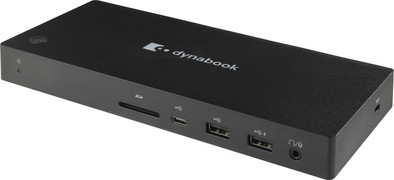
You can connect your Windows laptop with all your peripherals with the Dynabook USB-C Dock. With this dock, you can connect up to 2 monitors to your laptop. That way, you can open all your windows on at most 3 screens. In addition to monitors, you can connect peripherals like your mouse, keyboard, internet cable, and headphones. That's useful at the office, or when you work from home. This dock can also charge your laptop. That way, you don't have to look for a socket while you work. This Dynabook dock works with all Windows laptops with at least Windows 10 and a USB-C port that sends a video siganl.This is how you check whether your laptop has a suitable USB-C port.
5 stars
0
4 stars
0
3 stars
1
2 stars
0
1 star
0
Dock does not work with my HP Elitebook, does charge, USB connection works, but no image on the external screen.
Joost Regterschot
3 August 2022
Automatically translated from Dutch
Coolblue takes care of everything, from taking out an insurance to repairs
For almost all accidents
More coverage in case of damage than your standard warranty
No deductible
First, add your dock for laptops to your shopping cart. On the next page, choose the Protection Plan below. You always have a 30-day return window and pay no deductible in case of damage.
2-year Protection Plan
14,99
one-time3-year Protection Plan
24,99
one-time
Product number | 901591 | |
|---|---|---|
Manufacturer code | PA5356E-1PRP | |
Brand | Dynabook | |
Processing of your defect | Via Coolblue | |
Old product returned for free |
Made for laptop models | Windows laptop |
|---|
Laptop docking station suitable for | Connect 2 monitors and a Windows laptop, [Charge laptop], [Charge phone], [Connect Headphones], [Work with wired internet] | |
|---|---|---|
Type of main connector | USB-C | |
Supported video technology on Docking Station | DisplayLink | |
Number of USB ports | 6 | |
USB function | Charge, Charging an external device, Data transfer, Device connection, Play media, Power source | |
Type of USB port | Standard USB-A, USB-C | |
Number of female standard USB-A ports | 4 | |
Female standard USB-A port version | 3.1 | |
Number of USB-C ports | 2 | |
Protocol Female USB-C port | DisplayPort Alternative Mode, USB | |
USB version Female USB-C port | 3.1 | |
Number of USB 3.1 Female USB-C port | 1 | |
Number of HDMI connectors | 1 | |
Female HDMI Type A port version | 2.0 | |
Number of Ethernet ports | 1 | |
Ethernet speed | Gigabit Ethernet (1000Mbps) | |
Number of female standard VGA ports | 1 | |
Type of VGA connector | Standard VGA | |
Type of DisplayPort connector | standard DisplayPort | |
Number of Female Standard DisplayPort 1.4 ports | 1 | |
Version Female Standard DisplayPort port | 1.4 | |
Number of headphone jacks | 1 | |
Type of headphone connection | 3.5mm (TRS) | |
Memory card reader | ||
Memory card | SD | |
Number of connectable monitors | 2 | |
Maximum image resolution 1 monitor | 4K (3840x2160) | |
Maximum refresh rate 1 monitor | 60 Hz | |
Maximum image resolution 2 monitors | Full HD (1920x1080) | |
Maximum refresh rate of 2 monitors | 30 Hz |
Cable length | 1 m | |
|---|---|---|
Color | Black | |
Height | 3 cm | |
Width | 23,4 cm | |
Depth | 8,44 cm | |
Weight | 1,3 kg |
