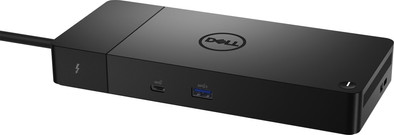
Dell Thunderbolt Dock WD22TB4
Never available again
View alternatives in the sidebar
View alternatives in the sidebar
Extra functionalities docking station | Charge laptop via docking station, Charge laptop via own charger, Charge phone via docking station, Connect wired network | |
|---|---|---|
Type of main connector | USB-C | |
Total available video outputs | 1x HDMI, 2x DisplayPort | |
Number of connectable monitors | 4 | |
Type of USB port | Standard USB-A, USB-C |
According to our dock for laptops expert
Expand your laptop with up to 4 monitors with a 4K resolution and all your accessories with the Dell Thunderbolt Dock WD22TB4 Docking Station. Thanks to Thunderbolt 4, you can use this dock to transfer data from and to your laptop at a speed of 40Gbps, which is faster than Thunderbolt 3 or other connectors. The dock also has space for all accessories you need while working, such as an ergonomic mouse or keyboard. The docking station has a replaceable module, which means you can easily upgrade it in the future. With this docking station, you don't have to worry about an empty battery. The dock charges your laptop while you work. When you're working somewhere with a bad wireless internet connection, you can connect an Ethernet cable to have online meetings with your colleagues without any problems. This docking station works on all Windows laptops and MacBook models with a USB-C port that transmits a video signal. This is how you check if your laptop has a suitable USB-C port.
5 stars
11
4 stars
15
3 stars
3
2 stars
3
1 star
0
Gebruiksgemak
Prijs-kwaliteitverhouding
Duurzaamheid
Unpack, connect and get started without any problems, exactly what you expect from such a device. I use it in combination with an HP Elitebook on Ethernet and 2 external ASUS monitors connected to DisplayPort connections.
Paul
2 June 2022
Automatically translated from Dutch
Now I have 1 cable in my laptop that provides everything: power, extra 4k screen, gigabit ethernet and USB ports.
Matt Casters
14 May 2022
Automatically translated from Dutch
Stekker in het stopcontact, kabels aansluiten en alles werkt meteen, getest met een HP Laptop en een Intel Mac Mini.
Mac kan maximaal 2 schermen aansturen door limitatie MacOS, 1 scherm via 1 poort uit de set van 2x displayport en 1x HDMI. Het 2e scherm moet via de thunderbolt poort worden aangesloten (getest en werkt).
TCL Nan
8 August 2022
Coolblue takes care of everything, from taking out an insurance to repairs
For almost all accidents
More coverage in case of damage than your standard warranty
No deductible
First, add your dock for laptops to your shopping cart. On the next page, choose the Protection Plan below. You always have a 30-day return window and pay no deductible in case of damage.
2-year Protection Plan
21,99
one-time3-year Protection Plan
34,99
one-time
Product number | 931688 | |
|---|---|---|
Manufacturer code | Dell-WD22TB4 | |
Brand | Dell | |
Processing of your defect | Via Coolblue | |
Old product returned for free |
Made for laptop models | Apple MacBook, Chromebook, Windows laptop |
|---|
Laptop docking station suitable for | Connect 1 monitor, Connect 2 monitors and a Chromebook, Connect 2 monitors and a Windows laptop | |
|---|---|---|
Extra functionalities docking station | Charge laptop via docking station, Charge laptop via own charger, Charge phone via docking station, Connect wired network | |
Type of main connector | USB-C | |
Supported video technology on Docking Station | Thunderbolt 4 | |
Number of USB ports | 6 | |
USB function | Charging an external device, Data transfer, Device connection, Power source | |
Type of USB port | Standard USB-A, USB-C | |
Number of female standard USB-A ports | 3 | |
Female standard USB-A port version | 3.1 | |
Power standard USB-A port | 7,5 W | |
Power second standard USB-A port | 4,5 W | |
Power third standard USB-A port | 4,5 W | |
Number of USB-C ports | 3 | |
Protocol Female USB-C port | DisplayPort Alternative Mode, Thunderbolt Alternative Mode, USB, USB electricity | |
USB version Female USB-C port | 3.1, 4.0 | |
Number of USB 3.1 Female USB-C port | 2 | |
Power USB-C port | 10 W | |
Fast charging USB-C port | ||
Power second USB-C port | 15 W | |
Fast charging second USB-C port | ||
Power third USB-C port | 15 W | |
Fast charging third USB-C port | ||
Total available video outputs | 1x HDMI, 2x DisplayPort | |
Number of HDMI connectors | 1 | |
Female HDMI Type A port version | 2.0 | |
Number of Ethernet ports | 1 | |
Ethernet speed | Gigabit Ethernet (1000Mbps) | |
Type of DisplayPort connector | standard DisplayPort | |
Number of Female Standard DisplayPort 1.4 ports | 2 | |
Version Female Standard DisplayPort port | 1.4 | |
Memory card reader | ||
Number of connectable monitors | 4 | |
Maximum image resolution 1 monitor | 4K (3840x2160) | |
Maximum refresh rate 1 monitor | 60 Hz | |
Maximum image resolution 2 monitors | 4K (3840x2160) | |
Maximum refresh rate of 2 monitors | 60 Hz | |
Maximum image resolution 3 monitors | 4K (3840x2160) | |
Maximum refresh rate 3 monitors | 60 Hz |
Color | Black | |
|---|---|---|
Height | 20,5 cm | |
Width | 2,9 cm | |
Depth | 9 cm | |
Weight | 0,45 kg |
