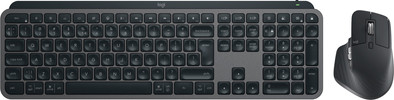
Logitech MX Keys S Graphite QWERTY + Logitech MX Master 3S Graphite
Never available again
View alternatives in the sidebar
View alternatives in the sidebar
According to our keyboard expert
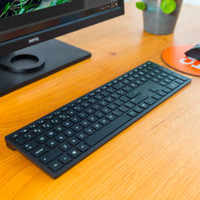
With the Logitech MX Keys S Graphite QWERTY + Logitech MX Master 3S Graphite set, you can complete your workplace. The special shape of the on the keyboard ensues they feel comfortable. They're shaped like your fingertips, so you can type comfortably. The mouse has multiple thumb buttons, a horizontal scroll wheel, and the MagSpeed scroll wheel. It also has a Darkfield sensor, which allows you to use the mouse on any surface. You can connect both the MX Master 3S mouse and the MX Keys to multiple devices at the same time. You can switch between these devices with the touch of a button.
5 stars
11
4 stars
3
3 stars
1
2 stars
1
1 star
0
Pairing the mouse and keyboard is a piece of cake and both look and feel good. Typing is also great, especially because of the small dimples in the keys. I only have one major disadvantage and I don't know if it's just me, but the connection to the PC seems to drop out every now and then. Then you're typing and a button gets stuck. At that moment no letters appear on the screen, but it hangs for a while and then suddenly about 6 of the same letters appear on the screen or all the words you typed during that time do not appear on the screen... The mouse also sometimes suddenly stops responding and is sometimes very slow... I can't find anything about it on the internet, so I'll just wait and see if it stays that way...
Martin
5 December 2023
Automatically translated from Dutch
The keyboard is incredibly smooth to type on. It's very solid, but I actually find the weight of the keyboard a bit annoying: I seem to shift it a bit to the left or right quite often, which is much easier with lighter keyboards. Not a problem, but I don't see any advantage to the sheer weight either.
Pairing via Bluetooth on Windows and Mac works fine. However, for those who need the included receivers: both the mouse and keyboard come with a USB-A receiver, but I don't know if you can share one between both devices. So maybe you need two USB ports? It's a shame, by the way, that those receivers can't be stored inside the keyboard and mouse. You'll lose them.
You can also charge the mouse while using it. That seems logical, but that's not possible with an Apple Magic Mouse, for example.
I bought it for working from home with a Windows laptop, so the fact that it also works on my own Mac seemed like a bonus. I don't use it for that anymore, though, because my brain just can't handle it: even though the buttons are in the right places, my muscle memory, strangely enough, can't get used to it, and then I press Option+Tab (or Windows Alt+Tab) instead of Cmd+Tab when switching programs.
Some keys, by the way, are placed differently than on a Mac: the function keys in particular are different, and the media controls, for example, are one button more to the right. (F7-F12 on your Mac are F8-F13 on this keyboard.) That's why I use an Apple Magic Keyboard for my MacBook. No wires, so switching is no problem.
I don't have Logi software installed on my Mac, but I do have Pilotmoon Scroll Reverser for the mouse wheel (and set it to work only for the mouse).
Arjan
2 August 2025
Automatically translated from Dutch
easy to connect
Ruud
11 June 2025
Automatically translated from Dutch
Product number | 908518 | |
|---|---|---|
Manufacturer code | 910-006559 | |
Brand | Logitech | |
Processing of your defect | Via Coolblue | |
Old product returned for free |
Mouse model | Standard | |
|---|---|---|
Input | Laser | |
Number of buttons | 7 | |
Ergonomic design | ||
Left or right-handed | Right-handed | |
Maximum dots per inch (DPI) | 8000 dpi | |
Adjustable DPI | ||
Mouse controls | Buttons, Scroll wheel | |
Suitable for gaming | ||
Scroll fast | ||
Rechargeable | ||
Programmable buttons | ||
Number of programmable buttons | 3 | |
Lighting peripherals | ||
Silent mouse | ||
Horizontal scrolling | ||
Mouse surface | Any surface | |
Product family | MX |
Connection type | Wireless | |
|---|---|---|
Type of USB port | USB-C | |
Nano receiver | ||
Bluetooth | ||
Bluetooth version | 5.0 | |
Number of devices that can be paired | 1 - 3 |
Plug and Play | ||
|---|---|---|
Compatible with operating system | ChromeOS, Windows, macOS |
Power supply type | Rechargeable battery, USB port PC/laptop | |
|---|---|---|
Battery level indicator | ||
Replaceable battery | ||
Battery included |
Color | Black | |
|---|---|---|
Mouse size | Medium | |
Width | 8,4 cm | |
Height | 5,1 cm | |
Depth | 12,49 cm | |
Material | Plastic | |
Finish | Matte |
Product number | 930939 | |
|---|---|---|
Manufacturer code | 920-011587 | |
Brand | Logitech | |
Processing of your defect | Via Coolblue | |
Old product returned for free |
Keyboard layout | QWERTY | |
|---|---|---|
Geographic keyboard layout | US international layout | |
Physical keyboard layout | ISO | |
Typing comfort | Mid-range | |
Backlit keyboard | ||
Spill-resistant | ||
Color lighting | White | |
Number of colors lighting | 1 | |
Brightness of backlight adjustable | ||
Programmable keys | ||
Multimedia shortcuts | ||
Flat keys | ||
Suitable for gaming | ||
Mechanical keyboard |
Connection type | Wireless | |
|---|---|---|
Type of USB port | USB-C | |
Nano receiver | ||
Bluetooth | ||
Bluetooth version | 5.1 |
Power supply type | Rechargeable battery, USB port PC/laptop |
|---|
Keyboard composition | Keyboard, Numpad | |
|---|---|---|
Ergonomic design | ||
Height | 13,16 cm | |
Width | 43 cm | |
Depth | 2 cm | |
Wrist rest | ||
Color | Black | |
Weight | 0,81 kg |