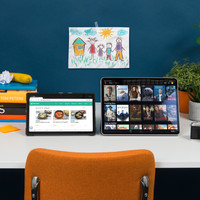
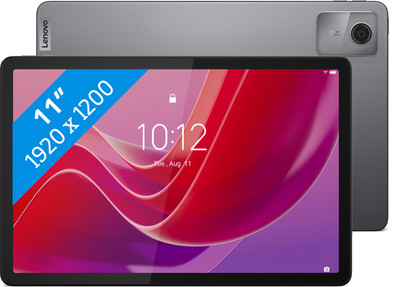
Lenovo Tab M11 11 inches 128GB WiFi Gray
Never available again
View alternatives in the sidebar
Insure your tablet
Coolblue takes care of everything, from taking out an insurance to repairs
For almost all accidents (such as a fall from the couch)
More coverage in case of damage than your standard warranty
No deductible
How do I insure my tablet?
First, add your tablet to your shopping cart. On the next page, choose one of the Protection Plans below. You always have a 30-day return window and pay no deductible in case of damage or theft.
2-year Protection Plan
34,99
one-time2-year Protection Plan with theft cover
36,99
one-timeProtection Plan - Monthly cancelable
1,97
per monthProtection Plan with theft cover - Monthly cancelable
2,11
per month
Specifications
Product
Product number | 943484 | |
|---|---|---|
Manufacturer code | ZADA0134SE | |
Brand | Lenovo | |
Processing of your defect | Via Coolblue | |
Old product returned for free |
Physical properties
Tablet size | Medium-sized | |
|---|---|---|
Depth | 0,715 cm | |
Width | 26 cm | |
Height | 17 cm | |
Color | Gray | |
Material | Metal |
Extra properties
Child mode available | ||
|---|---|---|
Children's tablet | ||
Recommended for use | Basic use, For the family | |
Samsung Enterprise Edition |
Screen
Screen quality | Decent | |
|---|---|---|
Screen size | 11 inches | |
Screen-to-body ratio | 80 % | |
Sharpness | Full HD (1080p) | |
Resolution height | 1200 pixels | |
Resolution width | 1920 pixels | |
Pixel density | 207 ppi | |
Brightness | 400 cd/m2 | |
HDR support | ||
Scratch resistant | ||
Panel type | LCD | |
Horizontal aspect ratio | 16 | |
Vertical aspect ratio | 10 | |
Refresh rate | 90 Hz |
Connectivity
Built-in WiFi | ||
|---|---|---|
WiFi standards | Wireless A (WiFi 2), Wireless AC (WiFi 5), Wireless AX (WiFi 6), Wireless B (WiFi 1), Wireless G (WiFi 3), Wireless N (WiFi 4) | |
Internet connection options | WiFi only | |
SIM card slot | ||
Bluetooth | ||
Bluetooth version | 5.1 | |
Headphone jack | ||
USB port | ||
Type of USB port | USB-C | |
Lightning connector |
Operating system and update policy
Year introduced | 2024 | |
|---|---|---|
Introduction month | January | |
Access to Google Play Store | ||
Operating system | Android | |
Android version when introduced | Android 13 | |
Update to Android version possible | Update not possible yet | |
Latest Android version | ||
Expected number of remaining Android updates | 2 | |
Assessment remaining Android updates | Standard | |
Expected frequency security updates | Each quarter | |
Assessment remaining security updates | Standard | |
Review update policy | Standard |
Memory
Total storage capacity | 128 GB | |
|---|---|---|
Memory card reader | ||
Memory card | MicroSD | |
Expandable storage capacity up to | 1024 GB | |
Internal RAM | 4 GB |
Processor
Speed class | Mediocre | |
|---|---|---|
Processor | MediaTek Helio G88 | |
Processor cores | Octa-Core (8) | |
Clock speed | 1,8 GHz | |
Turbo speed | 2 GHz |
Camera
Autofocus | ||
|---|---|---|
Front Camera | ||
Number of megapixels front camera | 8 MP | |
Second rear camera |
Battery
Battery/battery capacity | 7,04 Ah | |
|---|---|---|
Suitable for fast charging |
Sound
Built-in speakers | ||
|---|---|---|
Sound reproduction | Stereo | |
Number of speakers | 4 |
Sensors
Accelerometer | ||
|---|---|---|
GPS sensor | ||
Light sensor | ||
Fingerprint identity sensor | ||
Facial recognition |
Water resistance
Water-resistant | ||
|---|---|---|
IP certification | IP52 | |
Shockproof |