Written by Lucas
Edited on
17 September 2024
·
07:56
Get started with your wireless earbuds
WIth wireless earbuds, you can listen to music without a cable in your neck or along your body. The advantage is that you have a lot of freedom of movement. In this article, you can read how to get started with your earbuds. That way, you can enjoy your favorite music as soon as possible.

Get started with your fully wireless earbuds
With these 4 tips, you'll know how to get started with your wireless earbuds as well as possible.
Tip 1: connect to your phone
Tip 2: put in your earbuds
Tip 3: make sure you have a good connection
Tip 4: download the app

Tip 1: connect to your phone
Wireless earbuds include an accompanying charging case. When you take these earbuds from the case, they turn on automatically. Doing this for the first time? You can connect them to your smartphone via Bluetooth right away. In the article below, we'll give more information on how to connect your earbuds to your smartphone.
Tip 2: put in your earbuds
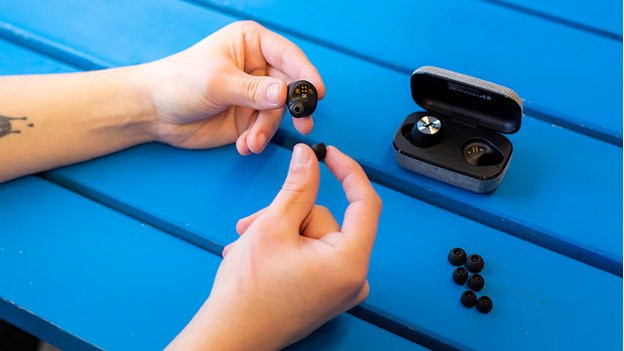
Most earbuds are in-ear and sometimes have an ear hook or ear clip. Every earbud type has a different wearing method. In-ear earbuds go into your ear canal. In-ear earbuds come with ear tips, so you always have an ear tip size that fits your ear. You place earbuds in your ear and keep your ear canal open. You can see which wearing method earbuds have per type.

Tip 3: make sure you have a good connection
If the sound from your wireless earbuds stutters, this is due to a bad connection. Try the following:
- Turn off all other Bluetooth devices in your area.
- Don't stand too close to appliances such as fridges and microwaves, as these will affect the Bluetooth signal.
- Keep your smartphone in your front pocket or in your hands, not in your backpack or back pocket.
- Turn the earbuds off and on again.

Tip 4: download the app
Some wireless earbuds have an app that you can use to adjust all sorts of settings. For example, you can download updates that provide a more stable connection or extra functions and you can adjust the sound via an equalizer. Not every brand has an app. Most earbuds by Sony, Sennheiser, Jaybird, Jabra, and Bose have an app available.
Article by Lucas
Audio Expert.