Written by Lucinda
Edited on
28 October 2024
·
16:23
Everything on Apple iOS 15
On 7 June 2021, Apple introduced iOS 15, the new operating system for the iPhone. This version comes with many new functions for FaceTime. In addition, it'll provide improvements to manage messaged and reduce distractions. You can read about what to expect from Apple iOS 15 in this article.
iOS 18 now available
The latest iOS version, iOS 18, was announced and will soon be available for the Apple iPhone. This new software update has lots of new and improved functions. In the article below, you can read everything on iOS 18.

FaceTime and SharePlay
From iOS 15 onwards, FaceTime doesn't only work on Apple products exclusively. As an Apple user, you can also invite friends with an Android device or Windows computer for a video call. Don't have anything to talk about? No need to get bored. FaceTime gets the SharePlay function. This allows you to watch a movie or listen to music with friends, or to edit a document with your colleagues.

Concentrate with Focus
With Focus, you can choose from which apps and people you'll receive notifications. Are you working? Choose a matching profile and only receive notifications from your calendar or messages from your colleagues. It automatically mutes notifications of Facebook birthdays and groups chats with friends. For a care-free weekend, choose a profile that mutes business or study notifications. You can even set a new home screen per profile, so you'll see different apps.

Sort notifications
The notifications on your iPhone will look differently, so you'll have a better overview and recognize notifications better. The icons at the top will be larger and you'll see a profile picture with messages of people. In the new notification overview, you'll see all notifications that aren't time-bound. These can be updates from news apps, for example. You can even choose when you see this overview. You'll always see important messages right away, so they're not included in the overview.
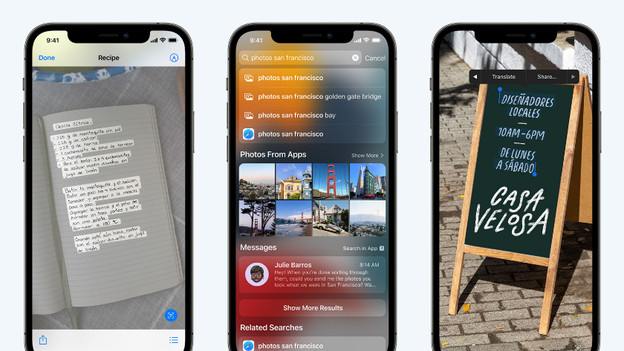
Find texts with Live Text
Thanks to Live Text, your iPhone will recognize text on photos. You can quickly search for a photo of a certificate in the Photos app. It also works the other way around. Scan a text, book, artwork, flower, or famous building with the camera pp and search for it in Safari right away. Are you traveling and do you want more information on a large monument? You can quickly find everything you want to know with Visual Look Up. It also allows you to easily translate texts.

More changes in iOS 15
There are a few more changes that make it worth it to upgrade to iOS 15.
- Safari gets a taskbar to quickly switch to different tab.
- The Maps app gets new functions to explore and navigate.
- In the app privacy report, you can see which apps use your camera, microphone, contacts, photos, and location.
- The Weather app gets new moving backgrounds.
- It's easier to find shared music and articles again.
- The iCloud service becomes iCloud+ with new functions like 'Hide my email address' and Private Relay. The latter is a sort of VPN to browse the internet more securely.
Available for iPhone and iPod Touch
We expect the update to Apple iOS 15 to be available in September. You can install in on the following models:
- The iPhone 6S and newer
- The iPod Touch (2019)