Samsung S24E650PL

Never available again
View alternatives in the sidebar
View alternatives in the sidebar
Sharpness | Full HD (1080p) | |
|---|---|---|
Curved | ||
Aspect ratio | Standard (16:9) | |
Refresh rate | 60 Hz | |
Response time | 4 ms | |
Panel type | PLS panel | |
Color depth | Less than 17 million colors (less than 8-bit) | |
Built-in speakers |
According to our monitor expert
The Samsung S24E650PL is a Full HD monitor for business use. Pivot, tilt, and rotate the monitor to get the best working posture. The PLS panel ensures you can see the image clearly from every angle. This makes the monitor very suitable for purposes ranging from surfing the web to photo and video editing. In stand-by mode, the monitor only uses 0.3 Watts, helping you save on your annual energy bill.
5 stars
16
4 stars
20
3 stars
1
2 stars
0
1 star
0
After mounting the monitor on the base, I connected it directly to the laptop via HDMI. Image is excellent in terms of colors and black values, I just lowered the brightness a bit. Been using the screen for a good 2 weeks now and haven't noticed any negatives yet.
Dennis
9 October 2015
Automatically translated from Dutch
I've always had Samsung monitors and I'm very happy with them. At a certain point, my previous monitor became so dark that certain programs could no longer be seen properly. Also, areas that were supposed to be white turned yellow. It was really time for a new one.
Many monitors compared. But I still opted for a Samsung: Samsung S24E650PL
Picture is good and clear.
Sound from the speakers is very soft. It reminds me of the 'PC speaker' of the past. It's good enough for Windows sounds. Even when it is quiet, it is difficult to understand voices, for example. I put my boxes back.
The advantage is that (if you connect it with the HDMI cable), the sound also goes through the headphone output of the monitor. You can connect the wire of your speakers nicely behind the monitor. Is a little quieter than to my laptop.
Height adjustment is very easy. You don't have to unscrew a screw. Just hold the display and gently move it up or down.
I don't use the menu very often. If everything is set up correctly, you will hardly ever get there.
The eye protection is actually a kind of dimmer. If the environment is very dark, it may be calmer for your eyes. During the day, the image may get a little too dark.
I also chose this monitor because I can also fall back on VGA if I have to.
I definitely recommend this monitor.
Steve
13 September 2016
Automatically translated from Dutch
Excellent monitor for both business with Windows and private use with Apple.
H Weerd
12 May 2016
Automatically translated from Dutch
Coolblue takes care of everything, from taking out an insurance to repairs
For almost all accidents
More coverage in case of damage than your standard warranty
No deductible
First, add your monitor to your shopping cart. On the next page, choose the Protection Plan below. You always have a 30-day return window and pay no deductible in case of damage.
3-year Protection Plan
16,99
one-time5-year Protection Plan
28,99
one-time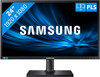
Product number | 633825 | |
|---|---|---|
Manufacturer code | LS24E65UPLC/EN | |
Brand | Samsung | |
Processing of your defect | Carry-in warranty | |
Old product returned for free |
Recommended display resolution | 1920x1080 | |
|---|---|---|
Sharpness | Full HD (1080p) | |
Brand-specific image technology | Samsung QLED | |
Aspect ratio | Standard (16:9) | |
Refresh rate | 60 Hz | |
Response time | 4 ms | |
Panel type | PLS panel | |
Brightness | 250 cd/m2 | |
Local dimming | ||
HDR support | ||
Contrast ratio | 1000 | |
Touchscreen | ||
Screen reflection | Anti-glare | |
Blue light filter | ||
Flicker-free technology | ||
Color space | sRGB | |
Color depth | Less than 17 million colors (less than 8-bit) | |
Adaptive Sync | ||
Resolution width | 1920 pixels | |
Resolution height | 1080 pixels | |
Anti-reflection type | Anti glare | |
Horizontal viewing angle | 178 ° |
Height | 48,73 cm | |
|---|---|---|
Width | 55,46 cm | |
Depth | 22,4 cm | |
Weight | 5,63 kg | |
Color | Black | |
Including stand | ||
Material | Plastic | |
Cable management | ||
Appearance | Neutral | |
Curved |
Number of HDMI connectors | 1 | |
|---|---|---|
Number of Female HDMI type A 1.4 ports | 1 | |
Number of headphone jacks | 2 | |
Type of headphone connection | 3.5mm (TRRS) | |
Number of Female Standard DisplayPort 1.2 ports | 1 | |
Number of female standard USB-A ports | 2 | |
Female standard USB-A port version | 2.0 | |
Number of female standard VGA ports | 1 | |
Number of female 3.5mm TS Audio Jack ports | 2 | |
Number of female 3.5mm TRRS Audio Jack ports | 2 | |
Type of USB port | Standard USB-A | |
Number of USB ports | 1 |
Included by default | DisplayPort cable |
|---|
Adjustable in height | ||
|---|---|---|
Tiltable | ||
Pivotable stand | ||
Pivot function | ||
VESA mount option | ||
VESA mount | 100x100mm |
Energy consumption standby | 0,3 W | |
|---|---|---|
Energy consumption active | 25 W |
Built-in speakers | ||
|---|---|---|
Sound system | Mono | |
Webcam | ||
Split screen | ||
Kensington lock | ||
Best tested |
Image quality according to customers | Very good | |
|---|---|---|
Design according to customers | Neutral | |
Recommended for use | Internet, email, and text processing, Office work, Watching movies in Full HD |
