Samsung LC27H711QEUXEN
Never available again
View alternatives in the sidebar
View alternatives in the sidebar
According to our monitor expert
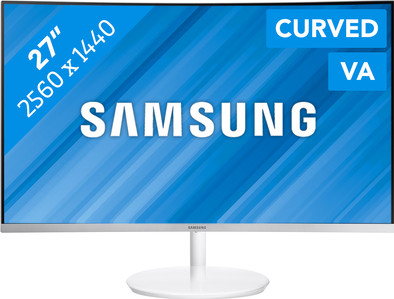
The Samsung LC27H711QEUXEN is a 27-inch curved monitor that you can use to work on your graphic projects. The screen slightly curves around you, allowing you to perceive colors in the same way over the entire screen, making for a more intense experience. Thanks to the Quantum Dot technology, this monitor displays 125% of the sRGB color space, resulting in true-to-life colors. The VA panel displays deeper black levels and has a wide viewing angle, so you have a good view of your screen from any position. Do you spend most of your days behind your monitor? The blue light filter and the curved design protect your eyes against strain and irritation. The FreeSync technology ensures smooth images while you're editing videos. This monitor has cable management, letting you store the cables in the back panel. This means your desk will always look tidy.
Sharpness | Quad HD (1440p) | |
|---|---|---|
Curved | ||
Aspect ratio | Standard (16:9) | |
Refresh rate | 60 Hz | |
Response time | 4 ms | |
Panel type | VA panel | |
Color depth | 17 million colors (8-bit) | |
Built-in speakers |
5 stars
7
4 stars
4
3 stars
0
2 stars
0
1 star
0
Wow what a cool thing! When I took the screen out of the packaging, the finish was immediately noticeable. Especially the back is super neatly finished. The power supply and image cables run through the rod and exit at the bottom. Because the connections are hidden, it looks very clean. Fortunately, it is very easy to open, so any cables can be exchanged. Furthermore, there are no visible cooling openings on the back. Unfortunately, the screen is against the wall with me and so I never really see the back … The screen is a bit bigger than my previous screen (21.5” vs. 27”), but you get used to that. In fact, I don't think I could go back. It's great that you can open many screens at the same time thanks to the QHD resolution and place them next to each other. Just have all your programs on 1 screen instead of switching between different desktops all the time. Then the performance of the screen. The Quantum Dot technology makes the colors pop off your screen, so beautiful! Especially green is nicer than on my previous screen. The screen has different modes for watching a movie or editing photos, but maybe I like the Eye Saver Mode the best! Less blue light so your eyes get tired less quickly. This is also nice in the evening with less light. For me, the Eye Saver Mode has become the standard for when I'm working. Together with the curve of the screen, I feel that my eyes tire much less quickly. For watching movies or photo editing, I do switch to a different mode, which displays the colors best. The only downside I can think of for this screen is that I experienced a few hiccups when my computer came out of sleep mode. Then it seemed as if the screen did not recognize the HDMI connection. Turning the screen off and on offered a solution.
Definitely recommended for anyone who places high demands on a screen. Very fanatical gamers will probably find 60Hz too low.
Kim31
23 July 2017
Automatically translated from Dutch
The slight curve provides a nice viewing angle and is not disturbing if you are used to a straight monitor. Picture and color are fantastic. I haven't tried all the functions yet, but I was primarily concerned with the image and appearance.
ARJ van den Berg
15 October 2017
Automatically translated from Dutch
The most striking thing about this curved monitor is the display of beautiful deep colors and high contrasts. I wanted a bigger screen with good graphics, especially video and games. This has been achieved with this 27 inch monitor. I think the curved screen has added value, especially for games. It doesn't help me much in other applications, but it doesn't bother me either. The Eye saver mode can be quite useful, but I don't easily suffer from a bright screen, so I don't use it. Furthermore, it is a beautiful design, with very narrow edges. The foot is a bit far back so you do need some space on your desk.
Ratu84
3 August 2017
Automatically translated from Dutch
Product number | 778383 | |
|---|---|---|
Manufacturer code | LC27H711QEUXEN | |
Brand | Samsung | |
Processing of your defect | Carry-in warranty | |
Old product returned for free |
Recommended display resolution | 2560x1440 | |
|---|---|---|
Sharpness | Quad HD (1440p) | |
Brand-specific image technology | Samsung QLED | |
Aspect ratio | Standard (16:9) | |
Refresh rate | 60 Hz | |
Response time | 4 ms | |
Panel type | VA panel | |
Brightness | 300 cd/m2 | |
Local dimming | ||
HDR support | ||
Contrast ratio | 3000 | |
Touchscreen | ||
Screen reflection | Anti-glare | |
Blue light filter | ||
Flicker-free technology | ||
Color space | Adobe RGB | |
Adobe RGB color coverage percentage | 79 % | |
sRGB color coverage percentage | 125 % | |
Color depth | 17 million colors (8-bit) | |
Adaptive Sync | ||
Type of adaptive sync | FreeSync | |
Resolution width | 2560 pixels | |
Resolution height | 1440 pixels | |
Anti-reflection type | Matte | |
Horizontal viewing angle | 178 ° |
Height | 46,2 cm | |
|---|---|---|
Width | 61,42 cm | |
Depth | 27,63 cm | |
Weight | 5,3 kg | |
Color | White | |
Including stand | ||
Material | Plastic | |
Cable management | ||
Appearance | Neutral | |
Curved |
Number of HDMI connectors | 1 | |
|---|---|---|
Number of Female HDMI type A 1.4 ports | 1 | |
Protocol mini DisplayPort port | DisplayPort | |
Number of female mini DisplayPort 1.2 ports | 1 | |
Number of Female Standard DisplayPort 1.2 ports | 1 |
Adjustable in height | ||
|---|---|---|
Tiltable | ||
Pivotable stand | ||
Pivot function | ||
VESA mount option |
Energy consumption standby | 0,3 W | |
|---|---|---|
Energy consumption active | 53 W |
Built-in speakers | ||
|---|---|---|
Split screen | ||
Kensington lock | ||
Best tested |
Image quality according to customers | Very good | |
|---|---|---|
Design according to customers | Nice | |
Recommended for use | Image editing and graphic design |
