HP Envy X360 15-bp130nd
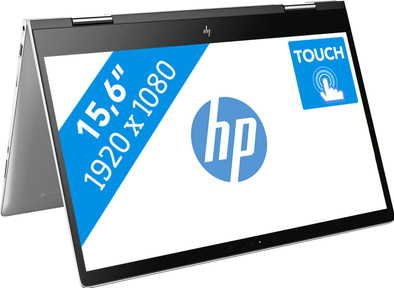
Never available again
View alternatives in the sidebar
View alternatives in the sidebar
Product number | 795167 | |
|---|---|---|
Manufacturer code | 2PM97EA#ABH | |
Brand | HP | |
Processing of your defect | Carry-in warranty | |
Old product returned for free |
Screen size | 15,6 inches | |
|---|---|---|
Touchscreen | ||
Panel type | IPS panel | |
Sharpness | Full HD (1080p) | |
Resolution width | 1920 pixels | |
Resolution height | 1080 pixels | |
Screen reflection | Glossy |
Processor | Intel Core i7 | |
|---|---|---|
Processor code name | Kaby Lake R | |
Processor cores | Quad-Core (4) | |
Clock speed | 1,8 GHz | |
Turbo speed | 4 GHz | |
Cache memory | 8 MB |
Internal RAM | 8 GB | |
|---|---|---|
Memory composition | 1x 8GB | |
Memory slot 1 | 8 GB | |
Total number of RAM slots | 1 |
Total storage capacity | 1256 GB | |
|---|---|---|
Storage type | SSD + HDD | |
SSD storage capacity | 256 GB | |
HDD storage capacity | 1 TB | |
Hard drive type | M.2, NVMe, PCIe |
Video card | NVIDIA GeForce MX150 | |
|---|---|---|
Type of video card | Dedicated | |
Video card RAM | 4 GB |
Operating system | Windows | |
|---|---|---|
Windows OS version | Windows 10 Home | |
Operating system language | Multiple languages can be configured |
Laptop model | 2-in-1 | |
|---|---|---|
Color | Silver | |
Material | Metal | |
Metal type | Aluminum | |
Height | 1,96 cm | |
Width | 35,97 cm | |
Depth | 24,88 cm | |
Weight | 2,16 kg |
Mobile data connection | No | |
|---|---|---|
Bluetooth | ||
Bluetooth version | 4.2 |
USB port | ||
|---|---|---|
Number of USB ports | 3 | |
Protocol Female USB-C port | USB | |
Number of female standard USB-A ports | 2 | |
Female standard USB-A port version | 3.0 | |
Number of USB 3.0 Female USB-C ports | 0 | |
HDMI connector | ||
DisplayPort connector | ||
VGA connector | ||
Network connector | ||
Thunderbolt connector | ||
Headphone jack | ||
Memory card reader |
Keyboard layout | QWERTY | |
|---|---|---|
Physical keyboard layout | ANSI | |
Numeric keypad | ||
Spill-resistant | ||
Backlit keyboard | ||
Mechanical keyboard | ||
Programmable keys |
Built-in microphone | ||
|---|---|---|
Number of speakers | 2 | |
Sound reproduction | Stereo | |
Integrated computer speakers brand | Standard speakers |
Built-in camera | ||
|---|---|---|
Image definition webcams | HD Ready (720p) |
Battery technology | Lithium-ion | |
|---|---|---|
Power connector input type (female) | Other brand/product specific |
Manufacturer's warranty |
|---|
TPM (Trusted platform module) | ||
|---|---|---|
Kensington lock | ||
Windows Hello | ||
Fingerprint identity sensor |
Screen size | 15,6 inches | |
|---|---|---|
Processor | Intel Core i7 | |
Internal RAM | 8 GB | |
Total storage capacity | 1256 GB | |
Video card | NVIDIA GeForce MX150 | |
Panel type | IPS panel | |
Touchscreen | ||
Windows OS version | Windows 10 Home |
According to our laptop expert
With this laptop you get the HP extra onsite manufacturer's warranty. HP will send someone to fix your laptop if you experience problems.
The NVIDIA GeForce MX150 video card makes this laptop suitable for editing videos.
Fold the screen around the keyboard 360 degrees, and use the laptop in different positions.
The glossy touchscreen is susceptible to fingerprints.
The HP Envy X360 15-bp130nd can be used as a laptop and a tablet for editing videos and other heavy usage. The 360-degree detachable touchscreen means you can use the Envy X360 in different positions. Remove the screen completely to use it as a tablet. Windows Ink lets you use the included pen to make sketches and notes as if you were writing on paper. The NVIDIA GeForce MX150 video card makes your graphic presentations and videos supple. In addition this 2-in-1 has the more powerful 8th generation Intel® Core¿ i7-8550U processor, with which it is easy to work with heavy programs such as Photoshop and Premiere. There is an extensive warranty on the Envy x360, so if you have technical problems you can count on an expert arriving the next working day to fix it.
This laptop has an Intel® Core¿ i7-8550U processor. Ultrabook, Celeron, Celeron Inside, Core Inside, Intel, the Intel logo, Intel Atom, Intel Atom Inside, Intel Core, Intel Inside, the Intel Inside logo, Intel vPro, Itanium, Itanium Inside, Pentium, Pentium Inside, vPro Inside, Xeon, Xeon Phi and Xeon Inside are trademarks of Intel Corporation or subsidiaries in the USA and/or other countries.
Note: with a i5 or i7 processor and a thin casing a laptop can be noisier than a similar laptop with a less powerful processor
5 stars
28
4 stars
9
3 stars
0
2 stars
0
1 star
0
I bought this laptop as a replacement for a 2013 Macbook Air, mainly because I need more speed. If you are looking for a fast laptop, you will soon end up with gaming laptops, which often have many drawbacks. However, this laptop has an 8th generation Intel processor, which makes it a lot faster than its predecessors; in addition, it has an Nvidia video chip, which is much faster than Intel HD Graphics. Despite that, it is still relatively light and HP promises a battery life of "Up to 11 hours and 45 minutes"; with that, I hoped it was the perfect middle ground between ultrabook and gaming laptop.
Immediately after pressing the power button for the first time, the noise that the laptop makes is very noticeable: it cannot be called quiet at all. The noise of the fan is clearly present, even with light use. In addition, the laptop makes a lot of other noises: it looks like a kind of "coil whine" but I'm not sure if that is it; it's disturbing anyway. In the BIOS you will also find an option "Fan always on", which is on by default. Disabling this option makes no difference, even if you leave the laptop on without using it, the fan will always be on and audible.
Another big minus is the display. It is a Full HD IPS panel with a touchscreen. The resolution, viewing angles and contrast are fine. The colors do not splash off the screen, but are acceptable. However, the brightness is not. The glass of the screen is mirrored, and not just a little; compared to my old laptop and an iPad, the screen reflects a lot more, so you quickly suffer from reflections. The low maximum brightness simply can't compete, and that makes the reflections disturbing, even indoors on a cloudy day.
And then there's the battery life: as I said, HP promises on the website "Up to 11 hours and 45 minutes". A striking detail is that Windows does not indicate how long the battery will last. It turns out that this is turned off by HP by default, but you can turn it back on in the BIOS. Why would HP want to hide that anyway? After turning on this option, the monkey quickly comes out of the sleeve: the first estimate with a full battery was less than 6 hours; and indeed, after barely more than 5 hours of light use, the battery was empty. I understand that the manufacturer may be exaggerating a bit, but with very light use I don't get more than 5-6 hours; half of what HP promises. The short battery life isn't even the worst: that's the fact that HP just plain lies about the battery life.
I also want to complain about the touchpad: it is not bad in itself, but recognizing a right mouse button by pressing the touchpad with 2 fingers worked very poorly for me: less than 50% of my attempts are recognized. By the way, tapping (without pressing the touchpad) with 2 fingers works, so I don't understand where it goes wrong.
For me these were enough reasons to return the laptop; but fortunately there are pluses that I will also mention. The design of the laptop is really beautiful; the housing is made of metal and has a high-quality feel. The keyboard is fine for a laptop, and certainly the keyboard layout is just perfect, given the odd layouts you often see in laptops. In addition, the performance is excellent for a laptop. I haven't taken the time to extensively test the CPU and GPU, but it really boots up in seconds and programs start right away. It is also nice that a pen with which you can draw and write on the screen is included. That works surprisingly well, provided you fold the screen completely; if you partially flip the screen, the screen wobbles too much to use the pen.
Although the HP seems ideal on paper, it turns out to be disappointing in practice; unfortunately, because it really is a beautiful laptop with good performance.
Bob243
1 November 2017
Automatically translated from Nederlands
Is surprisingly manoeuvrable and switches quickly and without any problems from PC to tablet mode (e.g. checking data in an Excel file, circling data that still need explanation with the stylus or adding a comment and then back to PC mode to add formulas edit, change data, etc.). With Adobe cc, it is difficult when using multiple apps at the same time. Obviously has trouble performing multiple graphical tasks: InDesign + illustrator + PS...(doesn't crash, but annoyingly slow in data processing). "Noise" from cooling, for heavier tasks, is not too bad. Sound quality is fine, screen brightness is less, but ok can live with it (*** and 1/2). In short, a nice machine for an acceptable price.
Almir Mahmutovic
6 August 2018
Automatically translated from Nederlands
Definitely super fast. On and off within 2 - 3 seconds and super fast in the programs. The downside is that the facial recognition always doesn't work - you have to enter the code every time. During the 1st test with Adobe, the program immediately crashed. And if you fold up the keyboard, it will ask for tablet mode. When you go back - don't automatically return to your laptop. So you just have to figure out how that goes. Last time I started up, my mouse was suddenly the ink pen - which I hadn't turned on and had to find out how to turn it off again. Still not found and PC restarted. Then my mouse was a mouse again and not an ink pen :)
Hilke Maatman
16 July 2018
Automatically translated from Nederlands