Asus Zenbook Pro Duo UX581GV-H2001T
Never available again
View alternatives in the sidebar
View alternatives in the sidebar
According to our laptop expert
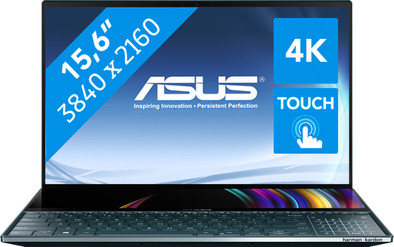
The Asus ZenBook Pro Duo UX581GV-H2001T is made for graphically creative people, because this laptop has not one, but two screens. The second screen, located above the keyboard, allows you to draw all your designs with the included stylus, making the screen feel like a drawing tablet. To bring your creativity to life, the ZenBook Pro Duo has an RTX 2060 with enough power to run the most demanding software without lag. If you use the ZenBook as a regular laptop, the second screen will come in handy as well. You can use the screen to quickly switch between windows, watch a video on YouTube, or you can use it to make your screen extra big.
Receive an email with a personal voucher code for 1 free year of Norton 360 Deluxe antivirus one day after purchase
Screen size | 15,6 inches | |
|---|---|---|
Processor | Intel Core i9 | |
Internal RAM | 32 GB | |
Total storage capacity | 1000 GB | |
Video card | NVIDIA GeForce RTX 2060 | |
Panel type | IPS panel | |
Touchscreen | ||
Windows OS version | Windows 10 Home |
5 stars
2
4 stars
1
3 stars
0
2 stars
0
1 star
0
I've been using laptops instead of a large desktop for years. A disadvantage of this is that you usually only work with 1 screen and that means that you have to switch between windows a lot. When I saw this Zenbook Pro Duo, I was immediately interested in this laptop. After much research and looking at reviews, we decided to order this one, but then the heaviest version. Admittedly, I'm not a huge fan of Asus, but this innovative design certainly deserves a compliment!
Finally ordered and as I am used to from Coolblue, neatly delivered the next day in sturdy packaging. Opening the package is actually an experience. In the cardboard box of Asus, the laptop is again in a sturdy box that you open from the top, just like a very expensive piece of clothing. The adapter comes in a smaller identical packaging. Yes, you paid well for it, but you also immediately get the feeling that you are dealing with a premium product!
You also immediately feel on the laptop itself that Asus has made no concessions with regard to the materials used. The housing is made of very solid aluminum and the screen therefore shows virtually no flex. The keyboard has a nice touch and good feedback. Typing takes some getting used to because the keyboard is now closer. Asus supplies a kind of wrist rest with the laptop that connects seamlessly to the front of the laptop and that actually works fine.
The 4K OLED screen is insanely beautiful and the contrast is unparalleled! I think by now everyone can imagine how beautiful a 4K OLED screen is in a laptop, wow! The second screen is actually half a screen, but in width it has the same number of pixels as the OLED screen, which makes dragging windows easy. Unfortunately, this is an IPS LCD screen and not an OLED. You can see this difference immediately, but it is not disturbing in itself.
TIP: On first use, it was immediately noticeable that the screen flickered, as if some kind of auto-brightness was active. This was so disappointing that I almost sent the laptop back. After a lot of digging on forums I luckily found the solution. You must then disable the power saving options at the Intel Graphics Control Panel. After that the image was stable and the issue did not occur again. Would have been nice if this had been mentioned somewhere.
You can drag programs to the second screen yourself, but you can also use the shortcuts of Screenpad (the software from ASUS). This allows you to easily manage all windows and you can even save a kind of workspace to start all desired programs in 1x the next time with all windows in the same place. This software feels mature and works excellently, so I am grateful to use it. The second screen is also useful to watch a tutorial while you can continue working on the other screen. I can work in my IDE, have a chat in Slack and watch a video on Youtube without having to drag or switch screens.
Unfortunately, Asus has had to make some concessions in terms of connections. For example, there are only two USB ports and a USB-C connection available. You also get an HDMI and a headphone connection. This is actually too little for a laptop of this size and price. The USB-C connection is also on the right side and this is very inconvenient for right-handers. Especially because USB-C lends itself well to plugging in a HUB with extra connections. I'm going to look for a 90 degree cable to fix it, but this is far from ideal.
I use the laptop for basically everything, software development, browsing, e-mailing, videos and heavy applications. With the Intel i9 on board with 32GB of RAM, everything runs smoothly. Gaming is also good with this all-rounder. The laptop does weigh a lot compared to other laptops, but I don't think this laptop is aimed at people who think portability is very important. This also applies to the battery life, which is ok, but not great. And especially with the second screen it goes fast. Fortunately, Asus also offers the option to turn off the screen.
Conclusion: For me the ideal laptop that offers everything I need. There are a few drawbacks, but they far outweigh the benefits (although the price is hefty!). Are you looking for a laptop that has excellent specs with an amazing display and an innovative extra display? Then this is definitely recommended!
David
22 March 2020
Automatically translated from Dutch
I've been using laptops instead of a large desktop for years. A disadvantage of this is that you usually only work with 1 screen and that means that you have to switch between windows a lot. When I saw this Zenbook Pro Duo, I was immediately interested in this laptop. After much research and looking at reviews, we decided to order this one, but then the heaviest version. Admittedly, I'm not a huge fan of Asus, but this innovative design certainly deserves a compliment!
Finally ordered and as I am used to from Coolblue, neatly delivered the next day in sturdy packaging. Opening the package is actually an experience. In the cardboard box of Asus, the laptop is again in a sturdy box that you open from the top, just like a very expensive piece of clothing. The adapter comes in a smaller identical packaging. Yes, you paid well for it, but you also immediately get the feeling that you are dealing with a premium product!
You also immediately feel on the laptop itself that Asus has made no concessions with regard to the materials used. The housing is made of very solid aluminum and the screen therefore shows virtually no flex. The keyboard has a nice touch and good feedback. Typing takes some getting used to because the keyboard is now closer. Asus supplies a kind of wrist rest with the laptop that connects seamlessly to the front of the laptop and that actually works fine.
The 4K OLED screen is insanely beautiful and the contrast is unparalleled! I think by now everyone can imagine how beautiful a 4K OLED screen is in a laptop, wow! The second screen is actually half a screen, but in width it has the same number of pixels as the OLED screen, which makes dragging windows easy. Unfortunately, this is an IPS LCD screen and not an OLED. You can see this difference immediately, but it is not disturbing in itself.
TIP: On first use, it was immediately noticeable that the screen flickered, as if some kind of auto-brightness was active. This was so disappointing that I almost sent the laptop back. After a lot of digging on forums I luckily found the solution. You must then disable the power saving options at the Intel Graphics Control Panel. After that the image was stable and the issue did not occur again. Would have been nice if this had been mentioned somewhere.
You can drag programs to the second screen yourself, but you can also use the shortcuts of Screenpad (the software from ASUS). This allows you to easily manage all windows and you can even save a kind of workspace to start all desired programs in 1x the next time with all windows in the same place. This software feels mature and works excellently, so I am grateful to use it. The second screen is also useful to watch a tutorial while you can continue working on the other screen. I can work in my IDE, have a chat in Slack and watch a video on Youtube without having to drag or switch screens.
Unfortunately, Asus has had to make some concessions in terms of connections. For example, there are only two USB ports and a USB-C connection available. You also get an HDMI and a headphone connection. This is actually too little for a laptop of this size and price. The USB-C connection is also on the right side and this is very inconvenient for right-handers. Especially because USB-C lends itself well to plugging in a HUB with extra connections. I'm going to look for a 90 degree cable to fix it, but this is far from ideal.
I use the laptop for basically everything, software development, browsing, e-mailing, videos and heavy applications. With the Intel i9 on board with 32GB of RAM, everything runs smoothly. Gaming is also good with this all-rounder. The laptop does weigh a lot compared to other laptops, but I don't think this laptop is aimed at people who think portability is very important. This also applies to the battery life, which is ok, but not great. And especially with the second screen it goes fast. Fortunately, Asus also offers the option to turn off the screen.
Conclusion: For me the ideal laptop that offers everything I need. There are a few drawbacks, but they far outweigh the benefits (although the price is hefty!). Are you looking for a laptop that has excellent specs with an amazing display and an innovative extra display? Then this is definitely recommended!
David
22 March 2020
Automatically translated from Dutch
Very nice and fast device, can last for years. I did have major problems getting all the functionalities, especially the second screen, to work. The necessary software was not installed on the second chance laptop. Online I read reviews about the great sound that the speakers produce, but with me the volume on the highest setting is too low when, for example, someone is talking in the same room. This may be due to the faulty installation of this second chance laptop.
Thomas
1 December 2020
Automatically translated from Dutch
Product number | 833344 | |
|---|---|---|
Manufacturer code | 90NB0NG1-M00880 | |
Brand | ASUS | |
Warranty | 2 years | |
Processing of your defect | Via Coolblue | |
Old product returned for free |
Operating system | Windows | |
|---|---|---|
Screen size | 15,6 inches | |
Processor | Intel Core i9 | |
Internal RAM | 32 GB | |
Total storage capacity | 1000 GB | |
Video card | NVIDIA GeForce RTX 2060 | |
Touchscreen |
Panel type | IPS panel | |
|---|---|---|
Sharpness | 4K (UHD) | |
Resolution width | 3840 pixels | |
Resolution height | 2160 pixels | |
Refresh rate | 60 Hz | |
Screen reflection | Glossy | |
Adaptive Sync |
Processor cores | Octa-Core (8) | |
|---|---|---|
Processor code name | Coffee Lake | |
Clock speed | 2,4 GHz | |
Turbo speed | 5 GHz | |
Cache memory | 16 MB |
Maximum internal memory | 32 GB | |
|---|---|---|
Memory composition | 2x 16GB | |
Memory slot 1 | 16 GB | |
Memory slot 2 | 16 GB | |
Total number of RAM slots | 2 |
Storage type | SSD | |
|---|---|---|
SSD storage capacity | 1000 GB | |
Hard drive type | M.2, NVMe, PCIe |
Type of video card | Dedicated | |
|---|---|---|
Video card RAM | 6 GB |
Windows OS version | Windows 10 Home | |
|---|---|---|
Operating system language | Dutch, English, French, Multiple languages can be configured |
Laptop model | Laptop | |
|---|---|---|
Color | Blue | |
Material | Metal | |
Metal type | Aluminum | |
Height | 2,3 cm | |
Width | 35,9 cm | |
Depth | 24,6 cm | |
Weight | 2,5 kg |
Mobile data connection | No | |
|---|---|---|
WiFi standards | Wireless AC | |
Bluetooth | ||
Bluetooth version | 5.0 |
USB port | ||
|---|---|---|
Number of USB ports | 3 | |
Type of USB port | Standard USB-A, USB-C | |
Protocol Female USB-C port | USB | |
USB version Female USB-C port | 3.1 | |
Number of female standard USB-A ports | 2 | |
Female standard USB-A port version | 3.1 | |
Number of USB 3.1 Female USB-C port | 1 | |
HDMI connector | ||
DisplayPort connector | ||
VGA connector | ||
Thunderbolt connector | ||
Headphone jack | ||
Memory card reader |
Keyboard layout | QWERTY | |
|---|---|---|
Physical keyboard layout | ANSI | |
Numeric keypad | ||
Spill-resistant | ||
Backlit keyboard | ||
Mechanical keyboard | ||
Programmable keys |
Built-in microphone | ||
|---|---|---|
Number of speakers | 2 | |
Sound reproduction | Stereo | |
Integrated computer speakers brand | Harman Kardon |
Built-in camera | ||
|---|---|---|
Image definition webcams | HD Ready (720p) |
Battery technology | Lithium-ion | |
|---|---|---|
Maximum battery life | 8 hours | |
Power connector input type (female) | Other brand/product specific |
Manufacturer's warranty |
|---|
TPM (Trusted platform module) | ||
|---|---|---|
Kensington lock | ||
Windows Hello | ||
Fingerprint identity sensor | ||
Infrared camera |
Extra installed software |
|---|