Note: the docking station works best if you install the DisplayLink driver before use. You can easily download this via the DisplayLink website.
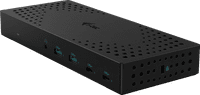
Expand the screen of your laptop with up to 3 4K monitors with the i-tec Triple 4K Docking Station 100W. With this, you can reach a resolution of maximum 4K at 60Hz. This way, you can work in multiple windows at the same time with a good overview and you can always enjoy a sharp image. In addition to monitors, you can connect various accessories to the dock. For example, a mouse and keyboard. This way, you can complete your workplace with this dock. Need a stable, wired internet connection? Connect an Ethernet cable and continue working without interruptions. You can mount this i-tec behind a monitor with a VESA mount, so you have a tidy workspace. You can use this docking station with all laptops and tablets with a USB-A or USB-C port. This is how you check if your laptop has a suitable USB-C port.
What can you do with this docking station?
- Connect up to 3 monitors
- Charge your laptop via USB-C or Thunderbolt (if it supports Power Delivery)
- Work with wired internet
- Connect a mouse and keyboard
- Charge a phone
- Connect headphones
What can't you do with this docking station?
- Read memory card
If you connect
1 monitorto this docking station, you can reach a maximum resolution of
5K at 60Hz.
If you connect
2 or 3 monitors to this docking station, you can reach a maximum resolution of
5K at 60Hz.