Written by Robyn
Edited on
31 December 2025
·
11:24
How do you solve notification issues on Apple Watch?
With the Apple Watch, you're always up-to-date with your health, calls, and texts. But sometimes, you suddenly don't receive notifications on your Apple Watch anymore. In this article, we'll explain what causes this and how to solve it.
Different causes
Aren't you receiving notifications from your iPhone on your Apple Watch anymore? This can have various causes. With these tips, you'll soon receive all your notifications on your Watch again.
- Tip 1: connect the Apple Watch to your iPhone.
- Tip 2: disable Do Not Disturb.
- Tip 3: turn on Notifications.


Tip 1: connect your Apple Watch to your iPhone
It could be that your Apple Watch isn't connected to your iPhone. Do you see a red cross, WiFI symbol, or iPhone symbol at the top of your Apple Watch screen? This means that your Watch is no longer connected to your iPhone.
Reconnect your Apple Watch to your iPhone by:
- Keeping your Apple Watch cloe to the iPhone
- Restarting your Apple Watch and iPhone
Doesn't this work? Disconnect your Apple Watch from your iPhone in the Apple Watch app. Then, pair your devices again via the Apple Watch app.
Tip 2: disable 'Do not disturb'
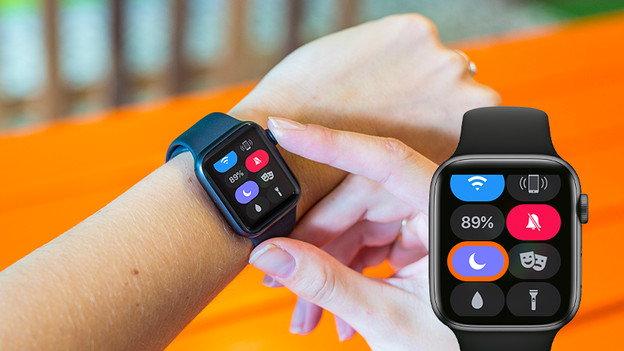
Is the 'Do Not Disturb' mode enabled on your Apple Watch? All incoming notifications are blocked and muted. This is how to turn off the 'Do Not Disturb' mode:
- Unlock your Apple Watch.
- Swipe up, so you open the control panel.
- Tap the purple moon symbol. This turns off the 'Do Not Disturb' mode. Is the moon symbol not purple? In that case, the 'Do Not Disturb' mode isn't turned on. Try the steps below.
Tip 3: turn 'Messages' on
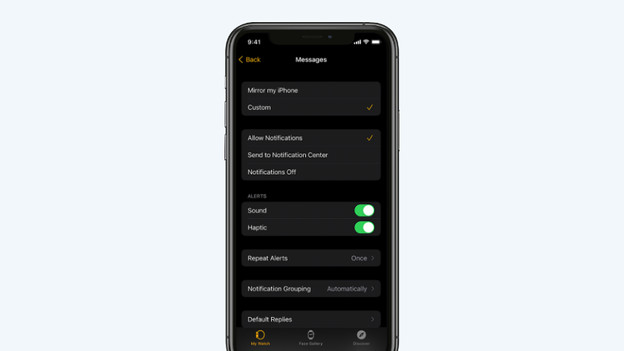
If you don't receive messages on your Watch, it might be because 'Messages' are turned off on your Watch. You can easily turn this on via your iPhone.
- Open the Apple Watch app on your iPhone and tap My Watch.
- Tap Messages and then choose the apps from which you want to receive notifications.
- Tap Match iPhone. You now receive all notifications you receive on your iPhone as well.
- You can also choose to receive messages and in what way via the app. You can read how to do that in the advice article below.
Article by Robyn
Smartwatch Expert.