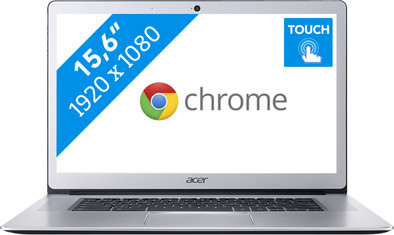
Acer Chromebook 15 CB515-1HT-C1W7
Never available again
View alternatives in the sidebar
View alternatives in the sidebar
According to our laptop expert
With the Acer Chromebook 15 CB515-1HT-C1W7, you can quickly type up notes using the keyboard, or use the touchscreen to highlight a piece of text. Do you need your files on another PC? On this Acer Chromebook, you can log into your Google account and save all your files in the cloud so that your important projects will be accessible wherever you are. This Chromebook is energy efficient, so you don't have to go looking for a socket during lectures. You can use the USB-C port to charge other devices with USB-C, such as your smartphone.
Note: Windows programs don't work on a Chromebook. Do you want to use Microsoft Office? Buy Office 365.
Screen size | 15,6 inches | |
|---|---|---|
Processor | Intel Celeron | |
Internal RAM | 4 GB | |
Total storage capacity | 64 GB | |
Video card | Intel HD Graphics 500 | |
Panel type | IPS panel | |
Touchscreen |
5 stars
42
4 stars
20
3 stars
0
2 stars
0
1 star
0
I've had this Acer Chromebook for a little over a week now. I bought the Chromebook as a like new Second Chance product to cut the price slightly and I really liked it (Coolblue, thanks!). For the money, I think this is one of the best Chromebooks on the market right now, provided you don't think a 15.6" screen is too big.
This Acer Chromebook is smooth to start up and use like almost all Chromebooks, although none of the hardware is upgradable. All parts are soldered, but the built-in hardware is fine for Chrome OS. The speakers in particular stand out in a positive way, because they are located on either side of the keyboard, can be quite loud and produce excellent sound for this price segment.
The Chromebook is also well built. The housing is largely made of aluminum (except for the hinge and the bottom panel) and bends little under pressure. You have to keep your expectations realistic: it doesn't feel like the aluminum housing of, for example, a MacBook, but nevertheless much better than many competing laptops. The keyboard is also fine. Typing feels solid and I think you can type long documents on it. Key combinations may take some getting used to, because the layout is slightly different than with Windows or Mac. There is no numerical section in favor of the stereo speakers. Personally, I would rather have good speakers than a numerical part, but this can be a disadvantage for others.
I am not very enthusiastic about the touchpad. Pointing is quite accurate and gestures are also recognized well (note that these are different than under Windows or Mac), but despite the sturdy construction, it remains a plastic touchpad that feels a bit stiff. Certainly not bad, just normal and therefore fine for daily use. If you don't like the touchpad, this Chromebook has a nice IPS touchscreen, with a resolution of 1920x1080 in a format of 15.6". Color reproduction is neat for this price segment and touches are well registered. tap the screen instead of using the touchpad.
The battery life is great. Acer advertises "up to 12 hours" and I can easily get that. This of course depends on your use, such as brightness of the screen and use of the speakers. Charging the battery goes from 0% to 100% in about 3 hours (I haven't tested this very closely) and the included USB-C charger plugs into both USB-C ports, one on each side of the laptop, to to charge. Make sure you don't use this charger for your smartphone! The voltage for that is too high.
In addition to charging ports, both USB-C ports are also suitable for storage via USB-C (type 3.1) and even for DisplayPort over USB-C! This Chromebook does not have an HDMI or regular DisplayPort connection. The disadvantage of this is that you will most likely have to purchase an adapter cable separately if you want to connect an external monitor.
Chrome OS is a bit more limited than Windows (which ran on my previous laptop), but all the features I needed as a student and used on my old laptop work fine on Chrome OS (for heavier tasks I use a desktop PC). Of course you can't run Windows programs, but the Chrome Web Store has plenty of alternatives and thanks to the touchscreen and the ability to use the Google Play Store on this Chromebook, you can run just about any Android apps! Please note that the Chromebook is seen as an Android tablet. You cannot install apps that do not work on tablets.
So are you looking for a new laptop and do you want to give Chrome OS a chance? Then definitely consider this Acer Chromebook. This laptop offers fantastic features for the price and if, like me, you mainly work within the browser (Chrome) on your laptop, Chrome OS will do just fine, especially if you also use a desktop PC for heavier applications.
Ruben Middag
23 April 2018
Automatically translated from Dutch
So, the Acer 15 Chromebook. After a lot of thinking and to list all the advantages and disadvantages, we decided to go for the chromebook. This is purely the fact that I have almost finished my studies and still have a Windows PC at home. If you don't have a Windows PC/laptop, this review is very important and in my opinion you should think twice before buying this laptop.
The advantages of Chrome OS are mainly the minimalist approach of the operating system. Everything works very easily, everything works very quickly and everything is well organized. Chrome OS also offers a lot of shortcuts with the laptop's touchpad and keyboard that let you work very quickly with the laptop. In the beginning it is difficult to memorize these shortcuts, but you get used to it.
The biggest downside to Chrome Os is, of course, that the market currently runs mostly on Windows (and a little on Apple's MacOs). This means that many programs that you use in normal daily life cannot be used on this laptop. Think of games and Microsoft Office (I'll come back to this in a moment).
The laptop also has Google its own variants of these apps. Google Docs is basically a minimalist version of Word. This makes it very possible to type, edit and keep files. You just can't put the fancy letters in 200 different rainbow colors above your document like everyone used to do on their reports. Google Docs also has the functionality to open Word files, just like Word has the functionality to open Docs documents. So it is always possible to open the files on both Windows and Chrome Os.
Chrome Os has been able to download and use apps from the Google Playstore (this is Android's app store) for a while now. Android is already much more mature than Chrome Os and therefore has a lot of apps that simply function well. This makes it possible to get a game or Word on your laptop via a detour! Are you a bit lucky, all those fancy colors again above your documents!
All things considered, it is a very nice laptop. For my purposes for simple everyday use, watching movies, surfing the web a bit and taking it with me wherever I have to wait (so the battery lasts seriously 8 hours or more with normal use!). This is because the laptop is very light and looks good. The sound is good and the screen can be very bright so that you can also look at the screen in the sun. In my opinion, the laptop is also suitable for school work because the necessary apps can be obtained via the Playstore because it is easy to carry.
Again what I said at the beginning: However, I only think this laptop is suitable if you also have a Windows PC/laptop so that you still have a more extensive operating system at your disposal.
Youri Paauwe
9 May 2018
Automatically translated from Dutch
User-friendly and fast Chromebook. Does what it has to do.
Peter van den Berg
5 March 2018
Automatically translated from Dutch

Product number | 793942 | |
|---|---|---|
Manufacturer code | NX.GP3EH.001 | |
Brand | Acer | |
Warranty | 2 years | |
Processing of your defect | Carry-in warranty | |
Old product returned for free |
Operating system | Google ChromeOS | |
|---|---|---|
Screen size | 15,6 inches | |
Processor | Intel Celeron | |
Internal RAM | 4 GB | |
Total storage capacity | 64 GB | |
Video card | Intel HD Graphics 500 | |
Touchscreen |
Panel type | IPS panel | |
|---|---|---|
Sharpness | Full HD (1080p) | |
Resolution width | 1920 pixels | |
Resolution height | 1080 pixels | |
Refresh rate | 50 Hz | |
Screen reflection | Glossy | |
Adaptive Sync |
Processor cores | Quad-Core (4) | |
|---|---|---|
Processor code name | Apollo Lake | |
Clock speed | 1,1 GHz | |
Turbo speed | 2,2 GHz | |
Cache memory | 2 MB |
Maximum internal memory | 4 GB | |
|---|---|---|
Memory composition | 1x 4GB | |
Memory slot 1 | 4 GB | |
Total number of RAM slots | 1 |
Storage type | Flash | |
|---|---|---|
SSD storage capacity | 64 GB | |
Hard drive type | SATA |
Type of video card | Shared |
|---|
Operating system language | Dutch, English, German, Multiple languages can be configured |
|---|
Laptop model | Chromebook | |
|---|---|---|
Color | Silver | |
Material | Metal | |
Metal type | Aluminum | |
Height | 1,8 cm | |
Width | 37,8 cm | |
Depth | 26,6 cm | |
Weight | 1,8 kg |
Mobile data connection | No | |
|---|---|---|
WiFi standards | Wireless AC | |
Bluetooth | ||
Bluetooth version | 4.0 |
USB port | ||
|---|---|---|
Number of USB ports | 4 | |
Type of USB port | Standard USB-A, USB-C | |
Protocol Female USB-C port | DisplayPort Alternative Mode, USB | |
USB version Female USB-C port | 3.0 | |
Number of female standard USB-A ports | 2 | |
Female standard USB-A port version | 3.0 | |
Number of USB 2.0 Female USB-C ports | 0 | |
Number of USB 3.0 Female USB-C ports | 1 | |
Number of USB 3.1 Female USB-C port | 0 | |
HDMI connector | ||
DisplayPort connector | ||
VGA connector | ||
Thunderbolt connector | ||
Headphone jack | ||
Memory card reader |
Keyboard layout | QWERTY | |
|---|---|---|
Physical keyboard layout | ANSI | |
Numeric keypad | ||
Spill-resistant | ||
Backlit keyboard | ||
Mechanical keyboard | ||
Programmable keys |
Built-in microphone | ||
|---|---|---|
Number of speakers | 2 | |
Sound reproduction | Stereo | |
Integrated computer speakers brand | Standard speakers |
Built-in camera | ||
|---|---|---|
Image definition webcams | HD Ready (720p) |
Battery technology | Lithium polymer | |
|---|---|---|
Maximum battery life | 12 hours | |
Battery life according to customers | Excellent |
Manufacturer's warranty |
|---|
TPM (Trusted platform module) | ||
|---|---|---|
Kensington lock | ||
Windows Hello | ||
Fingerprint identity sensor |
Extra installed software |
|---|