Lenovo Yoga 530-14ARR 81H9001PMH
Never available again
View alternatives in the sidebar
View alternatives in the sidebar
Product number | 812958 | |
|---|---|---|
Manufacturer code | 81H9001PMH | |
Brand | Lenovo | |
Processing of your defect | Via Coolblue | |
Old product returned for free |
Screen size | 14 inches | |
|---|---|---|
Touchscreen | ||
Panel type | IPS panel | |
Sharpness | Full HD (1080p) | |
Resolution width | 1920 pixels | |
Resolution height | 1080 pixels | |
Refresh rate | 50 Hz | |
Screen reflection | Glossy | |
Adaptive Sync |
Processor | AMD Ryzen 5 | |
|---|---|---|
Processor code name | Raven Ridge FP5 | |
Processor cores | Quad-Core (4) | |
Clock speed | 2,2 GHz | |
Turbo speed | 3,6 GHz | |
Cache memory | 4 MB |
Internal RAM | 8 GB | |
|---|---|---|
Memory composition | 2x 4GB | |
Memory slot 1 | 4 GB | |
Memory slot 2 | 4 GB | |
Total number of RAM slots | 2 |
Total storage capacity | 256 GB | |
|---|---|---|
Storage type | SSD | |
SSD storage capacity | 256 GB | |
Hard drive type | PCIe |
Video card | AMD Radeon Vega 8 | |
|---|---|---|
Type of video card | Shared |
Operating system | Windows | |
|---|---|---|
Windows OS version | Windows 10 Home |
Laptop model | 2-in-1 | |
|---|---|---|
Color | Black | |
Material | Metal, Plastic | |
Metal type | Aluminum | |
Height | 1,76 cm | |
Width | 32,8 cm | |
Depth | 22,9 cm | |
Weight | 1,67 kg | |
Operating system language | Multiple languages can be configured |
Mobile data connection | No | |
|---|---|---|
WiFi standards | Wireless AC | |
Bluetooth | ||
Bluetooth version | 4.0 |
USB port | ||
|---|---|---|
Number of USB ports | 3 | |
Type of USB port | Standard USB-A, USB-C | |
Protocol Female USB-C port | USB | |
USB version Female USB-C port | 3.0 | |
Number of female standard USB-A ports | 2 | |
Female standard USB-A port version | 3.0 | |
Number of USB 3.0 Female USB-C ports | 1 | |
HDMI connector | ||
Number of HDMI connectors | 1 | |
Female HDMI Type A port version | 1.4 | |
DisplayPort connector | ||
VGA connector | ||
Network connector | ||
Thunderbolt connector | ||
Headphone jack | ||
Memory card reader |
Keyboard layout | QWERTY | |
|---|---|---|
Physical keyboard layout | ANSI | |
Numeric keypad | ||
Spill-resistant | ||
Backlit keyboard | ||
Mechanical keyboard | ||
Programmable keys |
Built-in microphone | ||
|---|---|---|
Number of speakers | 2 | |
Sound reproduction | Stereo | |
Integrated computer speakers brand | Dolby Audio Premium |
Built-in camera | ||
|---|---|---|
Image definition webcams | HD Ready (720p) |
Battery technology | Lithium polymer | |
|---|---|---|
Battery life according to customers | Standard | |
Power connector input type (female) | Other brand/product specific |
Manufacturer's warranty |
|---|
TPM (Trusted platform module) | ||
|---|---|---|
Kensington lock | ||
Windows Hello | ||
Fingerprint identity sensor | ||
Infrared camera |
Extra installed software |
|---|
Screen size | 14 inches | |
|---|---|---|
Processor | AMD Ryzen 5 | |
Internal RAM | 8 GB | |
Total storage capacity | 256 GB | |
Video card | AMD Radeon Vega 8 | |
Panel type | IPS panel | |
Touchscreen | ||
Windows OS version | Windows 10 Home |
According to our laptop expert
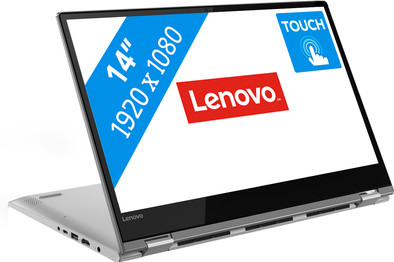
Flip the screen 360 degrees around the keyboard and use the laptop in different positions.
Use an optional touch pen with the touchscreen and sketch your designs directly on the screen.
The IPS panel displays true-to-life colors from any viewing angle.
Door het glanzende touchscreen heb je meer last van vetvlekken, lichtinval en weerspiegelingen.
We've tested it ourselves. You can read our expert review of the Lenovo Yoga 530-14ARR 81H9001PMH here.
The Lenovo Yoga 530-14ARR 81H9001PMH is a 2-in-1 laptop with which you edit photos in Photoshop, send emails, and watch movies. Fold the 14-inch Full HD IPS panel 360 degrees and use the Yoga as a tablet when you're on the couch or on the train. The touchscreen supports Windows Ink, so you write and draw just like on a paper notebook. In addition, you can use an optional stylus pen to retouch photos more easily. The 2-in-1 boots within 15 seconds, thanks to the 256GB PCIe NVMe SSD. This makes programs run even faster than with a traditional SSD. In the evening, you can fold the laptop into the tent position, so you can comfortably watch a movie or series.
5 stars
28
4 stars
15
3 stars
1
2 stars
0
1 star
0
Lenovo Yoga 530 14ARR (81H9001PMH)
After reading some reviews about the i5 processor with the HD620 versus a Ryzen 5 with Vega 8, I went to the Vega 8 myself. The Intel processor would be slightly more economical, which is useful on a laptop, but in games the Vega 8 still perform better. The Vega 8 should even be able to play The Witcher 3 (one of my favorite games ever), GTA V or Skyrim, for example, at over 30 FPS. So the choice came down to the Ryzen 5. And so there were 3 models left. the HP 14-cm0970nd, the Lenovo V330-14ARR and the Lenovo Yoga 530-14ARR. The Yoga was the most expensive, but it did have a larger battery capacity, a tilting screen and an illuminated keyboard.
First impression
When opening it for the first time, I have to admit that the screen was actually smaller than expected. The edge at the bottom (including Lenovo Logo) is on the large side, the edges on the side and top are well narrow. As with almost every notebook there is a camera, which is almost invisible. The screen is glossy and looks good from what I can see. However, a gloss layer and touchscreen is not a nice combination. You regularly suffer from greasy fingers on the screen. The keys feel good and give enough feedback. The fingerprint scanner looks nicer than such a narrow smart line that you have to put your finger on or pass. There is also a power button on the side, which I also like because having a power button on the keyboard has sometimes resulted in my laptop suddenly being in sleep mode. Of course a card reader, a kensington lock and a microphone. The back has 9 small openings for ventilation, with also openings at the bottom for ventilation. There are also 2 speakers at the bottom. The other side has the power plug, an LED next to it, hdmi, usb, usb-c and a 3.5mm connection. Not a super large amount of connections, but this is simply a 14-inch laptop and not a desktop, plus a hub can always offer solutions.
The housing is also sturdy. The device will probably be used rotated, because the screen can be rotated 360 degrees, so it must also be sturdy. Most of the device is made of metal, however some edges on the notebook are made of plastic. All in all, I think it feels decent.
And on!
As soon as you turn on the laptop, you immediately see the backlit keyboard, which looks luxurious. Setting up Windows is fairly easy. Booting is smooth anyway thanks to a 256Gb Hitachi SSD, and the fingerprint scanner scans quickly, but it is sometimes a bit difficult if my finger has to be scanned from the side. Furthermore, there were relatively few Lenovo apps on this model. The Ryzen 5 stays around 40 degrees when idle. Certainly not bad. When doing benchmarks and some gaming it goes to 65 to 70 degrees. The housing feels fine and the bottom certainly doesn't get hot at those 40 degrees, and you can't hear the fans in idle either. This is different with gaming or benchmarks, then the fans turn on well and this does make some noise. The keyboard feels, as I expected, very nice. It gives enough feedback and the travel is very short.
The CPU and memory are as I expected. The system is nice and smooth in simple work. Of the 8Gb, you're left with 7.55Gb. 256Mb is for the GPU (Vega 8) in normal use. This goes up dynamically in gaming. The memory is at 17-17-17-39 and the CPU at 2.0 Ghz.
The screen is pleasant to look at, sharp with excellent color reproduction. You will notice immediately that the brightness does not go very high. Visually (because I don't have the measuring equipment for this, everything is my own experience) I set the Yoga 530 to max and I can set my Toshiba Chromebook 2 to 3 quarters of the maximum to have the same brightness. The brightness of the screen is therefore slightly lower compared to other models. The screen reflects more than what I was used to, which in itself is not bad, but what I do find annoying in the dark black bar under the screen. Because of the reflection you will see your own hands flash back and forth regularly. I'm in favor of a black, whether or not, plastic layer in this place.
One of the extras of this model compared to other models that came in my list, is of course the touch functionality. You can seamlessly switch from the keyboard with touchpad to the touch function and everything is registered well. Now I have fairly slender fingers myself, which does help within Windows 10. Because if you have larger fingers, you will soon have to make some adjustments regarding the graphic zoom option, which will make the buttons a bit larger. The great thing about the Yoga is that you can fold it completely and turn it into a kind of tablet.
You will notice that the battery runs out faster, especially when gaming and streaming. With a little browser use, or typing this review, you will end up with a good 5 to 6 hours, but that is not very much compared to the Intel counterparts. With gaming and streaming, this is rather 4 to 5 hours.
The laptop is nice and stable when you place it on the table (partly due to the large rubber surfaces at the bottom) and is also pleasant on your lap. The weight between screen and keyboard (plus rest) is well distributed. I really like the keyboard and I also regularly switched on the lighting in the evening. There are two levels in the lighting (and of course the off level), whereby I experience the first level as the most pleasant. The second level is very bright.
The other options each the Yoga 530 has work as expected. The USB ports are smooth enough. The transfer of a 1Gb file went at an average of 120Mb/s to my Kingston HyperX Fury Usb 3.0 stick and back again at 170Mb/s, which is equivalent to what the stick could handle. I also see excellent speeds on the USB 3 external HDDs. The HDMI connection also works as expected. The USB-C is still a USB 3.0 version, which I personally think is a shame about this model. This does not support external charging, which would certainly have been added value for this model.
Benchmarks
Within Cinebench the results are for Single Core: 129 Cb, Multi Core: 635 Cb. This is slightly better compared to the i5 Model. PC Mark 10 gives a result of 3193. Also gaming, of course. Because I didn't just buy the system for a bit of office use. We'll start with The Witcher 3 GOTYE v1.32, at low quality 1280 x 720. On average, the FPS is between 25 and 35, which is playable. Rocket League runs quite decent as with most options on quality, full HD, I see an average of 25 to 40 fps. Of course older games also run without problems. But that is perfectly feasible on an Intel HD 620, you don't buy this laptop specifically for that.
Conclusion
Is this laptop worth the money? In short, yes, I am happy with the Yoga 530. It is not a real gaming laptop, but that was certainly not the intention. You can play a game. The most recent games will be more difficult, but games of about 5 years old play ok. The laptop is solid, the keyboard taps away nicely, but there are also quite a few drawbacks. The battery life is not very long, but on the other hand there is a short charging time, because within two to two and a half hours it is completely full again. It starts up quickly, and is sturdy in terms of housing. The 2 in 1 system is nice and the tilt mechanism also feels durable, the touch functions also work properly, but you will have to wonder how often you will use this. On the other hand, the screen is not top in terms of brightness, and the choice for a glossy screen with touch will quickly cause grease stains. The reflections at the bottom of the screen can even be experienced as annoying.
Jos van Hemert
29 January 2019
Automatically translated from Nederlands
I was in need for a laptop asap because the one I had broke (and it was quite old already..) and since I work as a freelance I use my own laptop to work. I couldn't take too long to decide which laptop I should buy, but I wanted to make sure I could buy one good enough to work with and also watch movies on Netflix and occasionally play some games. Plus I was thinking about the long term, my last laptop was 5 "years old" and I plan to invest on something for the same amount of time. I have to admit my choice was worth it. It's been almost a month that I have been using my new Lenovo Yoga 530 (AMD Ryzen 5 - 8 GB - 256 GB SSD) and I have been quite satisfied with it. It starts quite fast (but sometimes the fingerprint recognition doesn't work as fast..), the table mode is pretty good and very convenient to watch movies, series or simply read texts. I'm quite satisfied with the battery life as well and would recommend anyone who is searching for a new laptop and use it for the same reasons as I do: work - PPT & Excel is used a lot -, typing - the keyboard feels good and has lights on) -, watch movies and series on Netflix - sometimes for hours.. - and play games (in this case I play The Sim 3 & 4)
Rhaissa
19 October 2018
Automatically translated from Nederlands
It is a nice laptop to work with. If you don't have to use heavy programs, this laptop is definitely recommended!
Sam van Oers
20 March 2019
Automatically translated from Nederlands
