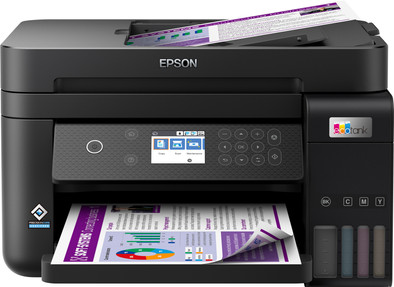
Epson EcoTank ET-3850
Our choice for a printer for freelancers or a small office with low printing costs
Choose your printer:
No extra ink bottles
Our choice for a printer for freelancers or a small office with low printing costs
Choose your printer:
No extra ink bottles
According to our printer expert
Print technology | Ink tank | |
Printer type | All-in-one | |
Type of ink | Ink bottles | |
Automatic duplex printing | ||
Automatic document feeder (ADF) | ||
Automatic duplex scanning | ||
Color printer | ||
Maximum print size | A4 |
5 stars
27
4 stars
30
3 stars
8
2 stars
0
1 star
1
Installation ease
Options
Print quality
The ET-3850 is a nice printer. Prints are good, not the highest achievable. I use it wired, so I am not bothered by possible WiFi connections that work poorly. If you read the reviews on Epson.com you won't be happy, but I think it's not too bad. People complain that it doesn't scan double-sided, but you know that when you buy it. Not that important to me. Prints are okay, scanning also works excellently. I think the ecotank system is great, no longer suffer from dried up cartridges. I have the impression that the software is still in need of updates, which is not always clear or logical. The screen is also a bit difficult to see, and therefore to operate. So place it high enough. My old XP-810 from Epson was a bit better and cheaper, and could also print CDs, which this one lacks. But the fact that you no longer have to spend gold money on ink was the deciding factor for me. Neat printer!
wm
27 December 2022
Automatically translated from Dutch
I would leave this one and find another.
I am coming from an HP all-in-one, but wanted an ink tank. That is fine in itself, but for the rest this is a big step backwards in terms of possibilities.
It starts with turning it on. Press the power button. Wait. Again. Wait. One more time, this time a bit harder.... With a bit of luck it will finally turn on.
Then the scanning. It has an automatic document feeder. But it cannot scan double-sided. That is really something you can expect for this price.
Then the scanning itself. The scanning program that comes with it is really bad. This is really, really bad. You get a window with some buttons, which looks like it was made in 1998. Icons with thick pixels, half-working functionalities, simple options that you do not have (for example, specifying a file name, the program will determine that for you).
For this money you can really get a much better deal, and I would recommend getting a different brand if you get this kind of software with it.

Jordi
14 August 2024
Automatically translated from Dutch
This printer is only recommended because of the economical use of ink.
Hans Mentink
11 December 2022
Automatically translated from Dutch
No deductible
For almost all accidents
More security than standard warranty
Coolblue takes care of everything, from taking out an insurance to repairs
First, add your printer to your shopping cart. On the next page, choose the Protection Plan below. You always have a 30-day return window and pay no deductible in case of damage.
3-year Protection Plan
42,99
one-time5-year Protection Plan
94,-
one-timeIf you purchase this printer between 1 April 2023 and 31 March 2026, you receive a 3-year warranty. This way, you have the default 1 year and 2 extra years of warranty. You can register your promotional product for the Epson promotion until 30 days after purchase. Go to the promotional Terms and Conditions for more information.
Current product
Â
Â
Â
Â
349,-
469,-
429,-
299,-
518,-
Yes
Yes
Yes
No
Yes
No
Yes
Yes
No
No
A4
A4
A4
A4
A3+
Ink tank
Ink tank
Ink tank
Ink tank
Ink tank
Product number | 893428 | |
Manufacturer code | C11CJ61402 | |
Brand | Epson | |
Warranty | 2 years | |
Processing of your defect | Via Coolblue | |
Old product returned for free |
Printer size | Medium | |
Width | 37,5 cm | |
Depth | 34,7 cm | |
Height | 23,1 cm | |
Color | Black | |
Weight | 6,7 kg |
Printer type | All-in-one | |
Photo printer | ||
Print quality photos | Stand | |
Portable (mobile use) | ||
Usage location | Office |
Cartridge line | Epson 102 | |
Print technology | Ink tank | |
Type of ink | Ink bottles | |
Number of cartridges/toner cartridges | 4 | |
Color printer | ||
Print speed black (ISO) | 15,5 ppm | |
Print speed color (ISO) | 8,5 ppm | |
First black page ready after | 9 seconds | |
Speed class | Good | |
Usage costs per page | 1 eurocent | |
Maximum print resolution height | 1200 dpi | |
Maximum print resolution width | 4800 dpi | |
Maximum print size | A4 | |
Automatic duplex printing | ||
Borderless printing | ||
Maximum print size duplex printing | A4 |
Scan functionality | ||
Automatic duplex scanning | ||
Maximum optical scan resolution width | 1200 dpi | |
Maximum optical scan resolution height | 2400 dpi | |
Scanner type | Flatbed scanner | |
Maximum scan size | A4 (21x29.7cm) | |
Automatic document feeder (ADF) | ||
Maximum paper size ADF | A4 | |
Scan sizes | A4 | |
Scan speed (PPM) | 4 ppm | |
Color depth output | 24 bpp | |
Scan to | Cloud, Dropbox, Email, Email address, Email server, FTP, Folder, Image, Network, PC (local), PDF, PDF/A | |
ADF capacity | 30 | |
OCR |
Copying functionality | ||
Copy speed black (ISO) | 4 ppm | |
Copy speed color (ISO) | 4 ppm | |
Maximum copy resolution height | 1200 dpi | |
Maximum copy resolution width | 4800 dpi |
Fax functionality |
Built-in screen | ||
Color screen | ||
Touchscreen |
Compatible with operating system | Android, ChromeOS, Linux, Windows, Windows Phone, iOS, macOS | |
Connection type | Wired, Wireless | |
Apple AirPrint | ||
Email print | ||
WPS (Wireless Protected Setup) | ||
Ethernet port | ||
Number of Ethernet ports | 1 | |
NFC | ||
Built-in WiFi | ||
Bluetooth | ||
WiFi direct | ||
USB port |
Manual input tray | ||
Photo paper drawer | ||
Output capacity output drawer | 30 | |
Maximum print size standard paper tray | A4 | |
Input capacity standard paper tray | 250 | |
Number of standard paper trays | 1 |
Memory card reader |