Microsoft Surface Laptop Studio - i5/16GB/512GB/iGPU
Never available again
View alternatives in the sidebar
View alternatives in the sidebar
According to our laptop expert
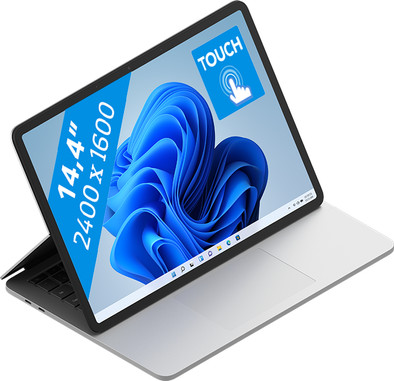
The Microsoft Surface Laptop Studio - i5/16GB/512GB/iGPU is suitable for all your daily activities. This laptop and tablet in one has Windows 11, so you have all of the new software at your disposal right away. The Surface Laptop Studio has a 11th generation Intel Core i5 processor and 16GB RAM. Thanks to these, you can start multitasking and photo editing. Fold the Surface Laptop studio into a tablet and use the separately available Surface Slim Pen 2 to draw your creative ideas with a lot of detail. The powerful processor is energy-efficient, so your battery will last a long time. That way, you can always focus on your tasks and you don't have to think about charging until you're done.
Receive an email with a personal voucher code for 1 free year of Norton 360 Deluxe antivirus one day after purchase.
Screen size | 14,4 inches | |
Processor | Intel Core i5 | |
Internal RAM | 16 GB | |
Total storage capacity | 512 GB | |
Video card | Intel Iris Xe Graphics | |
Recommended for use | Internet, email, and text processing, Photo editing, School, Spreadsheets and presentations, Streaming movies and series | |
Panel type | LCD | |
Build quality laptops | Mid-range |
5 stars
15
4 stars
3
3 stars
0
2 stars
0
1 star
0
After having enjoyed using the Surface Book 2 (i7 8650U/8GB/GTX1050) for 3.5 years, I was looking for a successor. I ended up with the Surface Laptop Studio (i5 11300H/16GB/Iris Xe) for almost the same price as the SB2 at the time. Because I can imagine that the potential buyers have had a Surface Book before, I compared it with that as much as possible.
The SLS is the successor to the Surface Book line. In terms of size, they are actually the same and the weight of the SLS is slightly higher (1754g) compared to the SB2 (1622g). I expected a lighter weight and thinner design, given the special mounting mechanism in the SB2. The charger of the SLS is slightly smaller and lighter.
The special screen mechanism will play an important role in the purchase consideration of both. The SLS can still be used as a tablet, but no longer separate from the keyboard. That is immediately a major disadvantage: you then drag the entire laptop (SLS 1754g) instead of just a tablet (SB2 710g).
However, there is now the option to position the screen in front of the touchpad, which is useful, for example, when viewing videos and photos. The screen of the SB2 was not bad, but the SLS surpasses it with nicer colors, smoother due to the higher number of Hz and can be a bit brighter. The reflection is still the same.
To compare performance I ran both with a clean Windows 11 installation. In terms of processor, they are very comparable with 4 cores and 8 threads. However, the Cinemark benchmark shows the progress, with 43~93% higher performance: SB2 single 960 / multi 2890 | SLS single 1373 / multi 5590.
You will not notice this immediately during normal use. For example, startup is just as fast and no immediate differences are noticeable when browsing. In terms of gaming I have tried Age of Empires IV (from Microsoft), I see the same settings there as well (low-medium at 1920x1080px). A nice improvement, because the i5 8650U can keep up with the separate NVIDIA GTX 1050 video card of the SB2 with less heat, noise and energy consumption. But do not expect high gaming performance from the i5 variant, for that you really have to look at the i7 variant with separate NVIDIA video card.
Apart from that, there are a few other advantages: the much better sound system with a bit of bass (for a notebook). The slightly more pleasant touchpad. And the webcam gives a nicer picture, but with slightly less detail. There are also other drawbacks: the number of connections is (too) limited with 2 USB-C, there is no longer an SD card slot or USB-A input. The special pen for, among other things, the tablet position is unfortunately not included, despite the high price.
Bram
28 March 2022
Automatically translated from Dutch
After years of having had a comparable laptop with different modes (laptop, tablet and studio), I recently switched to this beautifully designed laptop from Microsoft. The whole product feels and looks beautiful. There are many things to mention that really stand out to me about this laptop. Firstly, logging in with the Hello camera is very easy, so I no longer have to enter login details. In addition, the screen looks really tight and images are displayed very smoothly thanks to the 120Hz technology. An additional advantage is the draft screen that responds to touch without delay.
The battery lasts a good working day with normal use and I also have some left at the end of the day, so good enough for me. Furthermore, the laptop is powerful enough to perform all my tasks without effort.
Despite the modest size of the laptop, it still has a reasonable weight at 1.7 kg. What I found strange was that there were many Microsoft Office languages installed that all had to be uninstalled separately. This feels unnecessary. I also really like the touchpad, because it is large. For me it just took some getting used to where the 'left mouse button' ended and where the 'right mouse button' began. The last point that I really find a disadvantage is that the laptop only has 2 USB-C ports, so that a USB hub or the docking station always has to be included.
All in all, a very satisfied user of this beautiful and powerful Microsoft Surface Laptop Studio.
Stukato
16 March 2022
Automatically translated from Dutch
Where Apple does not dare to use the touchscreen on a laptop, Microsoft does so with a hybrid device. Works well as a laptop due to the excellent keyboard and touchpad. Especially Windows 11 with the addition of new gestures works very well. I mainly use the screen in laptop mode, but I find touch very useful. Especially the fast scrolling with the touchpad and the fine work via touch works very well. In tablet mode, it is a bit heavy. For this I quickly grab my iPad Pro. The studio mode is nice for watching media, but I haven't been able to find other uses yet.
The surface laptop studio is not the fastest laptop, but it is more than sufficient for the applications I use (business). The build quality of the laptop is very good. Sturdy together with good components. The speakers are louder than I've ever heard on a laptop and the camera is of good quality. This makes video calling via teams a lot nicer. All in all a very nice product from Microsoft's surface lineup.
Timo
18 March 2022
Automatically translated from Dutch
If you purchase of a laptop or desktop, you receive 1 year of Norton 360 Deluxe for free. One day after purchase, you'll receive an email with a personal voucher code. Go to the promotional Terms and Conditions for more information.

Product number | 897669 | |
Manufacturer code | 9WI-00009 | |
Brand | Microsoft | |
Warranty | 2 years | |
Processing of your defect | Via Coolblue | |
Old product returned for free |
Operating system | Windows | |
Screen size | 14,4 inches | |
Processor | Intel Core i5 | |
Internal RAM | 16 GB | |
Total storage capacity | 512 GB | |
Video card | Intel Iris Xe Graphics | |
Touchscreen | ||
Recommended for use | Internet, email, and text processing, Photo editing, School, Spreadsheets and presentations, Streaming movies and series | |
Speed class laptops | Mid-range | |
Build quality laptops | Mid-range |
Panel type | LCD | |
Sharpness | WQXGA | |
Resolution width | 2400 pixels | |
Resolution height | 1600 pixels | |
Refresh rate | 120 Hz | |
Screen reflection | Glossy | |
Adaptive Sync |
Processor number | 11300H | |
Processor cores | Quad-Core (4) | |
Processor code name | Tiger Lake U | |
Clock speed | 3,1 GHz | |
Turbo speed | 4,4 GHz | |
Cache memory | 8 MB | |
Intel Evo laptop |
Memory composition | 1x 16GB | |
Memory slot 1 | 16 GB | |
Total number of RAM slots | 1 |
Storage type | SSD | |
SSD storage capacity | 512 GB |
Type of video card | Shared |
Windows OS version | Windows 11 Home | |
Operating system language | Multiple languages can be configured |
Laptop model | Laptop | |
Color | Silver | |
Material | Metal | |
Metal type | Aluminum, Magnesium alloy | |
Height | 1,9 cm | |
Width | 32,3 cm | |
Depth | 22,9 cm | |
Weight | 1,7 kg |
Mobile data connection | No | |
WiFi standards | Wireless A (WiFi 2), Wireless AC (WiFi 5), Wireless AX (WiFi 6), Wireless B (WiFi 1), Wireless G (WiFi 3), Wireless N (WiFi 4) | |
Bluetooth | ||
Bluetooth version | 5.1 |
USB port | ||
Number of USB ports | 2 | |
Type of USB port | USB-C | |
Protocol Female USB-C port | Thunderbolt Alternative Mode, USB | |
USB version Female USB-C port | 4.0 | |
Number of female standard USB-A ports | 0 | |
HDMI connector | ||
DisplayPort connector | ||
VGA connector | ||
Thunderbolt connector | ||
Headphone jack | ||
Memory card reader |
Keyboard layout | QWERTY | |
Physical keyboard layout | ANSI | |
Numeric keypad | ||
Spill-resistant | ||
Backlit keyboard | ||
Mechanical keyboard | ||
Programmable keys |
Built-in microphone | ||
Number of speakers | 4 | |
Sound reproduction | Stereo | |
Integrated computer speakers brand | Dolby Audio |
Built-in camera | ||
Image definition webcams | Full HD (1080p) |
Battery technology | Lithium-ion | |
Maximum battery life | 19 hours |
Manufacturer's warranty |
TPM (Trusted platform module) | ||
Kensington lock | ||
Windows Hello | ||
Fingerprint identity sensor | ||
Infrared camera | ||
Security class laptops | Basic |
Extra installed software |