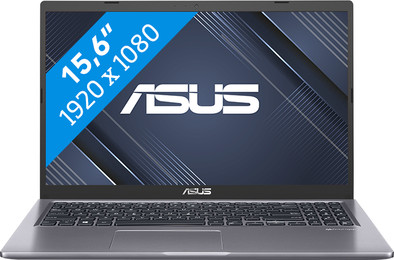
ASUS Vivobook 15 X515EA-EJ3288W
Never available again
View alternatives in the sidebar
View alternatives in the sidebar
If you purchase of a laptop or desktop, you receive 1 year of Norton 360 Deluxe for free. One day after purchase, you'll receive an email with a personal voucher code. Go to the promotional Terms and Conditions for more information.

Product number | 920934 | |
|---|---|---|
Manufacturer code | 90NB0TY1-M04L80 | |
Brand | ASUS | |
Processing of your defect | Via Coolblue | |
Old product returned for free |
Screen size | 15,6 inches | |
|---|---|---|
Screen quality: laptops | Basic | |
Touchscreen | ||
Panel type | TN panel | |
Sharpness | Full HD (1080p) | |
Resolution width | 1920 pixels | |
Resolution height | 1080 pixels | |
Refresh rate | 60 Hz | |
Screen reflection | Anti-glare | |
Adaptive Sync | ||
Brightness | 200 cd/m2 |
Processor | Intel Core i5 | |
|---|---|---|
Processor number | 1135G7 | |
Processor generation | 11th gen | |
Processor code name | Tiger Lake U | |
Processor cores | Quad-Core (4) | |
Clock speed | 2,4 GHz | |
Turbo speed | 4,2 GHz | |
Cache memory | 8 MB | |
Speed class laptops | Mid-range | |
Intel Evo laptop |
Internal RAM | 16 GB | |
|---|---|---|
Memory composition | 2x 8GB | |
Memory slot 1 | 8 GB | |
Memory slot 2 | 8 GB | |
Total number of RAM slots | 2 | |
RAM type (DDR type) | DDR4 | |
Number of replaceable RAM slots | 2 | |
Number of free RAM slots | 0 |
Total storage capacity | 512 GB | |
|---|---|---|
Storage type | Optane + SSD | |
SSD storage capacity | 512 GB | |
HDD storage capacity | 32 GB | |
Hard drive type | NVMe |
Video card | Intel Iris Xe Graphics | |
|---|---|---|
Type of video card | Shared |
Operating system | Windows | |
|---|---|---|
Windows OS version | Windows 11 Home |
Recommended for use | Internet, email, and text processing, School, Spreadsheets and presentations, Streaming movies and series |
|---|
Build quality laptops | Basic | |
|---|---|---|
Laptop model | Laptop | |
Color | Gray | |
Material | Plastic | |
Height | 1,99 cm | |
Width | 36 cm | |
Depth | 23,5 cm | |
Weight | 1,8 kg | |
Operating system language | Multiple languages can be configured |
Mobile data connection | No | |
|---|---|---|
WiFi standards | Wireless A (WiFi 2), Wireless AC (WiFi 5), Wireless B (WiFi 1), Wireless G (WiFi 3), Wireless N (WiFi 4) | |
Bluetooth | ||
Bluetooth version | 4.1 |
USB port | ||
|---|---|---|
Number of USB ports | 4 | |
Type of USB port | Standard USB-A, USB-C | |
Protocol Female USB-C port | USB | |
USB version Female USB-C port | 3.0 | |
Number of female standard USB-A ports | 3 | |
Female standard USB-A port version | 2.0, 3.0 | |
Number of USB 3.0 Female USB-C ports | 1 | |
HDMI connector | ||
Number of HDMI connectors | 1 | |
Female HDMI Type A port version | 1.4 | |
DisplayPort connector | ||
VGA connector | ||
Network connector | ||
Thunderbolt connector | ||
Headphone jack | ||
Memory card reader |
Keyboard layout | QWERTY | |
|---|---|---|
Physical keyboard layout | ANSI | |
Numeric keypad | ||
Spill-resistant | ||
Backlit keyboard | ||
Mechanical keyboard | ||
Programmable keys |
Built-in microphone | ||
|---|---|---|
Number of speakers | 2 | |
Sound reproduction | Stereo | |
Integrated computer speakers brand | Standard speakers |
Built-in camera | ||
|---|---|---|
Image definition webcams | VGA (480p) |
Battery technology | Lithium-ion | |
|---|---|---|
Power connector input type (female) | Other brand/product specific |
Manufacturer's warranty |
|---|
TPM (Trusted platform module) | ||
|---|---|---|
TPM type | Firmware TPM | |
Kensington lock | ||
Windows Hello | ||
Fingerprint identity sensor | ||
Security class laptops | Basic |
Extra installed software | ||
|---|---|---|
ISV certification |
Screen size | 15,6 inches | |
|---|---|---|
Processor | Intel Core i5 | |
Internal RAM | 16 GB | |
Total storage capacity | 512 GB | |
Video card | Intel Iris Xe Graphics | |
Recommended for use | Internet, email, and text processing, School, Spreadsheets and presentations, Streaming movies and series | |
Panel type | TN panel | |
Screen quality: laptops | Basic |
According to our laptop expert
With an Intel Core i5 processor and 16GB RAM, you can edit photos and multitask with light programs.
You can easily expand this laptop with extra storage, which makes it future-proof.
You can quickly enter numbers and formulas on the numeric keypad.
If you edit videos, choose a laptop with at least an Intel Core i7 or AMD Ryzen 7 processor.
This laptop doesn't have keyboard backlight, so the keys are difficult to read in the dark.
With the 15-inch ASUS Vivobook 15 X515EA-EJ3288W, you can edit photos and multitask between different light programs. The 11th generation Intel Core i5 processor is powerful enough for programs like Adobe Photoshop. With 16GB DDR4 RAM, you can use different programs at the same time, such as Microsoft Word, Google Chrome, and Spotify. Thanks to the 512GB SSD, you have enough storage for your files. Do you want more storage? Expand the laptop with a 2.5-inch HDD. Thanks to the anti-glare screen, you're less bothered by reflections, so you can easily work near a window or in the garden on a sunny day.
Receive an email with a personal voucher code for 1 free year of Norton 360 Deluxe antivirus 1 day after purchase.
5 stars
20
4 stars
33
3 stars
4
2 stars
0
1 star
0
Battery life
Speed
Design
With the Asus Vivobook 15 X515EA-EJ3288W, you can easily work in multiple programs at the same time without the laptop stuttering. The viewing angle of the screen is less pleasant.
Appearance and size The Asus laptop has a beautiful but simple design. I can easily enter my numbers on the numeric keypad. The keyboard is very pleasant to type on and looks neat. This laptop has a 15.6-inch screen, which makes it on the large side. That's why I often work with this laptop in one place and don't often take it with me. This laptop has enough USB A ports to which I can connect my accessories.
Multitasking This laptop has an Intel Core i5 processor and 16 GB of RAM. This makes multitasking between different programs smooth. The laptop does not freeze or stutter. In addition to various browsers, I also used Word and Spotify. I easily edited photos in Adobe Photoshop.
Display This laptop has a 15.6-inch Full HD screen. I see a lot of details and I can easily work in two windows next to each other. The anti-reflection screen made it easy for me to work in the sun, because my screen was still clearly visible. Due to the TN panel, I could not see my screen equally well from every viewing angle. For example, when I tilted the screen, part of the screen became a little brighter. As a result, I occasionally had to pay more attention to how I placed the laptop.
Deanne. Laptop specialist.
20 September 2023
Automatically translated from Nederlands
This Asus Vivobook is a mid-range model, comparable to other laptops in the mid-range segment. An Asus I had before was my best experience with this type of laptop. However, after a few months of use, I would call this a bad buy. But read on, because it's a personal experience.
Ok, the fact that several programs are now interfering or even not or barely working is of course already a major negative (even Adobe Acrobat crashes) that others may also experience.
More annoying is that I have my second monitor, NB. An Asus Zenscreen that cannot be connected with USB-C... to the two predecessors (HP and Medion) was then effortless. This Asus laptop does not even work with the power support of the extra monitor.
Of course, I knew when I bought it that it doesn't have a keyboard backlight. I thought it wouldn't be a problem. But if you are used to it, like me, it is difficult if you suddenly have to turn on the light now that the days are shorter.
I read that someone thinks it is a plus that little software is included. I think he means the extras (McAfee etc.), because there is a lot of Asus promotion and some utilities that are of little use to me. And my virus program (AVG Ultimate) is busy, because too often MyAsus wants to inspect and run everything on the laptop; moreover, things that most people are not looking forward to. At least I don't, but turning it off doesn't make much sense.
And I don't know what the percentage of left-handers is in Asia, but in the West it's 10%. Right-handed people use a separate mouse on the right side of the laptop. It is therefore irritating that the designer designed almost all USB ports on the right, which means that external hard drives, etc., get in the way of smooth movement.
I mainly work with Word, Outlook and Acrobat. The battery lasts about 4 hours; too short for such a new device where they claim it would last 10 hours (depending on what you do with it. But I suspect that word processing is the least stressful).
Another stupid design thing, the light to see that the computer is really off is on the side, not on top. Ok, maybe I'm exaggerating now. But in practice it is inconvenient. There are only two lights on top (CapsLock and Microphone).
Of course, this review was written after yet another frustrated wait for two programs to possibly respond. And then I think about the fun with the previous laptops. And how annoying it is to have an unreliable laptop. Just like a car, a laptop should just work and in the case of a laptop, don't bother with programs you work with regularly. If CoolBlue extends its return policy to six months, this ASUS will be returned today.
Well, two nice things to end it on a somewhat positive note. This Asus has an Fn+Esc button. I don't use it and haven't checked whether it is useful yet. And on the F-bar there are buttons to turn the speaker, microphone and cam camera on/off.
Rene
19 October 2023
Automatically translated from Nederlands
The laptop is easy and convenient to use. However, the battery life is very short. The laptop runs out of power quickly. Overall a good laptop.
Natascha
11 September 2023
Automatically translated from Nederlands