MSI Modern 15 B7M-253NL QWERTY
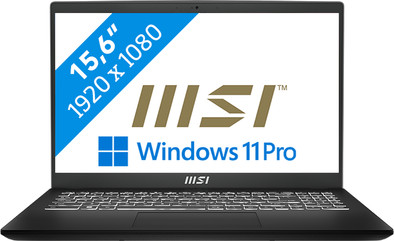
Never available again
View alternatives in the sidebar
View alternatives in the sidebar
If you purchase of a laptop or desktop, you receive 1 year of Norton 360 Deluxe for free. One day after purchase, you'll receive an email with a personal voucher code. Go to the promotional Terms and Conditions for more information.

Product number | 932991 | |
|---|---|---|
Manufacturer code | 9S7-15HK12-253 | |
Brand | MSI | |
Processing of your defect | Via Coolblue | |
Old product returned for free |
Screen size | 15,6 inches | |
|---|---|---|
Screen quality: laptops | Basic | |
Touchscreen | ||
Panel type | IPS panel | |
Sharpness | Full HD (1080p) | |
Resolution width | 1920 pixels | |
Resolution height | 1080 pixels | |
Refresh rate | 60 Hz | |
Screen reflection | Anti-glare | |
Color space | NTSC | |
Percentage color coverage NTSC | 45 % | |
Adaptive Sync | ||
Brightness | 250 cd/m2 |
Processor | AMD Ryzen 7 | |
|---|---|---|
Processor number | 7730U | |
Processor generation | 7000 series | |
Processor code name | Barcelo | |
Processor cores | Octa-Core (8) | |
Clock speed | 2 GHz | |
Turbo speed | 4,5 GHz | |
Cache memory | 16 MB | |
Speed class laptops | High-end |
Internal RAM | 16 GB | |
|---|---|---|
Memory composition | 1x 16GB | |
Memory slot 1 | 16 GB | |
Total number of RAM slots | 1 | |
Number of replaceable RAM slots | 0 | |
Number of free RAM slots | 0 |
Total storage capacity | 512 GB | |
|---|---|---|
Storage type | SSD | |
SSD storage capacity | 512 GB | |
Hard drive type | NVMe |
Video card | AMD Radeon Graphics | |
|---|---|---|
Type of video card | Shared |
Operating system | Windows | |
|---|---|---|
Windows OS version | Windows 11 Pro |
Recommended for use | Business use, Music production and DJing, Photo editing, Spreadsheets and presentations, Video editing |
|---|
Build quality laptops | Basic | |
|---|---|---|
Laptop model | Laptop | |
Color | Black | |
Material | Plastic | |
Height | 1,99 cm | |
Width | 35,9 cm | |
Depth | 24,1 cm | |
Weight | 1,75 kg | |
Operating system language | Multiple languages can be configured |
Mobile data connection | No | |
|---|---|---|
WiFi standards | Wireless A (WiFi 2), Wireless AC (WiFi 5), Wireless AX (WiFi 6), Wireless B (WiFi 1), Wireless G (WiFi 3), Wireless N (WiFi 4) | |
Bluetooth | ||
Bluetooth version | 5.2 |
USB port | ||
|---|---|---|
Number of USB ports | 4 | |
Type of USB port | Standard USB-A, USB-C | |
Protocol Female USB-C port | USB, USB electricity | |
USB version Female USB-C port | 3.2 | |
Number of female standard USB-A ports | 3 | |
Female standard USB-A port version | 2.0, 3.1 | |
HDMI connector | ||
Number of HDMI connectors | 1 | |
Female HDMI Type A port version | 2.1 | |
DisplayPort connector | ||
VGA connector | ||
Network connector | ||
Thunderbolt connector | ||
Headphone jack | ||
Memory card reader |
Keyboard layout | QWERTY | |
|---|---|---|
Physical keyboard layout | ANSI | |
Numeric keypad | ||
Spill-resistant | ||
Backlit keyboard | ||
Mechanical keyboard | ||
Programmable keys |
Built-in microphone | ||
|---|---|---|
Number of speakers | 2 | |
Sound reproduction | Stereo | |
Integrated computer speakers brand | Standard speakers |
Built-in camera | ||
|---|---|---|
Image definition webcams | HD Ready (720p) |
Battery technology | Lithium polymer | |
|---|---|---|
Power connector input type (female) | Other brand/product specific | |
Charger included |
Manufacturer's warranty |
|---|
TPM (Trusted platform module) | ||
|---|---|---|
TPM type | Firmware TPM | |
Kensington lock | ||
Windows Hello | ||
Fingerprint identity sensor | ||
Security class laptops | Mid-range |
Extra installed software | ||
|---|---|---|
ISV certification |
Screen size | 15,6 inches | |
|---|---|---|
Processor | AMD Ryzen 7 | |
Internal RAM | 16 GB | |
Total storage capacity | 512 GB | |
Video card | AMD Radeon Graphics | |
Recommended for use | Business use, Music production and DJing, Photo editing, Spreadsheets and presentations, Video editing | |
Panel type | IPS panel | |
Screen quality: laptops | Basic |
According to our laptop expert
With the AMD Ryzen 7 processor and 16GB RAM, you can edit photos and videos, and multitask between demanding programs.
Windows Pro provides better security for your files and you can log in to another computer in your domain via Remote Desktop.
This laptop passed military-grade testing, so you don't have worry if you spill a drink on the keyboard.
For designing 3D projects, you need an Intel Core i9 or AMD Ryzen 9 processor and an RTX, Quadro, or RX video card.
This laptop doesn't have a fingerprint sensor, so you can only enter your password manually.
With the 15-inch MSI Modern 15 B7M-253NL business laptop, you can work safely in management systems and edit videos. You can also multitask between demanding programs like Adobe Premiere Pro. The AMD Ryzen 7 processor and 16GB DDR5 RAM are powerful enough for this. You don't have to worry about the security of your files, because your files are better secured on Windows 11 Pro. You also don't have to worry about spilling a drink on the backlit keyboard, because the laptop passed military-grade testing. For entering numbers and formulas, you can use the numeric keypad. If you prefer to work in the sun, that's no problem. With the anti-glare screen, you're less bothered by reflections, glare, and greasy fingerprints.
Receive an email with a personal voucher code for 1 free year of Norton 360 Deluxe antivirus 1 day after purchase.
5 stars
3
4 stars
1
3 stars
0
2 stars
0
1 star
0
The MSI Modern 15 B7M is a powerful laptop when you work on video editing or other heavy tasks. You can see everything clearly on the 15-inch screen. In addition, you can work without delays thanks to the Intel Core i7 processor and the 16 GB RAM. To test the laptop, I started working in Adobe Photoshop and Premiere Pro. I also tried to work without a monitor for a day, to see whether the overview was kept well.
Powerful hardware The Intel Core i7 processor and 16GB RAM make this laptop powerful enough for demanding tasks, such as video editing. I opened Adobe Premiere Pro and started working on a corporate video. The program started without delays or hitches and editing also went smoothly on the Full HD screen. The laptop also continued to run stably when importing multiple images. The fan turned a little louder, but the blowing was not disturbing.
Good overview on the screen A 15-inch screen is large enough for 2 windows next to each other. For example, I opened a standard spreadsheet and a word processor and the screen remained more than clear. In the spreadsheet I saw up to about 8 rows. This way I easily transferred my data to the word processor, without having to keep switching between windows. This kept my focus on the work better. 15 inches is also a nice size for the various Adobe programs. The disadvantage is that the USB-C port does not support image signals. To connect to a monitor, you must connect the laptop via HDMI.
Extra security inside and out The MSI Modern 15 B7M has Windows 11 Pro as standard. This gives you extra security and privacy, so that your business files remain well protected. The laptop has also been militarily tested, so it can withstand a knock. Of course I didn't drop the laptop, but the case felt very sturdy. The disadvantage is that you quickly see fingerprints on the design. It doesn't hurt to wipe with a cloth after use.
Backlit keyboard with numpad If you work a lot with numbers, you will benefit greatly from the number pad on the right side of the keyboard. In the spreadsheet, I quickly typed in my formulas and had no problems typing other data. The keyboard lighting is a nice addition. With 3 settings, I can easily adjust it to my environment.
Giorgos. Laptop specialist.
14 September 2023
Automatically translated from Nederlands
The MSI Modern 15 B7M is a powerful laptop when you work on video editing or other heavy tasks. You can see everything clearly on the 15-inch screen. In addition, you can work without delays thanks to the Ryzen 7 processor and the 16 GB RAM. To test the laptop, I started working in Adobe Photoshop and Premiere Pro. I also tried to work without a monitor for a day, to see whether the overview was kept well.
Powerful hardware The AMD Ryzen 7 processor and 16GB RAM make this laptop powerful enough for demanding tasks, such as video editing. I opened Adobe Premiere Pro and started working on a corporate video. The program started without delays or hitches and editing also went smoothly on the Full HD screen. The laptop also continued to run stably when importing multiple images. The fan turned a little louder, but the blowing was not disturbing.
Good overview on the screen A 15-inch screen is large enough for 2 windows next to each other. For example, I opened a standard spreadsheet and a word processor and the screen remained more than clear. In the spreadsheet I saw up to about 8 rows. This way I easily transferred my data to the word processor, without having to keep switching between windows. This kept my focus on the work better. 15 inches is also a nice size for the various Adobe programs. The disadvantage is that the USB-C port does not support image signals. To connect to a monitor, you must connect the laptop via HDMI.
Extra security inside and out The MSI Modern 15 B7M has Windows 11 Pro as standard. This gives you extra security and privacy, so that your business files remain well protected. The laptop has also been militarily tested, so it can withstand a knock. Of course I didn't drop the laptop, but the case felt very sturdy. The disadvantage is that you quickly see fingerprints on the design. It doesn't hurt to wipe with a cloth after use.
Backlit keyboard with numpad If you work a lot with numbers, you will benefit greatly from the number pad on the right side of the keyboard. In the spreadsheet, I quickly typed in my formulas and had no problems typing other data. The keyboard lighting is a nice addition. With 3 settings, I can easily adjust it to my environment.
Giorgos
14 September 2023
Automatically translated from Nederlands
After 1 day wifi adapter stopped working, w11 clean install did not help, had to plug in my own wifi adapter during installation so that W11 could complete its setup. After installation no wifi, then looked in Boos and no wifi card present. Called Coolblue and no problem, exchange created. The next day restarted again and to my surprise it worked again, very strange, so let's see. But now it runs perfectly.
Jim
16 February 2025
Automatically translated from Nederlands
