Written by Mark
Edited on
12 July 2024
·
15:23
How do you wirelessly connect the Arctis 9X to your Xbox One and Series X and S?
You like to game online with your new Arctis 9X headset for you Xbox. You first have to connect this headset to your Xbox. In this article, we'll explain how you can connect the Arctis 9X to your Xbox One or the Xbox Series X and S. This way, you can play at your best in no time
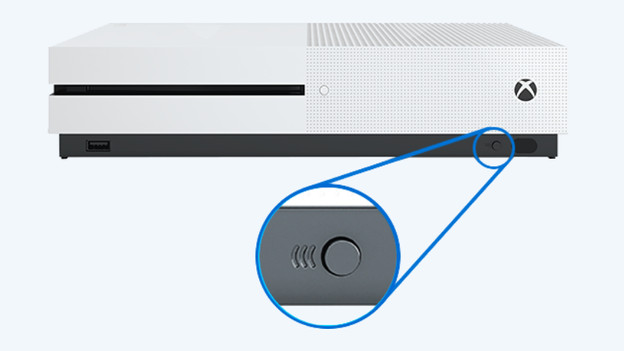
Connect to the Xbox One
To connect your Arctis 9X to your Xbox One, follow a few steps. We've listed these steps for you below.
- Press the sync button on the bottom right of the Xbox.
- Check if the light on the Xbox flashes.
- Make sure the headset is turned off and press the on/off button for 6 seconds.
You've connected the Arctis 9X to your Xbox One. Can't find the sync button of your Xbox One on the bottom right? You have an older model. With this model, the button is on the bottom left.
Connect to the Xbox Series X and S
With the Xbox Series X and S, it works a bit differently. Connect your Actix 9X by following these steps.
- Press and hold the on/off button of the Arctis 9X for 15 seconds.
- Check if the light of the headset flashes.
- Press the sync button on the bottom right of the Xbox Series X or S.
The Arctis 9X is now connected to the Xbox Series X or S.