Fujitsu ScanSnap S1300i
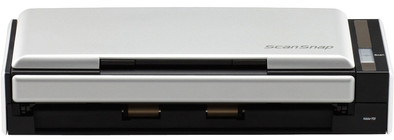
Never available again
View alternatives in the sidebar
According to our scanner expert
Thanks to its compact size, you can take the Fujitsu ScanSnap S1300i with you everywhere you go. It allows you to make a scan during a client meeting, for instance, or while you're having a cup of coffee on the road. The scanner supports duplex scanning at a speed of 12 pages per minute. Thanks to the automatic document feeder, you can scan 10 pages back to back, without having to manually feed documents into the scanner. Thanks to optical character recognition (OCR), you can create searchable files that are easy to edit.
Scanner type | File scanner, Mobile scanner | |
|---|---|---|
Scan sizes | A4, A5, A6 | |
Automatic document feeder (ADF) | ||
Automatic duplex scanning |
5 stars
65
4 stars
26
3 stars
0
2 stars
0
1 star
1
When I read about the Fujitsu ScanSnap I immediately thought: this is the ideal addition to my Evernote account. The installation went smoothly, and I immediately set up the interface to automatically send all scans to my Evernote. I chose the jpg format, so that Evernote also performs OCR on handwritten notes (in PDF that does not work). A new step towards "paperless living"!
Vincent JOSSE
26 April 2013
Automatically translated from Dutch
I have been using the Fujitsu ScanSnap S1300i for years now. I bought the scanner so that I can do my administration completely digitally: and that is no problem with this device. The documents are scanned, and then processed by the supplied ABBYY OCR software to ensure proper text recognition. The documents are saved in a compact PDF. With the software (especially ABBYY) you have to practice to set up your entire 'workflow' correctly. Once it works, you don't have to worry about it anymore.
What I am particularly pleased about is that Fujitsu continues to provide updates. Soon macOS 10.15 will be released, and about two weeks ago an update of the Fujitsu software followed. I was able to throw away my previous scanner (a Canon...) because Canon no longer included the product in the update cycle after a few years.
The scanner switches on automatically as soon as you open the cover. You place the papers (several at the same time no problem, just made before) and press the blue button. Depending on your settings, the paper is immediately scanned, processed and stored on both sides.
Hans ten Velde
31 August 2019
Automatically translated from Dutch
I've had the ScanSnap for a few weeks now and after the first processing of the pile of paper on my desk and cleaning out my drawers I'm well on my way to having to keep much less paper. Now when mail of any importance comes in, it goes through the ScanScnap. Then it goes in the trash. The OCR is fine, the PDFs are excellently searchable and take up hardly any space due to the barely visible image compression. The scanner is fast, nicely compact and is well coordinated with the software, which, for example, ignores blank backs and recognizes color (otherwise scans black and white). Also nice: it works well on OS X, where I use the scanner. If you have had enough of all those "keep it anyway" piles of paper, you can reclaim your desk and cupboards with this Fujitsu.
Lars
4 July 2013
Automatically translated from Dutch
Product number | 215692 | |
|---|---|---|
Manufacturer code | PA03643-B001 | |
Brand | Fujitsu | |
Warranty | 2 years | |
Processing of your defect | Via Coolblue | |
Old product returned for free |
Maximum optical scan resolution height | 600 dpi | |
|---|---|---|
Maximum optical scan resolution width | 600 dpi | |
Scan speed (PPM) | 12 ppm | |
Automatic duplex scanning | ||
Maximum paper weight ADF | 80 g/m2 | |
Maximum paper size ADF | A4 | |
ADF capacity | 10 | |
Color scanner | ||
Color depth output | 48 bpp | |
Automatic document feeder (ADF) | ||
Maximum scan size | A4 (21x29.7cm) | |
Gray tones output | 8 bpp | |
Scan to | Cloud, Dropbox, Email, Evernote, Google Docs, Microsoft Excel, Microsoft PowerPoint, Microsoft SharePoint Connector, Microsoft Word | |
Scan without PC/laptop | ||
Scanner type | File scanner, Mobile scanner |
OCR | ||
|---|---|---|
Scan drivers | Own operating system | |
Double input detection | ||
Portable (mobile use) | ||
Skew correction | ||
Skip blank page | ||
Digital photo optimization |
Network connector | ||
|---|---|---|
Wired connector type | Port (in device) | |
Port type | Power connector, USB | |
Total number of ports | 2 | |
Type of USB port | Standard USB-B (2.0 form) | |
Number of USB ports | 1 | |
Gender standard USB-B (2.0 form) port | Female | |
Female standard USB-B (2.0 form) port version | 2.0 | |
Number of female standard USB-B (2.0 form) ports | 1 |
Built-in WiFi | ||
|---|---|---|
Bluetooth |
Built-in screen | ||
|---|---|---|
USB port | ||
Width | 28,4 cm | |
Depth | 9,9 cm | |
Height | 7,7 cm | |
Number of USB ports | 1 | |
Compatible with operating system | Windows, macOS | |
Color | Black, Silver | |
Weight | 1,4 kg | |
USB version | USB 2.0 |