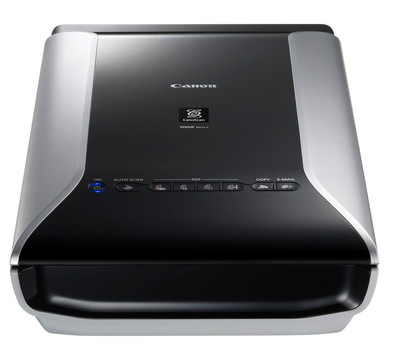
Canon CanoScan 9000F Mark II
Never available again
View alternatives in the sidebar
View alternatives in the sidebar
Scanner type | Flatbed scanner, Photo scanner, Slide scanner | |
|---|---|---|
Scan sizes | A4, Film (35mm), Slides (35mm), [Photos] | |
Automatic document feeder (ADF) |
According to our scanner expert
You can scan photos, slides, and documents with Canon's CanoScan 9000F Mark II flatbed scanner. With a 9600x9600 resolution, you can digitize all your images in high quality. To scan film strips (6x22cm), use the included film holder. Since the scanner doesn't need any warm-up time, you can start scanning straight away. Use the buttons on the scanner to make scans, copies, or PDFs without needing a PC. You can also email the files straight away.
5 stars
85
4 stars
53
3 stars
3
2 stars
0
1 star
0
Fast, zzer easy and above all, a brilliant scan quality, up to 9600 dpi! Agfascan was no longer usable on my new windows 8.1 environment so had to buy another one, but what a difference. Although I already used the Zolio and Ion 2 pro scanners for my thousands of slides and negatives, I have to say that they are toys compared to the Canoscan 9000F Mark II. I now use the Canon scan to make high-quality prints from slides and negatives. Here is a scanned slide as an example.
Danny Collewaert
2 March 2015
Automatically translated from Dutch
Ten thousand (or more) slides have been gathering dust in cupboards and boxes for fifty years. I haven't seen them since my Kodak Carroussel broke down ten years ago. I used to have a so-called slide scanner, but I was absolutely not satisfied with the result. Especially the maximum resolution was much too low. This Canon Canoscan 9000F has been making me rediscover old slides every day for a few weeks now. The machine runs full time and processes framed slides (4 at a time), strips of up to 6 slides (2 strips at a time), loose, unframed slides (up to 12 at a time, although insertion requires a little more care) and also all my black-and-white white negatives with incredible quality. Larger film formats are also possible, although I don't need them myself, so I haven't tried them yet. In addition, it is also a full-fledged flatbed scanner for documents, photos, drawings. I am particularly happy with the included software, the Canon IJ Scan Utility. Simple to use. Even the automatic mode delivers very good scans, but with the ScanGear you can adjust every aspect of your scan yourself: input and output modalities, resolution (tss 300 and 9600 dpi) color mode, image adjustments and corrections and much more. You first make a preview (it only takes a few seconds) and only then you decide which slides you really want to scan. That takes about a minute per slide, but that is certainly not too much for the quality you get. You get the idea: this is my best purchase in years and I'm already completely calm just hearing the soft zen hum telling me that high-quality scans of my slides are already in the works.
Willy Schuyesmans
25 April 2015
Automatically translated from Dutch
Excellent scanner with many options, just connect via USB to PC and Windows 7 find the necessary drivers directly, you can already use the scanner without installing the supplied software. More options are available if you install the supplied software.
Rudy De Vogelaere
11 May 2014
Automatically translated from Dutch
Coolblue takes care of everything, from taking out an insurance to repairs
For almost all accidents
More coverage in case of damage than your standard warranty
No deductible
First, add your scanner to your shopping cart. On the next page, choose the Protection Plan below. You always have a 30-day return window and pay no deductible in case of damage.
2-year Protection Plan
12,99
one-time3-year Protection Plan
20,99
one-time
Product number | 316132 | |
|---|---|---|
Manufacturer code | 6218B009 | |
Brand | Canon | |
Processing of your defect | Carry-in warranty | |
Old product returned for free |
Maximum optical scan resolution height | 9600 dpi | |
|---|---|---|
Maximum optical scan resolution width | 9600 dpi | |
Scan speed (PPM) | 16 ppm | |
Color scanner | ||
Color depth output | 48 bpp | |
Automatic document feeder (ADF) | ||
Maximum scan size | A4 (21x29.7cm) | |
Gray tones output | 8 bpp | |
Scan to | Cloud, File, Image, PDF | |
Scan without PC/laptop | ||
Scanner type | Flatbed scanner, Photo scanner, Slide scanner |
OCR | ||
|---|---|---|
Scan drivers | TWAIN, WIA | |
Double input detection | ||
Portable (mobile use) | ||
Skew correction | ||
Skip blank page | ||
Digital photo optimization |
Network connector |
|---|
Built-in WiFi | ||
|---|---|---|
Bluetooth |
Built-in screen | ||
|---|---|---|
USB port | ||
Width | 27 cm | |
Depth | 48 cm | |
Height | 11 cm | |
Number of USB ports | 1 | |
Compatible with operating system | Windows, macOS | |
Color | Black, Gray | |
Weight | 4,6 kg | |
USB version | USB 2.0 |