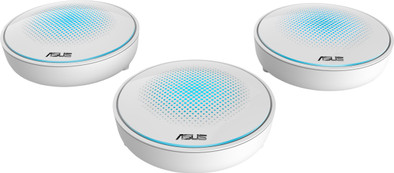
Asus Lyra MAP-AC2200 3-Pack Multi-room WiFi

Never available again
View alternatives in the sidebar
View alternatives in the sidebar
Product number | 761894 | |
|---|---|---|
Manufacturer code | 90IG04C0-BM0B10 | |
Brand | ASUS | |
Processing of your defect | Carry-in warranty | |
Old product returned for free |
Can be expanded with extra stations |
|---|
Frequency bands | Simultaneous tri-band | |
|---|---|---|
WiFi speed | AC2200 | |
2.4GHz band speed | 400 Mbit/s | |
5GHz band speed | 867 Mbit/s | |
Number of WiFi antennas | 7 | |
Jumbo frame support |
Ethernet speed | Gigabit Ethernet (1000Mbps) | |
|---|---|---|
Network connector | ||
Number of Ethernet ports | 1 | |
PoE support | ||
USB port |
Automatically switches to 3G/4G | ||
|---|---|---|
SIM card slot |
Quality of Service (QoS) | ||
|---|---|---|
MU-MIMMO | ||
Seamless roaming | ||
Beamforming | ||
Port forwarding | ||
LACP Link aggregation |
Parental controls | ||
|---|---|---|
WLAN security | WEP, WPA, WPA-PSK, WPA2, WPA2-PSK | |
Firewall | ||
Firewall type | DoS, NAT Firewall, SPI Firewall | |
Guest network | ||
VPN server | ||
VPN client | ||
VPN passthrough |
Mounting possible | ||
|---|---|---|
Width | 14 cm | |
Height | 14 cm | |
Depth | 4 cm | |
Weight | 327 g | |
Color | White | |
Material | Plastic |
Power supply type | Power grid | |
|---|---|---|
Battery level indicator |
Ethernet speed | Gigabit Ethernet (1000Mbps) | |
|---|---|---|
Frequency bands | Simultaneous tri-band | |
WiFi speed | AC2200 | |
Number of Ethernet ports | 1 |
According to our router expert
With Multi-room WiFi, you can create 1 large WiFi network with a strong signal throughout your home.
The 3 satellites of this Multi-room WiFi system create a mesh network together, which means you'll have a stable connection because all stations communicate together.
The stations are connected wirelessly, so you won't have to install network cables.
To benefit from the highest speed that this router offers, all connected devices have to support 5GHz.
With the Asus Lyra, you can create 1 large WiFi network for your entire house. This way, you'll enjoy a good WiFi signal in every room. This package consists of 3 stations: place the first one near your modem and the other two on different floors. The mesh system stations communicate with each other. Your devices will automatically connect to the station that has the strongest signal. This means no more signal loss while you're walking through your house with your smartphone.
5 stars
3
4 stars
2
3 stars
0
2 stars
1
1 star
0
Owner of the Lyra for a week. The idea behind the MESH functionality / technology is good and for me the reason to buy these routers. I have been looking for a long time for a system that creates one big bubble of WiFi in and around my house with 'seamless roaming'.
Connecting was a piece of cake. Download the app and you will be neatly guided through the different steps that ensure a stable network. Because I already have a router running, my first Lyra was wired to the router. Here comes the first tricky thing: this Lyra (main node) can't run as an Access Point, so you're going to introduce a second IP range. The Lyra requires a WAN IP and a different IP range. After contacting Asus Support, it appears that you cannot adjust this. In my case, this meant that all devices with a fixed IP, which run on WiFi, had to be terminated to adjust the IP. The laymen are already stuck here. You don't have this problem if you use the Lyra as your main router, of course.
My network situation was such that I had the first Lyra downstairs in my living room. This was connected (via the 'dedicated' 5GHz band) with the Lyra on the mezzanine, which was then connected again with the Lyra in the attic. This worked fine and with the app you can see how the connections run, what quality these connections have and (I personally liked) which devices were connected per Lyra. The latter also makes it possible to 'Manage' them. For example, I could use the app to switch off the internet connection of my children's tablets. Ideal, just before going to sleep!
After a day of trying and testing I noticed that the range was good, the 'seamless roaming' worked perfectly, but the speed left something to be desired. I then went to test with Lyra. FYI: I have a Ziggo 150D/15U line. On my Lyra in the living room (which is wired) I have the full 150/15. The mezzanine was already less (90/15) and in the attic it just got bad, namely (40/8). I don't buy a relatively expensive Lyra system for that. According to Asus Support, this has to do with the relatively weak 5Ghz signal that is easily interfered with.
Then, because it was already there, I decided to cable the Lyras. This works fine for the speed, but then I lost the principle of the app. The 'seamless roaming' still worked, but I could no longer see my Lyras in the app and therefore could no longer 'manage' them. After contacting Asus Support it turned out that this behavior is "by design"; if a Lyra is plugged into a cable, it then behaves as a main node (ie router) and no longer as part (access point) of the MESH network. In short: by connecting by means of a network cable lost a lot of functionalities.
In the end, both these things (Router vs AP and Speed) made me decide to return the Lyra. I solved it 'old-fashioned' with my router downstairs and a separate access point in the attic. Lost almost 300 euros less, and then manually switch my WiFi on my devices.
It is a good solution for people who are less demanding about the internet speed and who prefer range. For people who have more questions or more specific wishes regarding their network, I personally find it a meager solution. Honesty compels me to say that the hardware that does solve it costs about 1000 euros each. Basically, the Lyra is an excellent solution, but not for fulfilling my wishes.
Robbert
23 August 2017
Automatically translated from Nederlands
Product installation is very easy. Network expansion is effortless
VC
26 August 2017
Automatically translated from Nederlands
Since 2004 I worked with 2 TP-Link 30Mbps repeaters. The 2nd (furthest) failed repeatedly and it was always a hassle to get it up and running again. In addition, the internet speed via the 2nd repeater was substandard.
And then mesh or multi-room WiFi came into the picture. After a 'comparative study' of 9 devices based on the September issue (350) of the computer magazine C* and the specifications offered on CoolBlue, I chose the Asus Lyra AC2200. We weighed in on that choice (in descending order of importance): the dimensions (as discreet as possible), the possibility of wall mounting, presence of 7 antennas & MU-MIMO, the price. At Coolblue Zaventem they had no experience with mesh (yet), so the few questions I still had remained unanswered. Then take the gamble. A stroke of luck: the Asus Lyra with 3 modules turned out to cost 'only' € 369 instead of the expected € 429.
The installation did not go as smoothly as hoped. Especially the connection of the 2nd & 3rd module was difficult. But possibly not being familiar with this matter and 'nerves' played tricks on me. Calmly rereading the Start Guide (32 languages), the App and the Asus Lyra website brought solace. On my devices I now see 'Lyra72 (connected)', and below that my original 'bbox2-b368 (saved)'.
In the end I chose not to hang the Asus Lyra modules. That the Asus logo would then be upside down is, in my opinion, an incomprehensible designer mistake! But it's not the main reason. I find the light radiation in the dark very disturbing. Asus would do well to remedy this, for example with a dimming option.
Finally: I noticed the speed improvement from day 1. And 1 month later, there has not been a single dropout of the connection. So still recommended.
VK
6 February 2018
Automatically translated from Nederlands