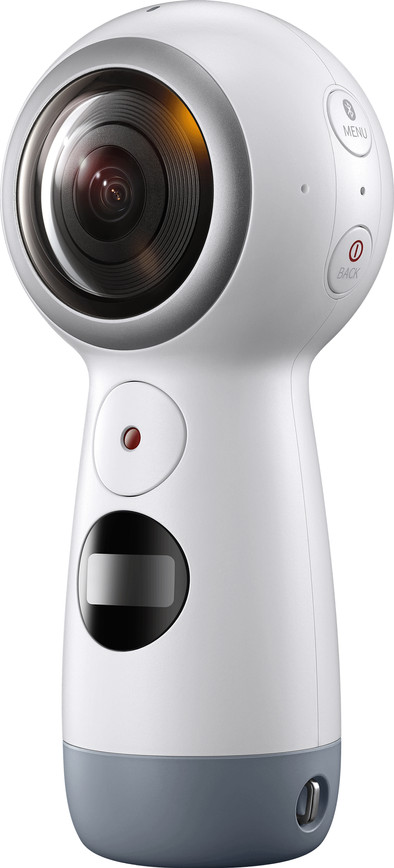
Samsung Gear 360 (2017)
Never available again
View alternatives in the sidebar
View alternatives in the sidebar
Product number | 775937 | |
|---|---|---|
Manufacturer code | SM-R210NZWAPHN | |
Brand | Samsung | |
Processing of your defect | Carry-in warranty | |
Old product returned for free |
MicroSD memory card version | MicroSD, MicroSDHC, MicroSDXC | |
|---|---|---|
Weight | 130 g | |
Color | Gray, White | |
Material | Plastic | |
Memory card | MicroSD | |
Expandable storage capacity up to | 265 GB | |
Power supply type | Rechargeable battery | |
Battery technology | Lithium-ion | |
Battery/battery capacity | 1160 mAh | |
Number of batteries included | 1 | |
Battery / battery voltage | 3,6 V | |
Charging dock included | ||
Type of battery | Specific battery | |
Rechargeable battery | ||
Maximum battery life | 130 min | |
Width | 4,61 cm | |
Height | 10,06 cm | |
Depth | 4,51 cm | |
Internal memory (Byte) | 0 MB | |
LCD screen | ||
Water-resistant | ||
Water-repellent coating | ||
Water resistance | Splash proof | |
Dustproof | ||
Shockproof | ||
Voice control |
Wide-angle | ||
|---|---|---|
Viewing angle | 360 ° | |
360 functionaliteit | Panoramic 360 | |
Image stabilization | ||
Aperture | 2,2 | |
Type of image sensor | 1/2.6" | |
Technology image sensor | CMOS | |
Total number of megapixels | 15 MP | |
ISO sensitivity | 1600 | |
Horizontal aspect ratio | 16 | |
Vertical aspect ratio | 9 | |
Photo resolution width | 4096 pixels | |
Photo resolution height | 2048 pixels | |
Type of image definition support | Ultra HD (4K) | |
Photo file format | JPEG | |
Video file format | MP4 | |
Audio file format | aac |
USB port | ||
|---|---|---|
Number of USB ports | 1 | |
HDMI connector | ||
Microphone connector | ||
Bluetooth | ||
Built-in WiFi |
Recommended for activity | Outdoor, Traveling | |
|---|---|---|
Attachment method action cam | N/A | |
GPS sensor |
Viewing angle | 360 ° | |
|---|---|---|
Type of image definition support | Ultra HD (4K) | |
Built-in WiFi | ||
Shockproof | ||
Water-resistant |
According to our 360-degree camera expert
With the Gear 360 app, you can stream live to social media.
You can pair the camera with your smartphone via WiFi and Bluetooth to see what you're filming.
Live broadcasting is only possible with Android and iPhone smartphones that run Nougat (7.0 and higher) or iOS 10 or higher.
The app for editing your photos and videos doesn't work on iPhone smartphones.
Note!The camera can only be paired with the following smartphones: Galaxy S8, S8+, S7, S7 edge, Note5, S6, S6 edge, S6 edge+, A5/A7 that run on Android 5.0 or higher. Also the iPhone 7, 7+, 6S, 6S+, SE that run on iOS 10.0 or higher. A memory card isn't included.
With the Samsung Gear 360 (2017), you'll be able to capture everything around you in 360 degrees. Let the world enjoy it with you in real time, thanks to live broadcasting. Connect the camera to an Android or iPhone smartphone that has Android Nougat 7.0 or higher or iOS 10 or higher, and choose the social media platform on which you want to stream. The 360-degree camera is compact and has a handy grip which makes the device very comfortable to use. The camera has no screen, so you can't see what you're filming. However, you can use the Samsung Gear 360 app for this, which allows you to see exactly what you're filming on your smartphone and you can immediately adjust the image size. The Gear has a small LCD screen that shows the battery level.
The Gear360 comes in a nice compact box. It comes with a sleeve and a cable (USB-C to USB). It is so small that it hardly takes up space in my handbag. The setup to connect the Gear360 to my smartphone was quick and simple. After that, it always reconnects to my smartphone at lightning speed.
I quickly learned the keys on the Gear360. You therefore do not need your mobile phone. There is a small screen on which you can see the battery status, remaining memory and connection settings. But I do find it easier to use the Gear360 via my smartphone. Especially if I want to quickly change settings.
After I had taken nice videos and photos, I was able to view them quickly via my smartphone. Quickly and simply I selected the best images and saved nice photos. You can apply many more operations via the software that you can put on your computer.
In the beginning I had some trouble discovering what you can do with the Gear360. I also had to find the best way to hold the Gear360. But once I had taken some photos/videos I saved nice, creative photos that can count on a lot of positive response. Also filming with only 1 lens gives a good quality of image. The sound is picked up very well even if you don't speak loudly. I was pleasantly surprised about this.
During a trip we did an altitude trail. I filmed this with the Gear360. Seeing this again with the Gear VR gives me the creeps.
The Gear360 ensures that you never miss a beat because you can watch everything from 360 degrees and share the experience with your family and friends.
Karolien
15 August 2017
Automatically translated from Nederlands
In the past you had to put together 360 degree photos manually and that took a while. A few years ago, the Nexus phones offered the ability to combine 360-degree photos from different photos that you take manually. This was already a lot faster, but there was no guarantee that the result would be seamless. With the Gear 360, this is all made very easy: with one click, two 180-degree photos are taken that you can merge in the app. In addition, you can also make videos with it that you can then watch back in VR or post as a 360 degree video on Facebook and YouTube. In practice, the promised 4K for video turns out to be close to full-HD or maybe even slightly less. For the price you have a very nice toy that allows you to take the most unique photos and videos of the moment. In short, a must for gadget lovers and creative hobby photographers! Do you want more quality? Then you will have to choose another model or wait for a new generation of models.
Amar Sjauw En Wa
24 July 2017
Automatically translated from Nederlands
Fun to make 360 degree snapshot movies and photos. If you do not want to be prominently in the picture, it is best to place the Gear 360 on a tripod and control it remotely with your phone or set a timer. The Gear 360 has the following options:
You can set a timer to delay the start of the recording by, for example, 5 seconds. With the software and the app for your phone, the photos and films can be presented in a different way (360 degrees, round, stretched, double or panorama). All in all well worth the money.
John Redeker
3 July 2017
Automatically translated from Nederlands