Never available again
View alternatives in the sidebar
View alternatives in the sidebar
Product number | 776239 | |
|---|---|---|
Manufacturer code | 960-001106 | |
Brand | Logitech VC | |
Processing of your defect | Via Coolblue | |
Old product returned for free |
Plug and Play | ||
|---|---|---|
Sharpness | 4K Cinema | |
Autofocus | ||
Wide-angle | ||
Automatic brightness adjustment | ||
Coverable lens |
Built-in microphone | ||
|---|---|---|
Microphone recording type | Mono | |
Microphone noise suppression | ||
Voice control | ||
Infrared (IrDA) | ||
Tiltable | ||
Type of webcam holder | Universal clip |
Width | 10,2 cm | |
|---|---|---|
Depth | 2,7 cm | |
Height | 14 cm | |
Weight | 63 g | |
Color | Black | |
Material | Plastic | |
Finish | Matte |
Type of USB port | Standard USB-A | |
|---|---|---|
Connection type | Wired | |
Compatible with operating system | ChromeOS, Windows, macOS | |
Cable length | 1,5 m |
Plug and Play | ||
|---|---|---|
Compatible with operating system | ChromeOS, Windows, macOS | |
Autofocus | ||
Sharpness | 4K Cinema | |
Built-in microphone |
According to our webcam expert
The Ultra HD resolution produces pictures that are 4 times sharper than with a Full HD webcam.
The HDR technology automatically adjusts the brightness of your surroundings.
Infrared facial recognition lets you sign into your computer with Windows Hello.
A wired webcam has to be set up close to your computer.
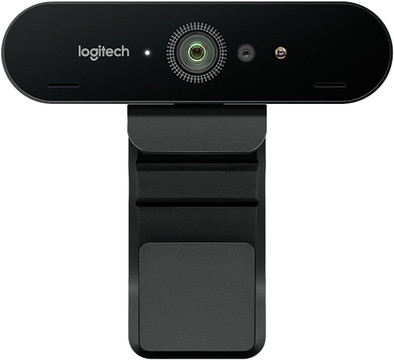
The Logitech Brio is a 4K webcam that lets you make video calls and recordings in Ultra HD resolution. The HDR technology adjusts the brightness of your recording in overly bright and low-light situations, so you'll always be clearly visible to the person you're talking with. This webcam features infrared facial recognition, which lets you use Windows Hello to sign into your PC by just looking into the camera. Use the software to select your own background and you'll be able to have meetings wherever you want. The 5x digital zoom lets you focus on whoever is speaking during group calls and autofocus will prevent image blur at all times. The universal clip lets you attach the Brio to any laptop, monitor, and tripod.
Installation
Quality
Options
Best webcam I've come across so far within private price range. Design is slick, suspension is easy to use. After plugging in, it works immediately within your OS without additional software. To get the most out of your camera, you do need the Logitech G Hub software, which is not immediately clear to the layman and is also not easy to find. Tip: make sure that there is no dirt in front of the lens, such as a fingerprint, otherwise you will never get it sharp.
Martin
19 April 2021
Automatically translated from Nederlands
In use for over a week now with all day video conferencing: this logitech BRIO 4K stream edition is ideal for that.
Maarten Nypels
11 June 2020
Automatically translated from Nederlands
At first glance a nice, sturdy thing, this webcam. Nice resolution too. The sharper you can therefore see that the autofocus does not focus properly. If you are further than about 40cm from your camera, the image will be blurry. And with a blurry, out-of-focus image, a good resolution is of no use. And furthermore, the supplied software is difficult to find and very poor in quality.
Hans-Peter
26 January 2023
Automatically translated from Nederlands