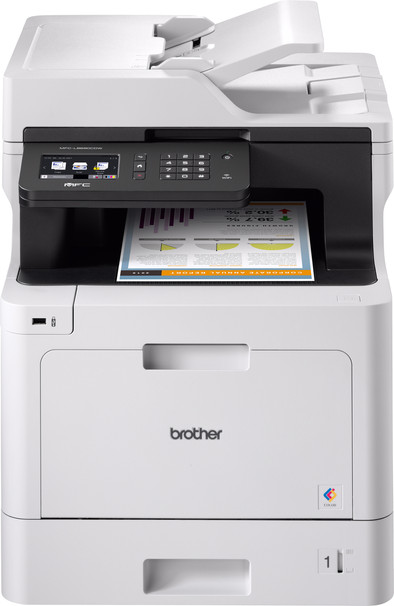
Brother MFC-L8690CDW

Never available again
View alternatives in the sidebar
View alternatives in the sidebar
Product number | 782212 | |
|---|---|---|
Manufacturer code | MFC-L8690CDW | |
Brand | Brother | |
Processing of your defect | Via Coolblue | |
Old product returned for free |
Printer size | Extra large | |
|---|---|---|
Width | 43,5 cm | |
Depth | 52,6 cm | |
Height | 53,9 cm | |
Color | Gray | |
Weight | 27,9 kg |
Printer type | All-in-one | |
|---|---|---|
Photo printer | ||
Print quality photos | Mediocre | |
Portable (mobile use) | ||
Recommended for use printers | Business printing |
Usage costs for 1 page | 7 eurocents | |
|---|---|---|
Toner cartridge line | Brother TN-421 | |
Print technology | Laser | |
Type of ink | Toner cartridges | |
Number of cartridges/toner cartridges | 4 | |
Color printer | ||
Print speed black (ISO) | 31 ppm | |
Print speed color (ISO) | 31 ppm | |
First black page ready after | 15 seconds | |
Speed class | Excellent | |
Maximum print resolution height | 600 dpi | |
Maximum print resolution width | 2400 dpi | |
Maximum print size | A4 | |
Automatic duplex printing | ||
Borderless printing | ||
Maximum print size duplex printing | A4 |
Scan functionality | ||
|---|---|---|
Automatic duplex scanning | ||
Maximum optical scan resolution width | 600 dpi | |
Maximum optical scan resolution height | 2400 dpi | |
Scanner type | File scanner, Flatbed scanner | |
Maximum scan size | A4 (21x29.7cm) | |
Automatic document feeder (ADF) | ||
Maximum paper size ADF | A4 | |
Scan sizes | A4, A5, A6, A7 | |
Scan speed (PPM) | 28 ppm | |
Color depth output | 24 bpp | |
Scan to | Dropbox, Email address, Evernote, FTP, Google Docs, PC (network), USB | |
ADF capacity | 50 | |
OCR |
Copying functionality | ||
|---|---|---|
Copy speed black (ISO) | 31 ppm | |
Copy speed color (ISO) | 31 ppm | |
Maximum copy resolution height | 1200 dpi | |
Maximum copy resolution width | 1200 dpi |
Fax functionality | ||
|---|---|---|
Color fax |
Built-in screen | ||
|---|---|---|
Color screen | ||
Touchscreen |
Compatible with operating system | Android, ChromeOS, Linux, Windows, iOS, macOS | |
|---|---|---|
Connection type | Wired, Wireless | |
Apple AirPrint | ||
Email print | ||
WPS (Wireless Protected Setup) | ||
Female standard USB-A port version | 2.0 | |
Ethernet port | ||
Number of Ethernet ports | 1 | |
NFC | ||
Built-in WiFi | ||
WiFi frequency printers | 2.4GHz | |
WiFi direct | ||
Bluetooth | ||
USB port |
Location paper input | Front | |
|---|---|---|
Manual input tray | ||
Photo paper drawer | ||
Output capacity output drawer | 150 | |
Maximum print size standard paper tray | A4 | |
Input capacity standard paper tray | 250 | |
Number of standard paper trays | 1 |
Memory card reader |
|---|
Print technology | Laser | |
|---|---|---|
Printer type | All-in-one | |
Color printer | ||
Automatic duplex printing | ||
Maximum print size | A4 | |
Automatic document feeder (ADF) | ||
WiFi direct |
According to our printer expert
You can print, scan, copy, and fax with this 4-in-1 printer.
The print speed of this printer in color is 31 pages per minute, so you don't have to wait long for your print.
You can scan or copy a large stack of paper in one go with the automatic document feeder.
The printer is large and doesn't fit on your desk, so you have to place it on a separate table.
This Brother MFC-L8690CDW all-in-one color laser printer has security settings, which makes it possible for a notary office or ministry department. For example, secure your print jobs with a PIN code, so it only starts to print when you enter that first. That's useful if you don't want someone to read the prints before you get to the printer. Is a fax function still valuable in your company? Receive a fax digitally right away via email. This saves you time because you don't have to scan them afterward. You can also save on paper costs. Thanks to the text recognition function, you can archive contracts at a high speed and turn them into searchable PDFs. Looking for a document? Enter a search task and find the right papers in no-time.
Suitable for Brother MPS Essential
This printer is suitable for Brother MPS Essential, the Brother print service for business printing. Save on your print costs and only pay for the pages you print. You automatically receive ink or toner cartridges. In addition, Brother offers a repair service on location if there are problems with your printer. That way, you can continue printing in no time. More information on MPS Essential? View our advice article
5 stars
60
4 stars
33
3 stars
5
2 stars
1
1 star
1
Installation ease
Options
Print quality
Effortless installation in 10 minutes from box to operation, WPA2 Personal network included! Software is contemporary and adapted (especially for Mac, it works fine with macOS 10.14.4). Can be well secured.
Massimo
12 April 2019
Automatically translated from Nederlands
To be fair, the previous Brother was really over: lots of jams, stains, noise and therefore annoyance. A replacement was therefore urgently needed. And what a party. The journey to two high was tough, because the MFC-L8690CDW is no small boy. But once connected at the top, and, big surprise: we found a complete set of (expensive!) cartridges in the drawer. Fantastic tight prints within ten minutes, two-sided, that saves paper. Singing at work.
E. Woudenberg
16 November 2019
Automatically translated from Nederlands
You can skip white pages when scanning. Double-sided scans go through in 1 pass, he does not have to turn the paper.
Lotte
8 September 2020
Automatically translated from Nederlands