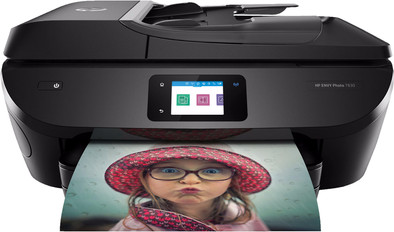
HP ENVY Photo 7830 All-in-One
Never available again
View alternatives in the sidebar
View alternatives in the sidebar
Product number | 793993 | |
|---|---|---|
Manufacturer code | Y0G50B#BHC | |
Brand | HP | |
Processing of your defect | Via Coolblue | |
Old product returned for free |
Printer size | Medium | |
|---|---|---|
Width | 45,35 cm | |
Depth | 41 cm | |
Height | 19,32 cm | |
Color | Black | |
Weight | 7,6 kg |
Printer type | All-in-one | |
|---|---|---|
Photo printer | ||
Portable (mobile use) | ||
Recommended for use printers | Printing at home, Printing photos |
Cartridge line | HP 303 | |
|---|---|---|
Print technology | Inkjet | |
Number of cartridges/toner cartridges | 2 | |
Color printer | ||
Print speed black (ISO) | 15 ppm | |
Print speed color (ISO) | 10 ppm | |
First black page ready after | 16 seconds | |
Speed class | Standard | |
Maximum print resolution height | 4800 dpi | |
Maximum print resolution width | 1200 dpi | |
Maximum print size | A4 | |
Automatic duplex printing | ||
Borderless printing | ||
Maximum print size duplex printing | A4 |
Scan functionality | ||
|---|---|---|
Maximum optical scan resolution width | 1200 dpi | |
Maximum optical scan resolution height | 1200 dpi | |
Scanner type | File scanner, Flatbed scanner | |
Maximum scan size | A4 (21x29.7cm) | |
Automatic document feeder (ADF) | ||
Maximum paper size ADF | A4 | |
Scan sizes | A4 | |
Scan speed (PPM) | 8 ppm | |
Color depth output | 256 bpp | |
Scan to | Email address, PC (network), SD card, USB | |
ADF capacity | 35 | |
OCR |
Copying functionality | ||
|---|---|---|
Copy speed black (ISO) | 19 Hz | |
Copy speed color (ISO) | 19 Hz | |
Maximum copy resolution height | 600 dpi | |
Maximum copy resolution width | 600 dpi |
Fax functionality | ||
|---|---|---|
Color fax |
Built-in screen | ||
|---|---|---|
Color screen | ||
Touchscreen |
Suitable for HP+ | ||
|---|---|---|
Suitable for HP Instant Ink |
Compatible with operating system | Android, Windows, iOS, macOS | |
|---|---|---|
Connection type | Wired, Wireless | |
Apple AirPrint | ||
Email print | ||
WPS (Wireless Protected Setup) | ||
Female standard USB-A port version | 2.0 | |
Number of Ethernet ports | 1 | |
NFC | ||
Built-in WiFi | ||
WiFi direct | ||
Bluetooth | ||
Bluetooth version | 4.0 | |
USB port |
Manual input tray | ||
|---|---|---|
Photo paper drawer | ||
Output capacity output drawer | 25 | |
Input capacity photo paper tray | 15 | |
Maximum print size standard paper tray | A4 | |
Input capacity standard paper tray | 125 | |
Maximum print size photo paper tray | 10x15 | |
Number of standard paper trays | 1 |
Memory card | SD | |
|---|---|---|
Memory card reader |
Print technology | Inkjet | |
|---|---|---|
Printer type | All-in-one | |
Color printer | ||
Automatic duplex printing | ||
Maximum print size | A4 | |
Automatic document feeder (ADF) | ||
WiFi direct |
According to our printer expert
It is a 4-in-1 printer, which means you can also scan, copy, and fax in addition to printing.
This printer also supports HP Instant Ink, so you automatically receive new cartridges before they run out.
With this printer, you can print documents directly from an SD card without the need of a laptop or PC.
If you prefer the colors that are more cost effective, a printer with at least 4 cartridges is better.
The HP ENVY Photo 7830 All-in-One is a comprehensive color inkjet printer for home use. Thanks to the automatic document feeder (ADF), you can scan or copy a stack of paper in one go. Connect your printer with a network cable or use WiFi to share the printer on your network and print from any device. Alternatively, connect a USB flash drive to print documents and photos directly. You can adjust settings as you see fit using the 6.75-centimeter color touchscreen. Does your smartphone or tablet have NFC? Hold it close to your printer to send a print job. The Envy Photo 7830 supports HP Instant Ink to make printing even easier.
Note: do you want to print a photo on photo paper? Place the backside (with the logo) facing upwards in the printer.
Installation ease
Options
Print quality
Packaging: The printer is well packaged, the box is quite large, but because of this there is sufficient protection around it so that the printer can take a beating. The contents of the box are limited, but everything you need is included: • The printer • 2 ink refills (Black and Color) • 2 power cables (EU and UK) • The manual and other documentation and a quick start guide • Design: The design of the printer has been thought through. There is a place for all options, yet it remains relatively compact. On the left is a place where you can insert a USB or SD card. This is nicely finished with a cover that you can turn or open. The paper tray is completely closed and is located under the paper exit. This makes it look like one block where the papers come out of the printer. You can easily pull out the paper tray here, and you can also remove the block from the paper output. This makes it easy for you to get to the paper. This paper tray consists of 2 parts. A large compartment for, for example, ordinary A4 printing paper and a small compartment above for photo paper. Unfortunately, there is no separate input tray if you want to print a document on stronger or special paper.
Installation: You really don't need to have studied to install this printer. This is almost plug and play. If you want to install it just follow the quick steps guide. You remove the packaging material (sometimes it is a good idea to check whether you have all the stickers and cardboard) and you follow the steps on the screen. At a certain point, the printer asks to go to a specific HP site for the PC, or to download a certain app for IOs or android. If you have this software, you can continue the printer steps there. The app first connects directly to the printer to further set it up. The installation took about 5 minutes for me and then it was ready to use. First I did it via the PC, then I also put the app on the mobile phone. Very useful for sending photos directly to the printer from the phone.
To print: As mentioned before, the ink consists of two cartridges, one with color and one black. There are many printers that have single colors. If you print a lot of one specific color, you will end up with something more expensive. But you can compensate for this by using the 'instant ink' subscription. I will come back to that below. The quality of the prints is very nice. I'm not a specialist, but if I hold them next to a printed photo of a photographer I see no difference. This was the same photo twice, so a good comparison. Printing is fast. According to the specifications 15ppm black and 10pppm color. So the speed is high enough. You will also notice this, once the first page is printed, the rest follows quickly. When you fill the paper trays, the printer will detect the size itself. This is especially useful with photo paper. It is a bit of discovering how to put the paper correctly so that it is correctly detected. This is especially the case with photo paper. Once you figure out how to do it, it works smoothly.
Scan: I haven't used scanning much myself at the moment, but I deliberately chose this printer because it has a transfer tray. This has the advantage that you don't have to scan each sheet individually, but you simply place it on the transfer tray and it scans them one by one. This way you can quickly scan and save all important documents. There are even options to email this or store it directly in the cloud.
Direct Ink: As mentioned earlier, I was talking about 'Direct ink'. This is a service HP offers to never run out of ink. If your printer is compatible with this service, you can subscribe to their website here. This means that you pay a certain amount each month for your subscription. This depends on the number of pages you plan to print. Your printer keeps track of how much ink is left in the cartridges, and if necessary sends a signal to ink directly via the internet that ink needs to be delivered. They actually ensure that you always have a spare at home in good time so that you never run out of ink. Since it is always possible that you print less or just more, it is possible to carry over part of the unprinted pages to the next month. For example, if you have 100 pages in your subscription per month, and you only print 50, you will have 150 pages the following month. Of course this is limited and different per subscription. What I find especially useful is that I don't have to look for the ink when it runs out, but just pay a small amount every month and be sure that I always have ink. The ink is simply delivered to your home and you send the old cartridge for recycling.
Overview: All in all, I think this is one of the most user-friendly printers I've had so far. You don't have to waste paper every time you want to print a photo or A4. The installation is very user-friendly. You can ensure that you automatically have ink at home. There is even an option to set an email address. If you email there, it will be printed automatically. There is also an SD card reader and USB connection for printing.
Thijs
17 May 2019
Automatically translated from Nederlands
Best photo print quality I've seen with an all in one inkjet printer. Instant ink also makes it very affordable to print photos at home and you get free months of free ink. If you use knhf63 as a code when registering the printer, you will receive an extra month for free.
Bavo
6 September 2021
Automatically translated from Nederlands
After another printer where the print head had to be replaced due to dehydration or clogging, now back to an old love, an hp printer. When you replace the cartridge, you actually also replace your print head. Ideal. With instant ink, which doesn't seem to be expensive. Voucher to try 4 months for free and even found a code on the hp site for an extra month. Top! Photos look great, and with WiFi and the ability to print from your smartphone or tablet, what more could you want?
Rob Hendriks
17 October 2018
Automatically translated from Nederlands