Google Nest Thermostat White
Never available again
View alternatives in the sidebar
View alternatives in the sidebar
Product number | 798286 | |
|---|---|---|
Manufacturer code | T3030EX | |
Brand | Google Nest | |
Processing of your defect | Via Coolblue | |
Old product returned for free |
Type of heating | Boiler, Combination boiler, District heating without cooling, Heat pump without cooling | |
|---|---|---|
Suitable for brand boiler | Intergas, Remeha | |
Suitable for type boiler | All boilers, Modulating boilers | |
Optimal for modulating boilers | ||
OpenTherm | ||
Suitable for floor heating |
Thermostat type | Smart thermostat | |
|---|---|---|
Programmable per time unit | By weekend, Per day, Per holiday, Per week days | |
Wireless connection with heating | ||
Self-learning | ||
Touchscreen | ||
Always-on display | ||
Geofencing | ||
Setting range degrees | 0 - 40 | |
Automatic daylight savings change | ||
Adjustable by half degrees | ||
Connection of external temperature sensor | ||
Adjustable temperature zones | ||
Control panel language | Dutch, English | |
Display backlight | ||
Brightness of backlight adjustable | ||
Built-in WiFi | ||
Programmable |
Controls via app | ||
|---|---|---|
Controlled via Apple app | ||
Controlled via Android app | ||
Controlled via Windows app | ||
Compatible with smartphone / apps | ||
Smart home platform | Amazon Alexa, Google Assistant |
Power supply type | Power grid | |
|---|---|---|
2-wire connector |
Height | 8,4 cm | |
|---|---|---|
Depth | 3,2 cm | |
Width | 8,4 cm | |
Weight | 244 g | |
Color | White | |
Material | Metal, Plastic |
Guaranteed support with updates | Unknown |
|---|
Internet connection required | ||
|---|---|---|
Manufacturer account required | ||
Multi-factor authentication | ||
Log in with fingerprint on your phone | ||
Log in with Face ID on your phone | ||
Usage possible without cloud environment manufacturer | ||
Support for future updates | ||
Expected date of last security update | January 2025 | |
Personal information required | ||
Type of information required | Personal information, Usage information |
Type of heating | Boiler, Combination boiler, District heating without cooling, Heat pump without cooling | |
|---|---|---|
Thermostat type | Smart thermostat | |
Suitable for type boiler | All boilers, Modulating boilers | |
Wireless connection with heating | ||
Suitable for floor heating |
According to our thermostat expert
You can control the thermostat remotely with the Nest app on your smartphone or tablet.
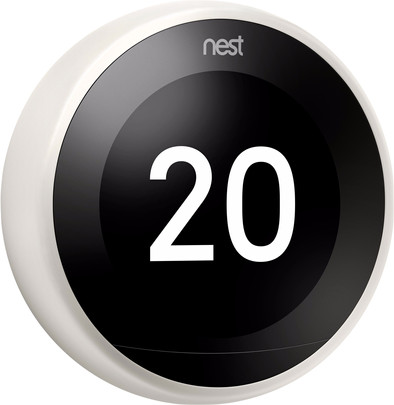
The large and illuminated screen shows the time and temperature, and lights up when you enter the house.
Within a week, the Google Nest Thermostat learns your daily schedule and it'll keep on learning your lifestyle.
This thermostat doesn't work if you have a hybrid or reversible water pump, district heating without thermostat, or a heater on electricity, wood, or biomass.
You can't connect extra sensors to this thermostat, so you can't control the temperature per room.
The Google Nest Learning Thermostat ensures that your home is always at the ideal temperature. That's because this thermostat learns every time you adjust the temperature. This way, the Nest thermostat predicts at what time you leave every day. The thermostat automatically lowers the temperature when you don't need a warm home. Thanks to geofencing, the thermostat also knows when your smartphone is nearby again. This way, you can come back to a heated home. The thermostat is modulating, but the Nest V3 also works with on/off boilers. You can control the temperature yourself via the Google Home app. You can see the time and temperature on the extra large screen. The screen lights up when you come in. Every month, you get an overview of the energy used. That way, you know exactly what your monthly energy costs are.
Note: this thermostat needs an extra module in combination with most boilers. If this is the case, it's recommended to use a Nest Pro installation service.
Note: this thermostat is suitable for all types of boilers. Want the thermostat to modulate? Ensure that your boiler has an OpenTherm protocol.
User friendliness
Settings
Ease of assembly
This smart device does exactly what it promises. In combination with a smart meter (electricity/gas) and a P1 dongle for the smart meter, you can use an app to keep track of exactly what you use in terms of gas and electricity. If you also have solar panels, you can also precisely monitor your feed-in. Because all this is now transparent, you can save energy. Even remotely. You no longer have to be at home to operate the thermostat. I think the smartest thing about the Nest thermostat V3 is that the device detects whether you are at home or not. If you have left the house and have accidentally forgotten to lower the thermostat, no problem for this Nest thermostat V3, because it does that itself. On that feature alone, this thermostat can save you a ton of gas.
A.R. Davis
13 November 2018
Automatically translated from Nederlands
I've been using the nest for about a week now. Installing HR was fairly easy. Cut the current cable to the thermostat in half and connect both pieces to the heat link. You do have to buy a separate plug to provide the heatlink with 220v (a pity they don't supply that).
You can easily connect the bottom plate of the nest thermostat to the wires that come out of the wall at the location of the previous thermostat. You then click the nest thermostat on the bottom plate and it is equal to. After this, you have to go through a number of settings that you need your mobile for if you want to connect it. The settings are very clear and anyone could use them.
Because it is so user-friendly, I also miss a number of settings. It is not possible to set when it should go into eco mode. In addition, the nest will try to achieve the temperature entered according to the schedule at that time. (For example, 21 degrees at 18:00 will also be achieved, and so the heating starts before 18:00 to achieve this) then you should not want to be in eco mode at 23:00, because then the heating will also stop well before 23:00 with heating. I regret that no distinction can be made here.
Estimating heating time is also not entirely accurate. He is far too optimistic. When setting the temperature, he guesses that it will take an hour before the setpoint is reached. 1 hour later he indicates that it would take another hour. The nest will also have to learn this in the coming weeks, but I think it will be much faster.
The last point that is a bit disappointing for me at the moment is the modulation of the nest. It should be a modulating thermostat, which means that it adjusts the burner intensity of the boiler to get the most comfortable indoor climate. It strikes me now that the temperature fluctuations are sometimes as much as one degree. I assume that this is also still in the learning process of the nest and that this should be a lot better in a while.
All in all I think it's a nice device and I'm very happy with it. It is connected to my phone and to my google home and both work perfectly. It is a real eye catcher and I give it a few weeks to learn everything.
Marwin Marwin Van Van Hateren
4 February 2018
Automatically translated from Nederlands
Turned out to be easy to install. Description could be better.
Huub de Kock
9 January 2018
Automatically translated from Nederlands
