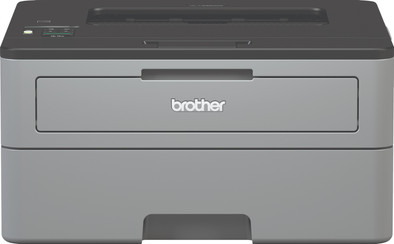
Brother HL-L2350DW

Never available again
View alternatives in the sidebar
View alternatives in the sidebar
Product number | 805962 | |
|---|---|---|
Manufacturer code | HLL2350DWRF1 | |
Brand | Brother | |
Processing of your defect | Via Coolblue | |
Old product returned for free |
Printer size | Small | |
|---|---|---|
Width | 35,6 cm | |
Depth | 36 cm | |
Height | 18,3 cm | |
Color | Black, Gray | |
Weight | 7,2 kg |
Printer type | Printing only | |
|---|---|---|
Photo printer | ||
Portable (mobile use) | ||
Recommended for use printers | Business printing |
Toner cartridge line | Brother TN-2410 | |
|---|---|---|
Print technology | Laser | |
Type of ink | Toner cartridges | |
Number of cartridges/toner cartridges | 1 | |
Color printer | ||
Print speed black (ISO) | 30 ppm | |
First black page ready after | 8,5 seconds | |
Speed class | Good | |
Maximum print resolution height | 2400 dpi | |
Maximum print resolution width | 600 dpi | |
Maximum print size | A4 | |
Automatic duplex printing | ||
Borderless printing | ||
Maximum print size duplex printing | A4 |
Scan functionality | ||
|---|---|---|
OCR |
Copying functionality |
|---|
Fax functionality |
|---|
Built-in screen |
|---|
Compatible with operating system | Linux, Windows, iOS, macOS | |
|---|---|---|
Connection type | Wired, Wireless | |
Apple AirPrint | ||
Email print | ||
WPS (Wireless Protected Setup) | ||
Female standard USB-A port version | 2.0 | |
NFC | ||
Built-in WiFi | ||
WiFi direct | ||
Bluetooth | ||
USB port |
Manual input tray | ||
|---|---|---|
Photo paper drawer | ||
Output capacity output drawer | 150 | |
Maximum print size standard paper tray | A4 | |
Input capacity standard paper tray | 250 | |
Number of standard paper trays | 1 |
Memory card reader |
|---|
Print technology | Laser | |
|---|---|---|
Printer type | Printing only | |
Color printer | ||
Automatic duplex printing | ||
Maximum print size | A4 | |
WiFi direct |
According to our printer expert
The printer has a small size, so you can easily put it on your desk or in a cabinet.
The print speed of the printer in black and white is 30 pages per minute, so you don't have to wait long for your print.
The input capacity is high with 250 sheets, so you don't have to refill the paper often.
This printer can only print, if you also want to copy and scan, choose an all-in-one printer.
It's not possible to print in color with this printer.
The Brother HL-L2350DW laser printer is a black and white laser printer for the office. The print speed of 30 black/white pages per minute makes it suitable for large offices. The HL-L2350DW prints double-sided automatically, so you save paper. Thanks to the built-in WiFi, you can also wirelessly connect the printer to your laptop, PC, phone, or tablet. This laser printer is relatively compact, so you can easily place it on a desk. With an input capacity of 250 sheets, it takes a while to refill the paper.
5 stars
84
4 stars
70
3 stars
8
2 stars
2
1 star
0
Installation ease
Options
Print quality
printer? cursing. Make a lot of noise for 5 minutes before they do anything, are not found in the network, printing with all stripes, ink always has to be replaced.. paper sticks out halfway, catches dust and wrinkles. Print heads get clogged and he then cleans them with your expensive ink. Which he won't accept because you bought the house brand. I often cried for fifteen minutes, in the middle on the floor between my failed prints.
Not this one. This one has lasers instead of ink. This is perfectly found over WiFi, also on iPhones. It always prints within 8 seconds, comes out of standby itself. It fits in a closet. It has a large paper tray. He makes little noise. It prints at lightning speed. It prints really super sharp, especially text. I send an order, it prints. It's ready before I get to the printer. I don't get it. I'm totally relaxed.
Printing costs? Dirt cheap. Such a toner costs 4-5 tens and prints up to 3300 pages. It won't dry out, won't clog the printer... ideal. Calculate how long it takes you to use up such a toner. Years?
When not to buy these? If you prefer to print your photos yourself instead of having it done at HEMA. Or if you really value color. This is not necessary at all for reports, return labels, tickets for events, etc. He is no-nonsense and that is precisely why he works so well. I should have bought this device 4 inkjet printers ago.
Sayn Hendriks
24 July 2019
Automatically translated from Nederlands
Installation is easy after watching the necessary YouTube tutorials because the manual ... well .. box filling let's say. Follow the steps below and you'll be printing in no time.
Install Toner
Load paper
Turn off deep sleep (so that you don't have to manually wake up the printer by pressing the button on the printer. This way it wakes up automatically when you give a print command from a device (and of course it is in standby - light sleep mode)
Turn off toner lock (if you do not do this, the chip will block the toner at some point because the toner must be replaced according to its calculations. You can then no longer print and there is still toner in the cartridge. This way you can continue printing until you find it necessary to replace the toner yourself. Shaking the toner also helps to use the last remnants)
Connect WiFi with WPS
Connect WiFi manually (if you don't have a WPS button on your router)
-WLAN Enable
Guido
23 April 2021
Automatically translated from Nederlands
What a misery to install this printer via an Apple on a wireless WiFi network. Sleep mode prevents the printer from connecting. In addition, the installation disk is outdated.
Guus
30 April 2018
Automatically translated from Nederlands